
Join the Conversation
- Find Answers
- :
- Using Splunk
- :
- Splunk Search
- :
- Re: SLA reporting in SPL
- Subscribe to RSS Feed
- Mark Topic as New
- Mark Topic as Read
- Float this Topic for Current User
- Bookmark Topic
- Subscribe to Topic
- Mute Topic
- Printer Friendly Page
- Mark as New
- Bookmark Message
- Subscribe to Message
- Mute Message
- Subscribe to RSS Feed
- Permalink
- Report Inappropriate Content

Hi,
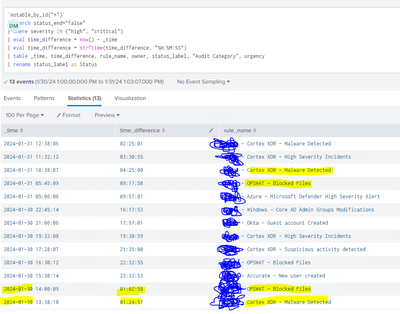
I have this query that calulates how much time the alerts are open, so far so good, but unfortunatelly if the rule name repeats (duplicate rule name) in a new event, then now() function does not know how to calculate the correct time for the first rule that triggered.
How can I calculate SLA time without deleting duplicates and keeping the same structure as showed in the picture ?
- Mark as New
- Bookmark Message
- Subscribe to Message
- Mute Message
- Subscribe to RSS Feed
- Permalink
- Report Inappropriate Content


Why are you formatting the two times before performing your calculation? Subtracting one string from another doesn't give you a number!
- Mark as New
- Bookmark Message
- Subscribe to Message
- Mute Message
- Subscribe to RSS Feed
- Permalink
- Report Inappropriate Content
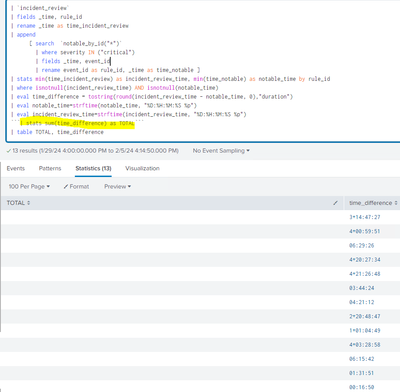
How can I sum all the time together ? stats sum did not work for me, and in addition, I need to add also
| stats count(event_id) and get the count of critical alerts in order to do Event Count / Total Time and get an average of how much time takes to close alert by severity.
- Mark as New
- Bookmark Message
- Subscribe to Message
- Mute Message
- Subscribe to RSS Feed
- Permalink
- Report Inappropriate Content
As I said before, you can't do calculations on strings! Try this
| stats avg(eval(incident_review_time-notable_time)) as average- Mark as New
- Bookmark Message
- Subscribe to Message
- Mute Message
- Subscribe to RSS Feed
- Permalink
- Report Inappropriate Content
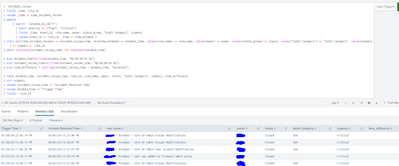
Hi, Can you help with this one? time_difference remains empty after the calculation
- Mark as New
- Bookmark Message
- Subscribe to Message
- Mute Message
- Subscribe to RSS Feed
- Permalink
- Report Inappropriate Content
Why are you formatting the two times before performing your calculation? Subtracting one string from another doesn't give you a number!
- Mark as New
- Bookmark Message
- Subscribe to Message
- Mute Message
- Subscribe to RSS Feed
- Permalink
- Report Inappropriate Content
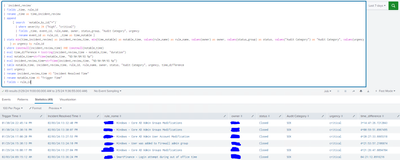
WORKS! thank you
- Mark as New
- Bookmark Message
- Subscribe to Message
- Mute Message
- Subscribe to RSS Feed
- Permalink
- Report Inappropriate Content
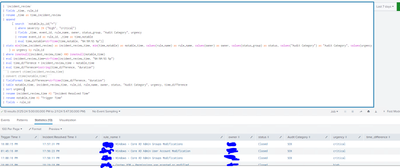
I tried the same concept for a different query and did not run:
This one calculates how much time took the alert to be closed on the incident manager
- Mark as New
- Bookmark Message
- Subscribe to Message
- Mute Message
- Subscribe to RSS Feed
- Permalink
- Report Inappropriate Content
Not quite - your fieldformat is using strftime rather than tostring
- Mark as New
- Bookmark Message
- Subscribe to Message
- Mute Message
- Subscribe to RSS Feed
- Permalink
- Report Inappropriate Content
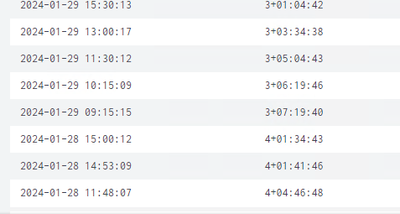
WORKED! And this is my final query. TY
`notable_by_id("*")`
| search status_end="false"
| where severity IN ("high", "critical")
| eval timenow=now()
| eval nowstring=strftime(now(), "%H:%M:%S %p")
| eval diff=now()-_time
| eval diff=tostring(diff, "duration")
| table _time, diff, rule_name, owner, status_label, "Audit Category", urgency
| rename status_label as Status
| rename diff as time_difference
- Mark as New
- Bookmark Message
- Subscribe to Message
- Mute Message
- Subscribe to RSS Feed
- Permalink
- Report Inappropriate Content
Exactly, This is my search
`notable_by_id("*")`
| search status_end="false"
| where severity IN ("high", "critical")
| eval time_difference=tostring(now() - _time)
| eval time_difference = strftime(time_difference, "%H:%M:%S")
| table _time, time_difference, rule_name, owner, status_label, "Audit Category", urgency
| rename status_label as Status- Mark as New
- Bookmark Message
- Subscribe to Message
- Mute Message
- Subscribe to RSS Feed
- Permalink
- Report Inappropriate Content
So, why not use tostring with duration as I suggested?
- Mark as New
- Bookmark Message
- Subscribe to Message
- Mute Message
- Subscribe to RSS Feed
- Permalink
- Report Inappropriate Content
that worked for 2 results but not for the last one

- Mark as New
- Bookmark Message
- Subscribe to Message
- Mute Message
- Subscribe to RSS Feed
- Permalink
- Report Inappropriate Content
For the last one, it should be 1+01:02:10 to signify 1 day + 1 hour, 2 minutes and 10 seconds, but since you haven't shown your complete search, it is difficult to know why you are missing the "1+"
- Mark as New
- Bookmark Message
- Subscribe to Message
- Mute Message
- Subscribe to RSS Feed
- Permalink
- Report Inappropriate Content
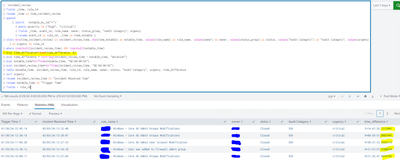
How can I round/get rid off the decimals after the seconds?
- Mark as New
- Bookmark Message
- Subscribe to Message
- Mute Message
- Subscribe to RSS Feed
- Permalink
- Report Inappropriate Content
Try combining the two lines
| eval time_difference=tostring(round(incident_review_time - notable_time, 0), "duration")- Mark as New
- Bookmark Message
- Subscribe to Message
- Mute Message
- Subscribe to RSS Feed
- Permalink
- Report Inappropriate Content
It is not clear what you are trying to achieve when _time is from the previous day.
Also, note that you could consider using
| eval time_difference=tostring(now() - _time, "duration")

Join the Splunk Community Slack to learn, troubleshoot, and make connections with fellow Splunk practitioners in real time!
Join Splunk User Groups to connect and learn in-person by region or remotely by topic or industry.
May 2026 Splunk Expert Sessions: Security & Observability
Network to App: Observability Unlocked [May & June Series]
SPL2 Deep Dives, AppDynamics Integrations, SAML Made Simple and Much More on Splunk ...
