
Join the Conversation
- Find Answers
- :
- Using Splunk
- :
- Splunk Search
- :
- Re: Run DBX query via REST API
- Subscribe to RSS Feed
- Mark Topic as New
- Mark Topic as Read
- Float this Topic for Current User
- Bookmark Topic
- Subscribe to Topic
- Mute Topic
- Printer Friendly Page
- Mark as New
- Bookmark Message
- Subscribe to Message
- Mute Message
- Subscribe to RSS Feed
- Permalink
- Report Inappropriate Content
Run DBX query via REST API

I've checked this, but it hasn't solved the problem for me: https://community.splunk.com/t5/Getting-Data-In/Is-it-possible-to-run-a-curl-command-on-a-dbxquery/m...
This is my curl request:
curl -u username:password -k https://192.168.xx.xxx:xxxx/services/search/jobs -d search=" | dbxquery query=\"select (select sum(bytes) from dba_data_files)+(select sum(bytes) from dba_temp_files)-(select sum(bytes) from dba_free_space) total_size from dual\" connection=\"XXX\""
And I get an SID back:
<?xml version="1.0" encoding="UTF-8"?>
<response>
  <sid>1611013146.153172</sid>
</response>
However when I try fetching the results, I get nothing back:
[user.name@host ~]$ curl -u username:password -k https://192.168.xx.xxx:xxxx/services/search/jobs/1611013146.153172/results/ --get -d output_mode=csv
[user.name@host ~]$
I've tried waiting a few minutes in between fetch attempts, still nothing. This same query works find and returns a result immediately when run from the DBX UI:
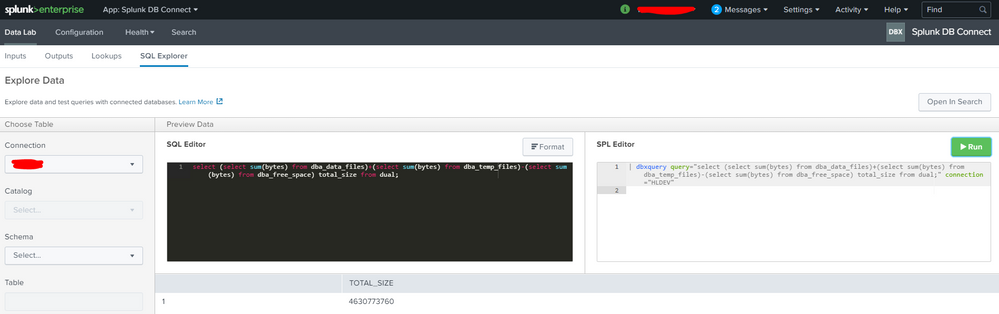
Is there something I'm missing here in order to get the result via the REST API? Thanks.
- Mark as New
- Bookmark Message
- Subscribe to Message
- Mute Message
- Subscribe to RSS Feed
- Permalink
- Report Inappropriate Content


Hi @mxanareckless,
You can try with export endpoint;
curl -u username:password -k https://192.168.xx.xxx:xxxx/services/search/jobs/export --data-urlencode search=' | dbxquery query=\"select (select sum(bytes) from dba_data_files)+(select sum(bytes) from dba_temp_files)-(select sum(bytes) from dba_free_space) total_size from dual\" connection=\"XXX\"'
If this reply helps you an upvote is appreciated.
- Mark as New
- Bookmark Message
- Subscribe to Message
- Mute Message
- Subscribe to RSS Feed
- Permalink
- Report Inappropriate Content
@scelikok Thank you; but still nothing is being returned after trying for 10 minutes, until eventually an error "Unknown SID" is returned:
[user.name@host ~]$ curl -u username:password -k https://192.168.xx.xxx:xxxx/services/search/jobs/export --data-urlencode search=' | dbxquery query=\"select (select sum(bytes) from dba_data_files)+(select sum(bytes) from dba_temp_files)-(select sum(bytes) from dba_free_space) total_size from dual\" connection=\"xxx\"'
<?xml version='1.0' encoding='UTF-8'?>
<results preview='0'>
<meta>
<fieldOrder />
</meta>
<messages>
  <msg type="DEBUG">Configuration initialization for /opt/splunk/etc took 19ms when dispatching a search (search ID: 1611076520.164004)</msg>
  <msg type="DEBUG">The 'dbxquery' command is implemented as an external script and may cause the search to be significantly slower.</msg>
  <msg type="DEBUG">search context: user="username", app="search", bs-pathname="/opt/splunk/etc"</msg>
</messages>

</results>

# Querying for result for 10 minutes, until below occurs:

[user.name@host ~]$ curl -u username:password -k https://192.168.xx.xxx:xxxx/services/search/jobs/1611076520.164004/results/ --get -d output_mode=csv
<?xml version="1.0" encoding="UTF-8"?>
<response>
  <messages>
    <msg type="FATAL">Unknown sid.</msg>
  </messages>
</response>


Join the Splunk Community Slack to learn, troubleshoot, and make connections with fellow Splunk practitioners in real time!
Join Splunk User Groups to connect and learn in-person by region or remotely by topic or industry.
Rethinking Zero Trust: From Product Purchases to Logical Control Evidence
Preparing your Splunk Environment for OpenSSL3
Announcing Modern Navigation: A New Era of Splunk User Experience
