
Join the Conversation
- Find Answers
- :
- Using Splunk
- :
- Splunk Search
- :
- Re: Rendering of JSON data in Splunk Web
- Subscribe to RSS Feed
- Mark Topic as New
- Mark Topic as Read
- Float this Topic for Current User
- Bookmark Topic
- Subscribe to Topic
- Mute Topic
- Printer Friendly Page
- Mark as New
- Bookmark Message
- Subscribe to Message
- Mute Message
- Subscribe to RSS Feed
- Permalink
- Report Inappropriate Content

Hi,
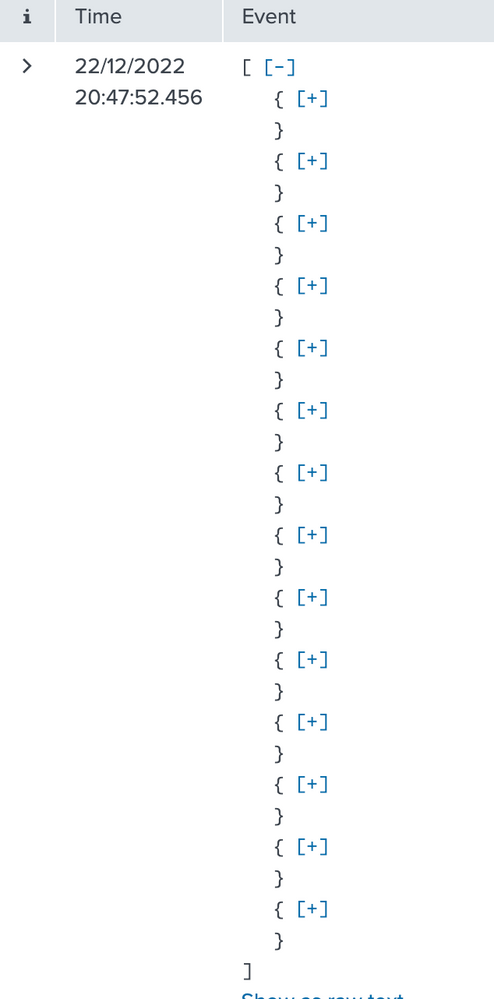
I need the JSON array in Splunk `List` view to be expanded by default instead of showing the Plus icon.
I have a Splunk event which is a JSON array:
[{
"cf_app_id": "uuid",
"cf_app_name": "app-name",
"deployment": "cf",
"event_type": "LogMessage",
"info_splunk_index": "splunk-index",
"ip": "ipaddr",
"message_type": "OUT",
"msg": "2022-12-22 19:11:30.242 DEBUG [app-name,02c11142eee3be456dc30ddb1b234d5f,f20222ba46461ea9] 28 --- [nio-8080-exec-1] classname : This is the start of the transaction",
"origin": "rep",
"source_instance": "0",
"source_type": "APP/PROC/WEB",
"timestamp": 1671732690242714069
},
{
"cf_app_id": "uuid",
"cf_app_name": "app-name",
"deployment": "cf",
"event_type": "LogMessage",
"info_splunk_index": "splunk-index",
"ip": "ipaddr",
"message_type": "OUT",
"msg": "2022-12-22 19:11:30.242 DEBUG [app-name,02c11142eee3be456dc30ddb1b234d5f,f20222ba46461ea9] 28 --- [nio-8080-exec-1] classname : app log text",
"origin": "rep",
"source_instance": "0",
"source_type": "APP/PROC/WEB",
"timestamp": 1671732690243292964
},
{
"cf_app_id": "uuid",
"cf_app_name": "app-name",
"deployment": "cf",
"event_type": "LogMessage",
"info_splunk_index": "splunk-index",
"ip": "ipaddr",
"message_type": "OUT",
"msg": "2022-12-22 19:11:30.242 DEBUG [app-name,02c11142eee3be456dc30ddb1b234d5f,f20222ba46461ea9] 28 --- [nio-8080-exec-1] classname : another app log",
"origin": "rep",
"source_instance": "0",
"source_type": "APP/PROC/WEB",
"timestamp": 1671732690243306564
},
{
"cf_app_id": "uuid",
"cf_app_name": "app-name",
"deployment": "cf",
"event_type": "LogMessage",
"info_splunk_index": "splunk-index",
"ip": "ipaddr",
"message_type": "OUT",
"msg": "2022-12-22 19:11:30.242 DEBUG [app-name,02c11142eee3be456dc30ddb1b234d5f,f20222ba46461ea9] 28 --- [nio-8080-exec-1] classname : {\"data\":{\"fields\":[{\"__typename\":\"name\",\"field\":\"value\",\"field2\":\"value2\",\"field3\":\"value 3\",\"field4\":\"value4\",\"field5\":\"value5\",\"field6\":\"value6\",\"field7\":\"value7\",\"field8\":null,\"field9\":\"value9\",\"field10\":null,\"field11\":111059.0,\"field12\":111059.0,\"field13\":null,\"field14\":\"value14\",\"field15\":\"2018-10-01\",\"field16\":null,\"field17\":false,\"field18\":{\"field19\":\"value19\",\"fieldl20\":\"value20\",\"field21\":2.6,\"field22\":\"2031-10-31\",\"field23\":\"2017-11-06\"},\"field24\":{\"field25\":\"\",\"field26\":\"\"},\"field27\":{\"field28\":{\"field29\":0.0,\"field30\":0.0,\"field31\":240.63,\"field32\":\"2022-12-31\",\"field33\":0.0,\"field34\":\"9999-10-31\"}},\"field35\":[{\"field36\":{\"field37\":\"value37\"}},{\"field38\":{\"field39\":\"value39\"}}],\"field40\":{\"__typename\":\"value40\",\"field41\":\"value41\",\"field42\":\"value 42\",\"field43\":111059.0,\"field44\":\"2031-04-01\",\"field45\":65204.67,\"field46\":null,\"field47\":\"value47\",\"field48\":\"value48\",\"field49\":null,\"field50\":\"value50\",\"field51\":null,\"field52\":null}},{\"__typename\":\"value53\",\"field54\":\"value54\",\"field55\":\"value55\",\"field56\":\"value56\",\"field57\":\"value57\",\"field58\":\"value58\",\"field59\":\"9\",\"field60\":\"value60\",\"field61\":null,\"field62\":\"value62\",\"field63\":null,\"field64\":88841.0,\"field65\":38841.0,\"field66\":null,\"field67\":\"value67\",\"field68\":\"2018-10-01\",\"field69\":null,\"field70\":false,\"field71\":{\"field72\":\"value72\",\"field73\":\"value73\",\"field74\":2.6,\"field75\":\"2031-10-31\",\"field76\":\"2017-11-06\"},\"field77\":{\"field78\":\"\",\"field79\":\"\"},\"field80\":{\"field81\":{\"field82\":0.0,\"field83\":0.0,\"field84\":84.16,\"field85\":\"2022-12-31\",\"field86\":0.0,\"field87\":\"9999-10-31\"}},\"field88\":[{\"field89\":{\"field90\":\"value90\"}},{\"field91\":{\"field92\":\"value92\"}}],\"field93\":null},{\"__typename\":\"value94\",\"field95\":\"value95\",\"field96\":\"value96\",\"field97\":\"value97\",\"field98\":\"value98\",\"field99\":\"value99\",\"field100\":\"1\",\"field101\":\"value101\",\"field102\":null,\"field103\":\"value103\",\"field104\":\"359\",\"field105\":88025.0,\"field106\":79316.87,\"field107\":\"309\",\"field108\":\"value108\",\"field109\":\"2018-10-01\",\"field110\":\"2048-09-30\",\"field111\":false,\"field112\":{\"field113\":\"value113\",\"field114\":\"value114\",\"field115\":2.35,\"field116\":\"2031-10-31\",\"field117\":\"2017-11-06\"},\"field118\":{\"field119\":\"\",\"field120\":\"\"},\"field121\":{\"field122\":{\"field123\":341.58,\"field124\":0.0,\"field125\":155.33,\"field126\":\"2022-12-31\",\"field127\":186.25,\"field128\":\"2022-12-31\"}},\"field129\":[{\"field130\":{\"field131\":\"value131\"}},{\"field132\":{\"field133\":\"value133\"}}],\"field134\":null}]}}",
"origin": "rep",
"source_instance": "0",
"source_type": "APP/PROC/WEB",
"timestamp": 1671732690243306564
},
{
"cf_app_id": "uuid",
"cf_app_name": "app-name",
"deployment": "cf",
"event_type": "LogMessage",
"info_splunk_index": "splunk-index",
"ip": "ipaddr",
"message_type": "OUT",
"msg": "2022-12-22 19:11:30.242 DEBUG [app-name,02c11142eee3be456dc30ddb1b234d5f,f20222ba46461ea9] 28 --- [nio-8080-exec-1] classname : This is the end of the transaction",
"origin": "rep",
"source_instance": "0",
"source_type": "APP/PROC/WEB",
"timestamp": 1671732690870483226
}
]
When I open this in Splunk website in List view then I had to manually click on `plus` icon to expand each JSON in the Splunk event. Is there an option to make them expanded by default so that I can click on `minus` sign to minimise it if I want to
- Mark as New
- Bookmark Message
- Subscribe to Message
- Mute Message
- Subscribe to RSS Feed
- Permalink
- Report Inappropriate Content

Default behavior is very much a feature, not to say any UI behavior is a convenience feature. I often file usability bugs but this one can hardly be called one. On the other hand, you can always submit to Ideas.
- Mark as New
- Bookmark Message
- Subscribe to Message
- Mute Message
- Subscribe to RSS Feed
- Permalink
- Report Inappropriate Content
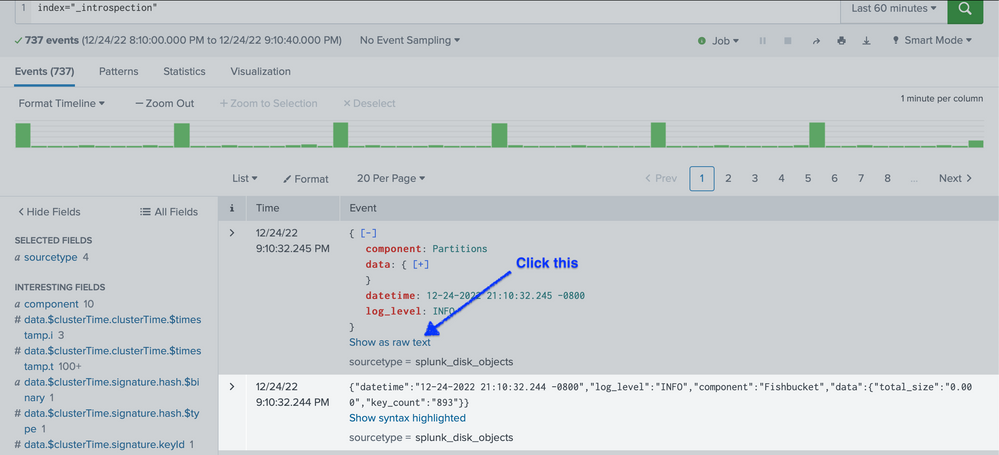
Did you see "Show raw text" in the event list? (That is right below the area shown in your screenshot.)
- Mark as New
- Bookmark Message
- Subscribe to Message
- Mute Message
- Subscribe to RSS Feed
- Permalink
- Report Inappropriate Content
Hi, I want to use "List" view so that I can get Syntax highlighting for JSON Splunk events. ('Show as raw text' is same as using the "raw" view).
I think this is a bug in Splunk GUI. Atleast upto 2 levels should have been maximised by Splunk by default instead of forcing user to keep clicking plus icon. Or atleast make this configurable in user preferences
- Mark as New
- Bookmark Message
- Subscribe to Message
- Mute Message
- Subscribe to RSS Feed
- Permalink
- Report Inappropriate Content
Default behavior is very much a feature, not to say any UI behavior is a convenience feature. I often file usability bugs but this one can hardly be called one. On the other hand, you can always submit to Ideas.


Join the Splunk Community Slack to learn, troubleshoot, and make connections with fellow Splunk practitioners in real time!
Join Splunk User Groups to connect and learn in-person by region or remotely by topic or industry.
A Four-Part Event Series: Full Stack Observability For the AI Era
SOC4Kafka - New Kafka Connector Powered by OpenTelemetry
Event Series: Level up your SOC: Advancing with Splunk Enterprise Security
