
Join the Conversation
- Find Answers
- :
- Using Splunk
- :
- Splunk Search
- :
- Re: Regex in transforms.conf
- Subscribe to RSS Feed
- Mark Topic as New
- Mark Topic as Read
- Float this Topic for Current User
- Bookmark Topic
- Subscribe to Topic
- Mute Topic
- Printer Friendly Page
- Mark as New
- Bookmark Message
- Subscribe to Message
- Mute Message
- Subscribe to RSS Feed
- Permalink
- Report Inappropriate Content

I'm trying to get this extraction for the filename to work via transforms.conf but it isn't working. Any ideas?
[My_source_type]
REPORT-file= extract_file
[extract_file]
REGEX =<Data Name='TargetFilename'>.*\\\\(?<file>[\S\s+]*)<\/Data>
FORMAT = file:$3
<Event xmlns='omitted><System><Provider Name='Microsoft-Windows-Sysmon' Guid='{omitted}'/><EventID>2</EventID><Version>4</Version><Level>4</Level><Task>2</Task><Opcode>0</Opcode><Keywords>omitted</Keywords><TimeCreated SystemTime='2021-06-09T16:31:46.813927400Z'/><EventRecordID>947063</EventRecordID><Correlation/><Execution ProcessID='4824' ThreadID='6932'/><Channel>Microsoft-Windows-Sysmon/Operational</Channel><Computer>omitted</Computer><Security UserID='S-1-5-18'/></System><EventData><Data Name='RuleName'></Data><Data Name='UtcTime'>2021-06-09 16:31:46.813</Data><Data Name='ProcessGuid'>{omitted}</Data><Data Name='ProcessId'>11932</Data><Data Name='Image'>C:\Users\omitted\AppData\Local\Microsoft\Teams\current\Teams.exe</Data><Data Name='TargetFilename'>C:\Users\omitted\AppData\Roaming\Microsoft\Windows\Recent\CustomDestinations\EJ5T0WEDS801S4OF2UEY.temp</Data><Data Name='CreationUtcTime'>2020-04-21 21:00:25.187</Data><Data Name='PreviousCreationUtcTime'>2021-06-09 16:31:46.802</Data></EventData></Event>
- Mark as New
- Bookmark Message
- Subscribe to Message
- Mute Message
- Subscribe to RSS Feed
- Permalink
- Report Inappropriate Content


[My_source_type]
REPORT-file= extract_file

[extract_file]
REGEX = \<Data Name\=\'TargetFilename\'\>.*\\(?<file>[^<]+)
FORMAT = file::$1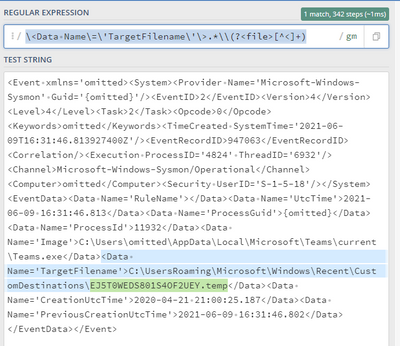
-----
An upvote would be appreciated if it helps!
- Mark as New
- Bookmark Message
- Subscribe to Message
- Mute Message
- Subscribe to RSS Feed
- Permalink
- Report Inappropriate Content
[My_source_type]
REPORT-file= extract_file

[extract_file]
REGEX = \<Data Name\=\'TargetFilename\'\>.*\\(?<file>[^<]+)
FORMAT = file::$1
-----
An upvote would be appreciated if it helps!
- Mark as New
- Bookmark Message
- Subscribe to Message
- Mute Message
- Subscribe to RSS Feed
- Permalink
- Report Inappropriate Content

Hi @TheBravoSierra ,
Can you check if the following works?
<Data Name='TargetFilename'>.*\\(?<file>[\S\s+]*)<\/Data>


Join the Splunk Community Slack to learn, troubleshoot, and make connections with fellow Splunk practitioners in real time!
Join Splunk User Groups to connect and learn in-person by region or remotely by topic or industry.
Data Management Digest – September 2026
Federated Search for CloudWatch Unified Data Store Is Generally Available
Announcing Modern Navigation: A New Era of Splunk User Experience
