
Join the Conversation
- Find Answers
- :
- Using Splunk
- :
- Splunk Search
- :
- Range Marker
- Subscribe to RSS Feed
- Mark Topic as New
- Mark Topic as Read
- Float this Topic for Current User
- Bookmark Topic
- Subscribe to Topic
- Mute Topic
- Printer Friendly Page
- Mark as New
- Bookmark Message
- Subscribe to Message
- Mute Message
- Subscribe to RSS Feed
- Permalink
- Report Inappropriate Content
Range Marker

I am trying to achieve the same visualization as documented over here: https://wiki.splunk.com/Community:Search_Report:_How_to_Add_a_Range_Marker_by_Advanced_XML
My understanding is that this is deprecated but are there anyway I can get this up in the latest version of Splunk?
- Mark as New
- Bookmark Message
- Subscribe to Message
- Mute Message
- Subscribe to RSS Feed
- Permalink
- Report Inappropriate Content

Did you ever solve this? I'm looking to do exactly the same thing - I'm after a range colouration on my chart that doesn't start at 0 - i.e. highlighting a min/max value that the other plotlines should be staying within.
- Mark as New
- Bookmark Message
- Subscribe to Message
- Mute Message
- Subscribe to RSS Feed
- Permalink
- Report Inappropriate Content

@Stevelim as you have figured Advanced XML is deprecated, so what you can try is to use Area Chart with Static Thresholds to mark ranges on chart (with light colors for obvious reasons) and then use Chart overlay to depict the required series. This option would however require you to mark Chart range color for background from 0 value onward (not directly something in the middle). I have used Lower Threshold as Light Green color and Upper Threshold as Light Red color.
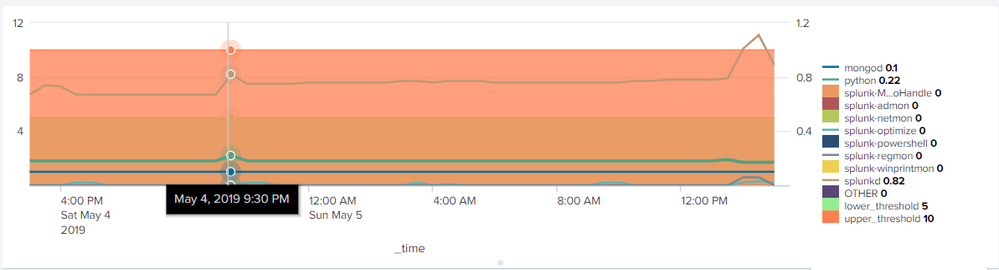
Following is a run anywhere example which also uses the feature of Legends seriesCompare which is available in Splunk 7.x versions. This allows simpler selection and display of all series values. I have also used some CSS override to show Series values in Legend for Series Compare as more visible Bold and Black color.
<dashboard>
  <label>Chart with Area</label>
  <row>
    <panel>
      <html depends="$alwaysHideCSSPanel$">
        <style>
          #chartAreaWithOverlay g.highcharts-legend-item tspan:nth-child(2){
            font-weight:bold !important;
            fill:black !important;
          }
        </style>
      </html>
      <chart id="chartAreaWithOverlay">
        <search>
          <query>index="_introspection" data.pct_memory=*
| timechart max(data.pct_memory) as max_memory_pct by data.process
| eval lower_threshold=5, upper_threshold=10</query>
          <earliest>-24h@h</earliest>
          <latest>now</latest>
          <sampleRatio>1</sampleRatio>
        </search>
        <option name="charting.axisLabelsX.majorLabelStyle.overflowMode">ellipsisNone</option>
        <option name="charting.axisLabelsX.majorLabelStyle.rotation">0</option>
        <option name="charting.axisTitleX.visibility">visible</option>
        <option name="charting.axisTitleY.visibility">visible</option>
        <option name="charting.axisTitleY2.visibility">visible</option>
        <option name="charting.axisX.abbreviation">none</option>
        <option name="charting.axisX.scale">linear</option>
        <option name="charting.axisY.abbreviation">none</option>
        <option name="charting.axisY.scale">linear</option>
        <option name="charting.axisY2.abbreviation">none</option>
        <option name="charting.axisY2.enabled">1</option>
        <option name="charting.axisY2.scale">inherit</option>
        <option name="charting.chart">area</option>
        <option name="charting.chart.bubbleMaximumSize">50</option>
        <option name="charting.chart.bubbleMinimumSize">10</option>
        <option name="charting.chart.bubbleSizeBy">area</option>
        <option name="charting.chart.nullValueMode">zero</option>
        <option name="charting.chart.overlayFields">mongod,python,splunk-regmon,splunk-optimize,splunkd</option>
        <option name="charting.chart.showDataLabels">none</option>
        <option name="charting.chart.sliceCollapsingThreshold">0.01</option>
        <option name="charting.chart.stackMode">default</option>
        <option name="charting.chart.style">shiny</option>
        <option name="charting.drilldown">none</option>
        <option name="charting.fieldColors">{"lower_threshold":"0x90EE90","upper_threshold":"0xFF7F50"}</option>
        <option name="charting.layout.splitSeries">0</option>
        <option name="charting.layout.splitSeries.allowIndependentYRanges">0</option>
        <option name="charting.legend.labelStyle.overflowMode">ellipsisMiddle</option>
        <option name="charting.legend.mode">seriesCompare</option>
        <option name="charting.legend.placement">right</option>
        <option name="charting.lineWidth">2</option>
        <option name="trellis.enabled">0</option>
        <option name="trellis.scales.shared">1</option>
        <option name="trellis.size">medium</option>
      </chart>
    </panel>
  </row>
</dashboard>
| makeresults | eval message= "Happy Splunking!!!"

- Mark as New
- Bookmark Message
- Subscribe to Message
- Mute Message
- Subscribe to RSS Feed
- Permalink
- Report Inappropriate Content
The issue with an overlay is that it goes all the way to the bottom of the y axis. In the rangemarker example, you can see that it is a range in the middle of the chart, ie. (4 to 6 in your example).

Join the Splunk Community Slack to learn, troubleshoot, and make connections with fellow Splunk practitioners in real time!
Join Splunk User Groups to connect and learn in-person by region or remotely by topic or industry.
Make Your Machine Data AI-Ready in Splunk
Splunk Asynchronous Forwarding Explained
How to Monitor AI Agents with Splunk Agent Observability
