
Join the Conversation
- Find Answers
- :
- Using Splunk
- :
- Splunk Search
- :
- Proper execution of subsearch help
- Subscribe to RSS Feed
- Mark Topic as New
- Mark Topic as Read
- Float this Topic for Current User
- Bookmark Topic
- Subscribe to Topic
- Mute Topic
- Printer Friendly Page
- Mark as New
- Bookmark Message
- Subscribe to Message
- Mute Message
- Subscribe to RSS Feed
- Permalink
- Report Inappropriate Content

So here is my existing query as it runs now
sourcetype=snort
[search sourcetype=snort
|top limit=20 src| table src]
| stats count, values(signature) as Sigs by src
| sort -count
| lookup dnslookup clientip as src OUTPUT clienthost as DST_RESOLVED
| iplocation src
| fields src, count, Country, DST_RESOLVED, Sigs
| rename src as "Source IP", count as Count, DST_RESOLVED as "DNS Resolution", Sigs as Signatures
I am not the original builder of this query but I am editing it.
these are normalized snort logs. Id like to return the top 20 signatures by source, while displaying source (src), count, country, dns rsolution (dnslookup) and signature (sigs)
There are signatures i want to completely exclude by (sig_id), and then there are signatures i would like to exclude where signature has specific src or cidr range. I seem to be creating unbalanced parenthesis when trying my boolean expressions or Wheres. Please assist
- Mark as New
- Bookmark Message
- Subscribe to Message
- Mute Message
- Subscribe to RSS Feed
- Permalink
- Report Inappropriate Content

sourcetype=snort
``` There is no need for sub-searching, since you end up searching for everything.```
| stats count, values(signature) as Sigs by src
| sort  20 - count
| lookup dnslookup clientip as src OUTPUT clienthost as DST_RESOLVED
| iplocation src
| fields src, count, Country, DST_RESOLVED, Sigs
| mvexpand Sigs
| search NOT [ | inputlookup Signatures.csv | rename Signatures as Sigs | format ]
``` exclude Sgnatures CSV ```
| rename src as "Source IP", count as Count, DST_RESOLVED as "DNS Resolution", Sigs as Signatures- Mark as New
- Bookmark Message
- Subscribe to Message
- Mute Message
- Subscribe to RSS Feed
- Permalink
- Report Inappropriate Content
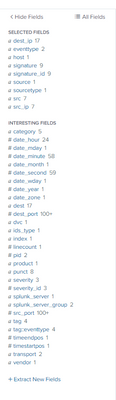
could you help me better understand the mvexpands ?
also i wouldnt need to import the signatures from a csv.
- Mark as New
- Bookmark Message
- Subscribe to Message
- Mute Message
- Subscribe to RSS Feed
- Permalink
- Report Inappropriate Content
| stats count, values(signature) as signature by srcThis makes signature multi-values. mvexpand separetes them to single rows.
It's going to everyone, but I can't make queries without logs.
- Mark as New
- Bookmark Message
- Subscribe to Message
- Mute Message
- Subscribe to RSS Feed
- Permalink
- Report Inappropriate Content
sourcetype=snort
``` There is no need for sub-searching, since you end up searching for everything.```
| stats count, values(signature) as Sigs by src
| sort  20 - count
| lookup dnslookup clientip as src OUTPUT clienthost as DST_RESOLVED
| iplocation src
| fields src, count, Country, DST_RESOLVED, Sigs
| mvexpand Sigs
| search NOT [ | inputlookup Signatures.csv | rename Signatures as Sigs | format ]
``` exclude Sgnatures CSV ```
| rename src as "Source IP", count as Count, DST_RESOLVED as "DNS Resolution", Sigs as Signatures- Mark as New
- Bookmark Message
- Subscribe to Message
- Mute Message
- Subscribe to RSS Feed
- Permalink
- Report Inappropriate Content
im sorry. i did not have the full query. this is the one as it runs now
sourcetype=snort
NOT (signature_id=129:7:1 OR signature_id=124:1:1 OR signature_id=142:1:1 OR signature_id=124:7:1 OR signature_id=129:18:1 OR signature_id=129:8:1)
[search sourcetype=snort (signature!="(spp_sip)*" (src_ip!=10.10.21.11 AND signature!="*POP3*") AND (src_ip!=10.108.246.111 OR 10.108.243.112 OR 10.108.243.113 OR 10.108.243.114 OR 10.108.243.115 OR 10.108.243.116) AND signature_id!=125:1:1)
|top limit=20 src| table src]
| stats count, values(signature) as Sigs by src
| sort -count
| lookup dnslookup clientip as src OUTPUT clienthost as DST_RESOLVED
| iplocation src
| fields src, count, Country, DST_RESOLVED, Sigs
| rename src as "Source IP", count as Count, DST_RESOLVED as "DNS Resolution", Sigs as Signatures

Join the Splunk Community Slack to learn, troubleshoot, and make connections with fellow Splunk practitioners in real time!
Join Splunk User Groups to connect and learn in-person by region or remotely by topic or industry.
Index This | What travels the world but is also stuck in place?
Discover New Use Cases: Unlock Greater Value from Your Existing Splunk Data
Continue Your Journey: Join Session 2 of the Data Management and Federation Bootcamp ...
