
Join the Conversation
- Find Answers
- :
- Using Splunk
- :
- Splunk Search
- :
- Re: Pie Chart - How to show my own field instead o...
- Subscribe to RSS Feed
- Mark Topic as New
- Mark Topic as Read
- Float this Topic for Current User
- Bookmark Topic
- Subscribe to Topic
- Mute Topic
- Printer Friendly Page
- Mark as New
- Bookmark Message
- Subscribe to Message
- Mute Message
- Subscribe to RSS Feed
- Permalink
- Report Inappropriate Content
Pie Chart - How to show my own field instead of Count% ?

Hi,
I have this search:
| stats count by application
| eval application = case(
      application=="malware-detection", "Malware",
      !isnull(application), upper(substr(application,1,1)).substr(application,2)
      )
| eventstats sum(count) as total
| eval count_2=round(100*count/total,2)
| fields- total
| eval count_perc="".count_2."%"
| rename application as Application, count as Count
and I would like to show the Application, Count and count_perc fields on mu Pie Chart, but splunk still show the Count%.
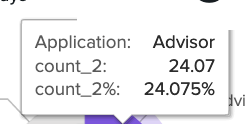
My goal is to round the percentage, how can I do this?
Thanks for support!
- Mark as New
- Bookmark Message
- Subscribe to Message
- Mute Message
- Subscribe to RSS Feed
- Permalink
- Report Inappropriate Content

The percentage shown is calculated as part of the Pie Chart Visualisation. As far as I know there are no Formatting Options (UI or SourceCode) that can change this. So the only way I can imagine is to make a custom visualisation that is an exact copy of the Splunk-Build Pie Chart and modify the code in there.
But I don't know if that effort is worth it.
My only other guess would be to look into the code of the page and see if there is a possibility to modify it through HTML Code Inserted into the XML Code of the Dashboard but that's a far stretch
_______________________________________
If this was helpful please consider awarding Karma. Thx!

New Year, New Changes for Splunk Certifications
Stay Connected: Your Guide to January Tech Talks, Office Hours, and Webinars!
[Puzzles] Solve, Learn, Repeat: Reprocessing XML into Fixed-Length Events
