
Join the Conversation
- Find Answers
- :
- Using Splunk
- :
- Splunk Search
- :
- PROPS Configuration file for data sources with ti...
- Subscribe to RSS Feed
- Mark Topic as New
- Mark Topic as Read
- Float this Topic for Current User
- Bookmark Topic
- Subscribe to Topic
- Mute Topic
- Printer Friendly Page
- Mark as New
- Bookmark Message
- Subscribe to Message
- Mute Message
- Subscribe to RSS Feed
- Permalink
- Report Inappropriate Content

Hello,
I am getting some error messages within my PROPS Configuration file to parse timestamp data. The sample file/event, my props configuration, and error message are giving below. Any help will be highly appreciated. Thank you so much:
Sample Event:
<?xml version="1.0" encoding="ISO99991"?>
<SDWDATA>
<MDWDATA>
<TIMESTAMP>20110630143000</TIMESTAMP>
<USERTYPE>TEST</USERTYPE>
<SESSION>zx530</SESSION>
<IPADDR>142.225.163.60</IPADDR>
<SYSTEM>CDE</SYSTEM>
<EVENTID>NAMEE</EVENTID> <EVENTTYPE>SEARCH</EVENTTYPE>
<RETURNCODE>0102</RETURNCODE>
<ERRORMSG>None</ERRORMSG>
<ESTATCD>1</ESTATCD>
<TESTCODE>210</TESTCODE>
<FNUMBER>1321</FNUMBER>
<OUTPUTCODE>10</OUTPUTCODE>
<RCODE>ASDC</RCODE>
<NAMECTRL>TESTPWE</NAMECTRL>
<USERID>I00XY09</USERID>
<ACCESS>ngd</ACCESS>
<CAMPUSCODE>p</CAMPUSCODE>
<SRCCD>ab31</SRCCD>
<SLNR>123456</SLNR>
</MDWDATA>
<SDWDATA>
PROPS:
[ __auto__learned__ ]
SHOULD_LINEMERGE=true
LINE_BREAKER=([\r\n]*)<MODTRANSAUDTRL>
TIME_PREFIX=<TIMESTAMP>
TIME_FORMAT=%Y%m%d%H%M%S
MAX_TIMESTAMP_LOOKAHEAD=14
TRUNCATE=1000
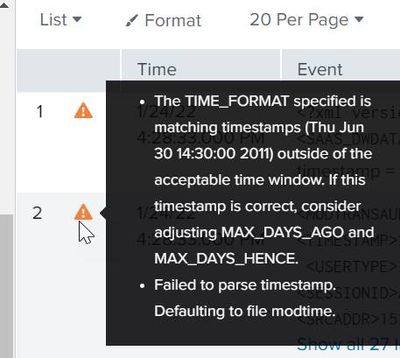
ERROR Message:
- Mark as New
- Bookmark Message
- Subscribe to Message
- Mute Message
- Subscribe to RSS Feed
- Permalink
- Report Inappropriate Content


The error should be quite self-explanatory. And the proposed solution as well.
Your date is from 2011, which is more than default 5.5 years ago limit.
Adjust your MAX_DAYS_AGO setting.
- Mark as New
- Bookmark Message
- Subscribe to Message
- Mute Message
- Subscribe to RSS Feed
- Permalink
- Report Inappropriate Content
The error should be quite self-explanatory. And the proposed solution as well.
Your date is from 2011, which is more than default 5.5 years ago limit.
Adjust your MAX_DAYS_AGO setting.


Join the Splunk Community Slack to learn, troubleshoot, and make connections with fellow Splunk practitioners in real time!
Join Splunk User Groups to connect and learn in-person by region or remotely by topic or industry.
Data Management Digest – September 2026
Federated Search for CloudWatch Unified Data Store Is Generally Available
Announcing Modern Navigation: A New Era of Splunk User Experience
