
Turn on suggestions
Auto-suggest helps you quickly narrow down your search results by suggesting possible matches as you type.
Splunk Search
×
Join the Conversation
Without signing in, you're just watching from the sidelines. Sign in or Register to connect, share, and be part of the Splunk Community.
Turn on suggestions
Auto-suggest helps you quickly narrow down your search results by suggesting possible matches as you type.
- Find Answers
- :
- Using Splunk
- :
- Splunk Search
- :
- On Splunk Search UI, The column and "edit mark" t...
Options
- Subscribe to RSS Feed
- Mark Topic as New
- Mark Topic as Read
- Float this Topic for Current User
- Bookmark Topic
- Subscribe to Topic
- Mute Topic
- Printer Friendly Page
- Mark as New
- Bookmark Message
- Subscribe to Message
- Mute Message
- Subscribe to RSS Feed
- Permalink
- Report Inappropriate Content
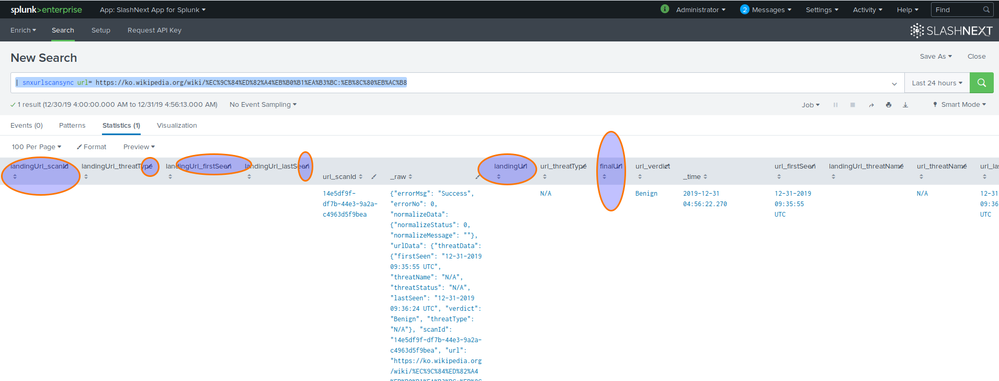
On Splunk Search UI, The column and "edit mark" to edit the column are overlapped

umairahmad3985
Path Finder
01-02-2020
07:20 AM
When I run my custom search command, the results in Splunk's Statistics tab are appearing in a weird UI. The column and the "edit mark" icon are overlapped. Ideally, the column title shouldn't be overlapped with edit option. Is this due to the data of the command or that's an issue with Splunk? See attached screenshot for reference:

- Mark as New
- Bookmark Message
- Subscribe to Message
- Mute Message
- Subscribe to RSS Feed
- Permalink
- Report Inappropriate Content

somesoni2
Revered Legend
01-02-2020
11:56 AM
What browser are you using? Can try on different browser you have?
I see similar behavior in IE but works well in Chrome
- Mark as New
- Bookmark Message
- Subscribe to Message
- Mute Message
- Subscribe to RSS Feed
- Permalink
- Report Inappropriate Content
umairahmad3985
Path Finder
01-02-2020
10:50 PM
I am seeing this behavior in Firefox. Also, Chrome is working fine as well.

Get Updates on the Splunk Community!
Enter the Agentic Era with Splunk AI Assistant for SPL 1.4
🚀 Your data just got a serious AI upgrade — are you ready?
Say hello to the Agentic Era with the ...
Stronger Security with Federated Search for S3, GCP SQL & Australian Threat ...
Splunk Lantern is a Splunk customer success center that provides advice from Splunk experts on valuable data ...
Accelerating Observability as Code with the Splunk AI Assistant
We’ve seen in previous posts what Observability as Code (OaC) is and how it’s now essential for managing ...
