
Join the Conversation
- Find Answers
- :
- Using Splunk
- :
- Splunk Search
- :
- Re: Notable event index is empty.
- Subscribe to RSS Feed
- Mark Topic as New
- Mark Topic as Read
- Float this Topic for Current User
- Bookmark Topic
- Subscribe to Topic
- Mute Topic
- Printer Friendly Page
- Mark as New
- Bookmark Message
- Subscribe to Message
- Mute Message
- Subscribe to RSS Feed
- Permalink
- Report Inappropriate Content

Hello everyone.
I am trying to deploy ESS, but I having some trouble with the notable events.
I can not see results at the Incident Review dashboard and this is because the notable event index is empty

I created a correlation search and as part of the adaptative response action a notable event had to be create.
But is not working, so I decided to run the search from de alert and there I can see results.
Also I followed the next guide https://docs.splunk.com/Documentation/ES/6.5.0/Admin/Troubleshootnotables
And I found this :

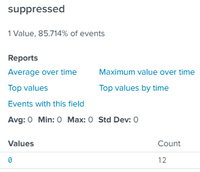

As you can see everything looks ok.
It is important to mention that some searches have been skipped, but not all of them and also I didn't change anything at the Splunk_SA_CIM, read that sometimes that can be a problem, but isn't my case.
Here a let a image of the result of this search index=_internal sourcetype=scheduler

I really don't know what is happening.
I will really appreciate the help.
Regards
- Mark as New
- Bookmark Message
- Subscribe to Message
- Mute Message
- Subscribe to RSS Feed
- Permalink
- Report Inappropriate Content


Hi @gl_splunkuser,
Is your Splunk standalone or distributed? If your Splunk instance is not standalone, you have to create notable index on your indexers.
- Mark as New
- Bookmark Message
- Subscribe to Message
- Mute Message
- Subscribe to RSS Feed
- Permalink
- Report Inappropriate Content
That have a lot of sense.
Thank you so much.
- Mark as New
- Bookmark Message
- Subscribe to Message
- Mute Message
- Subscribe to RSS Feed
- Permalink
- Report Inappropriate Content
Hi @gl_splunkuser,
Is your Splunk standalone or distributed? If your Splunk instance is not standalone, you have to create notable index on your indexers.


Join the Splunk Community Slack to learn, troubleshoot, and make connections with fellow Splunk practitioners in real time!
Join Splunk User Groups to connect and learn in-person by region or remotely by topic or industry.
Meet Splunk Observability Studio: AI-Assisted OpenTelemetry Instrumentation Without ...
Federated Search for Cisco Security and Analytics Logging (SAL) is now GA on Splunk ...
Your Path to AgenticOps: AI Experiences for Every Splunk Practitioner
