
Join the Conversation
- Find Answers
- :
- Using Splunk
- :
- Splunk Search
- :
- Need to create a Dashboard which can select multip...
- Subscribe to RSS Feed
- Mark Topic as New
- Mark Topic as Read
- Float this Topic for Current User
- Bookmark Topic
- Subscribe to Topic
- Mute Topic
- Printer Friendly Page
- Mark as New
- Bookmark Message
- Subscribe to Message
- Mute Message
- Subscribe to RSS Feed
- Permalink
- Report Inappropriate Content
Need to create a Dashboard which can select multiple fields based on user selection of checkbox/ radio button.

Hi all,
I Need to create a Dashboard which can select multiple extracted fields based on user selection of checkbox/ radio button.
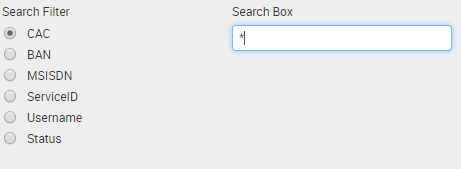
For example, I want the user to be able to search with both fields ServiceID AND Username. I currently have the single search functionality working but I cant seem to think of how I will pass multiple fields.
Will greatly appreciate any help with this.
- Mark as New
- Bookmark Message
- Subscribe to Message
- Mute Message
- Subscribe to RSS Feed
- Permalink
- Report Inappropriate Content


Hi jithinmathew,
I had a similar problem and I solved it creating a filter for each field.
In addition you have to manage the problem that not all the fields had 100% values so if you use "All" () as default for all fields you exclude all the events that haven't one of the fields.
To manage this problem, you have to use ad default something like: `Username= OR NOT Username=*`
Bye.
Giuseppe
- Mark as New
- Bookmark Message
- Subscribe to Message
- Mute Message
- Subscribe to RSS Feed
- Permalink
- Report Inappropriate Content

@jithinmathew,
Are you looking for something similar?
<form>
  <label>Radio Button</label>
  <fieldset submitButton="false">
    <input type="radio" token="sourcetype">
      <label>Sourc e Type</label>
      <choice value="splunkd">SPLUNKD</choice>
      <choice value="kvstore">KVSTORE</choice>
      <choice value="audittrail">AUDIT TRIAL</choice>
    </input>
    <input type="text" token="searchbox">
      <label>Search Box</label>
      <default>$sourcetype$</default>
      <initialValue>$sourcetype$</initialValue>
    </input>
    <input type="radio" token="index" searchWhenChanged="true">
      <label>Include Index In Group By?</label>
      <choice value="index">Yes</choice>
      <choice value="">No</choice>
      <prefix>, </prefix>
    </input>
  </fieldset>
  <row>
    <panel>
      <title>Value from Search Filter : $sourcetype$</title>
      <table>
        <search>
          <query>index=_* sourcetype=$sourcetype$|stats count by sourcetype $index$</query>
          <earliest>-15m</earliest>
          <latest>now</latest>
        </search>
        <option name="drilldown">none</option>
      </table>
    </panel>
  </row>
</form>
What goes around comes around. If it helps, hit it with Karma 🙂
- Mark as New
- Bookmark Message
- Subscribe to Message
- Mute Message
- Subscribe to RSS Feed
- Permalink
- Report Inappropriate Content
Hmm no, for example, I want the user to be able to search both splunkd and KVSTORE at the same time instead of one each.
- Mark as New
- Bookmark Message
- Subscribe to Message
- Mute Message
- Subscribe to RSS Feed
- Permalink
- Report Inappropriate Content
@jithinmathew,
That's simple, just change the radio button to checkbox
<form>
  <label>Radio Button</label>
  <fieldset submitButton="false">
    <input type="checkbox" token="sourcetype">
      <label>Sourc e Type</label>
      <choice value="splunkd">SPLUNKD</choice>
      <choice value="kvstore">KVSTORE</choice>
      <choice value="audittrail">AUDIT TRIAL</choice>
      <valuePrefix>sourcetype="</valuePrefix>
      <valueSuffix>"</valueSuffix>
      <delimiter> OR </delimiter>
      <prefix>(</prefix>
      <suffix>)</suffix>
    </input>
    <input type="text" token="searchbox">
      <label>Search Box</label>
      <default>$sourcetype$</default>
      <initialValue>$sourcetype$</initialValue>
    </input>
    <input type="radio" token="index" searchWhenChanged="true">
      <label>Include Index In Group By?</label>
      <choice value="index">Yes</choice>
      <choice value="">No</choice>
      <prefix>, </prefix>
    </input>
  </fieldset>
  <row>
    <panel>
      <title>Value from Search Filter : $sourcetype$</title>
      <table>
        <search>
          <query>index=_* $sourcetype$|stats count by sourcetype $index$</query>
          <earliest>-15m</earliest>
          <latest>now</latest>
        </search>
        <option name="drilldown">none</option>
      </table>
    </panel>
  </row>
</form>
What goes around comes around. If it helps, hit it with Karma 🙂



Join the Splunk Community Slack to learn, troubleshoot, and make connections with fellow Splunk practitioners in real time!
Join Splunk User Groups to connect and learn in-person by region or remotely by topic or industry.
Persistent Queue at TcpOut — One of Splunk's Most Practical Features
Skip the Awkward Silence: Have a .conf-ersation at .conf26
Rethinking Zero Trust: From Product Purchases to Logical Control Evidence
