
Join the Conversation
- Find Answers
- :
- Using Splunk
- :
- Splunk Search
- :
- Need help with timestamp recognition
- Subscribe to RSS Feed
- Mark Topic as New
- Mark Topic as Read
- Float this Topic for Current User
- Bookmark Topic
- Subscribe to Topic
- Mute Topic
- Printer Friendly Page
- Mark as New
- Bookmark Message
- Subscribe to Message
- Mute Message
- Subscribe to RSS Feed
- Permalink
- Report Inappropriate Content

I have struggled with getting splunk to recognize timestamps in timestamps from an udp input. I have tried for many hours to figure this out, trying out suggestions found on forum. Hopefully someone here can point me in the right direction.
My events comes in like this, where splunk has added a extra timestamp in exactly the same format as the one at the start of the message. So the events message start with two identical timestamps as seen below, the blacked out part is the Ip-adress. Clearly splunk does not recognize this timestamp an puts on it's own with the time of indexing.
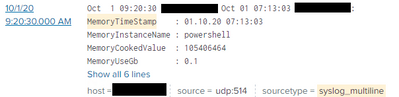
I have tried to remove the ":" at the end of timestamp with no success, and i have also edited the props.conf
Props.conf:
-----------------
[syslog_multiline]
BREAK_ONLY_BEFORE_DATE =
DATETIME_CONFIG =
LINE_BREAKER =
NO_BINARY_CHECK = true
SHOULD_LINEMERGE = false
category = Operating System
disabled = false
pulldown_type = 1
TIME_FORMAT = %b %d %H:%M:%S
TIME_PREFIX =
MAX_TIMESTAMP_LOOKAHEAD = 17
- Mark as New
- Bookmark Message
- Subscribe to Message
- Mute Message
- Subscribe to RSS Feed
- Permalink
- Report Inappropriate Content


Hi @hethu,
the approach when there are two timestamps in a log is to identify the correct one with TIME_PREFIX.
e.g. if you have a log like this:
Oct 01 10:10:56 10.10.10.10 Oct 01 10:09:12 fbdiunfuyfdixinuifniudniuinand you want the second timestamp, you should use as TIME_PREFIX the following regex:
TIME_PREFIX = ^\w+\s+\d+\s+\d+:\d+:\d+\s+In this way, you say to Splunk to use the second timestamp.
Obviously, the TIME_PREFIX depends on your logs so, if you have a different source, you have to find the correct regex for the TIME_PREFIX.
Ciao.
Giuseppe
- Mark as New
- Bookmark Message
- Subscribe to Message
- Mute Message
- Subscribe to RSS Feed
- Permalink
- Report Inappropriate Content
Hi @hethu,
the approach when there are two timestamps in a log is to identify the correct one with TIME_PREFIX.
e.g. if you have a log like this:
Oct 01 10:10:56 10.10.10.10 Oct 01 10:09:12 fbdiunfuyfdixinuifniudniuinand you want the second timestamp, you should use as TIME_PREFIX the following regex:
TIME_PREFIX = ^\w+\s+\d+\s+\d+:\d+:\d+\s+In this way, you say to Splunk to use the second timestamp.
Obviously, the TIME_PREFIX depends on your logs so, if you have a different source, you have to find the correct regex for the TIME_PREFIX.
Ciao.
Giuseppe
- Mark as New
- Bookmark Message
- Subscribe to Message
- Mute Message
- Subscribe to RSS Feed
- Permalink
- Report Inappropriate Content
HI @hethu,
good for you.
Ciao and happy splunking.
Giuseppe
P.S.: Karma Points are appreciated by all the contributors 😉
- Mark as New
- Bookmark Message
- Subscribe to Message
- Mute Message
- Subscribe to RSS Feed
- Permalink
- Report Inappropriate Content

r. Ismo


Join the Splunk Community Slack to learn, troubleshoot, and make connections with fellow Splunk practitioners in real time!
Join Splunk User Groups to connect and learn in-person by region or remotely by topic or industry.
Rounding off the Splunk Dashboard Contest
A Four Part Event Series: AI + Observability: AI Agents, LLMs, Apps, & Infrastructure
Splunk Technical Support Is Moving to Cisco Support Tools
