
Join the Conversation
- Find Answers
- :
- Using Splunk
- :
- Splunk Search
- :
- Re: Need help decuple only time from below record
- Subscribe to RSS Feed
- Mark Topic as New
- Mark Topic as Read
- Float this Topic for Current User
- Bookmark Topic
- Subscribe to Topic
- Mute Topic
- Printer Friendly Page
- Mark as New
- Bookmark Message
- Subscribe to Message
- Mute Message
- Subscribe to RSS Feed
- Permalink
- Report Inappropriate Content

My apologies
i was using "eventTimestamp" instead of "@timestamp" in my rex command
i just realized and its working now , However i do not need date in last column need only time.
Please help how to do that.
please find below details
================================================================================
Query
index=* namespace="dk1017-j" sourcetype="kube:container:kafka-clickhouse-snapshot-writer" message="*Snapshot event published*" AND message="*dbI-LDN*" AND message="*2024-04-03*" AND message="*"
|fields message
|rex field=_raw "\s+date=(?<BusDate>\d{4}-\d{2}-\d{2})"
|rex field=_raw "sourceSystem=(?<Source>[^,]*)"
|rex field=_raw "entityType=(?<Entity>\w+)"
|rex field=_raw "\"@timestamp\":\"(?<Time>\d{4}-\d{2}-\d{2}[T]\d{2}:\d{2})" --> Please help Here
|sort Time desc
|dedup Entity
|table Source, BusDate, Entity, Time
================================================================================
Screenshot
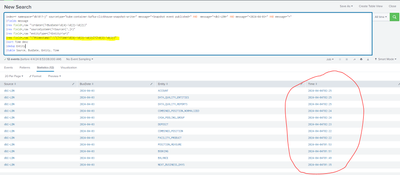
-------------------------------------------------------------------------------------------
raw data
Need only time 02:25:59 AM/PM in last column
- Mark as New
- Bookmark Message
- Subscribe to Message
- Mute Message
- Subscribe to RSS Feed
- Permalink
- Report Inappropriate Content


|rex field=_raw "\"@timestamp\":\"\d{4}-\d{2}-\d{2}T(?<Time>\d{2}:\d{2})"- Mark as New
- Bookmark Message
- Subscribe to Message
- Mute Message
- Subscribe to RSS Feed
- Permalink
- Report Inappropriate Content
is there way to add AM OR PM according to time.
- Mark as New
- Bookmark Message
- Subscribe to Message
- Mute Message
- Subscribe to RSS Feed
- Permalink
- Report Inappropriate Content
Yes, extract the full timestamp (including the date), then parse it with strptime() into an epoch time value (number of seconds since 1970), then format it with strftime() using the relevant time variables
- Mark as New
- Bookmark Message
- Subscribe to Message
- Mute Message
- Subscribe to RSS Feed
- Permalink
- Report Inappropriate Content
Appreciate if you can share some example .
- Mark as New
- Bookmark Message
- Subscribe to Message
- Mute Message
- Subscribe to RSS Feed
- Permalink
- Report Inappropriate Content
Assuming your ingest has already parsed your timestamp into the _time field, then you can just format that to get the time
| eval Time=strftime(_time, "%I:%M %p")- Mark as New
- Bookmark Message
- Subscribe to Message
- Mute Message
- Subscribe to RSS Feed
- Permalink
- Report Inappropriate Content
|rex field=_raw "\"@timestamp\":\"\d{4}-\d{2}-\d{2}T(?<Time>\d{2}:\d{2})"

Join the Splunk Community Slack to learn, troubleshoot, and make connections with fellow Splunk practitioners in real time!
Join Splunk User Groups to connect and learn in-person by region or remotely by topic or industry.
Supercharging Windows Security Detection Performance: Introducing Hybrid Field ...
Enriching Signals with the OTel Lookup Processor
Meet the .conf26 AI Agent Buildathon Winners
