
Join the Conversation
- Find Answers
- :
- Using Splunk
- :
- Splunk Search
- :
- Join command not working
- Subscribe to RSS Feed
- Mark Topic as New
- Mark Topic as Read
- Float this Topic for Current User
- Bookmark Topic
- Subscribe to Topic
- Mute Topic
- Printer Friendly Page
- Mark as New
- Bookmark Message
- Subscribe to Message
- Mute Message
- Subscribe to RSS Feed
- Permalink
- Report Inappropriate Content
Join command not working

I want to extend the results of the first search : add the column category (from the 2 search) to the results of the 1 search.
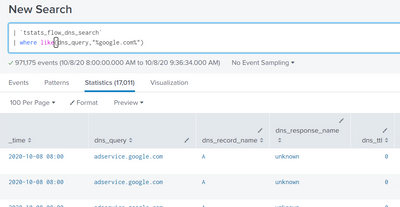
The results of the first search appear:
The results of the 2 search are also present:
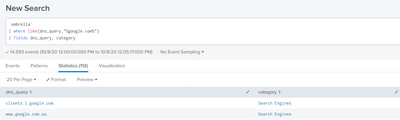
2 datasets have one common field dns_query .
But using join command no matches are found in these 2 datasets are found (it`s impossible, because I checked some of the dns_query )
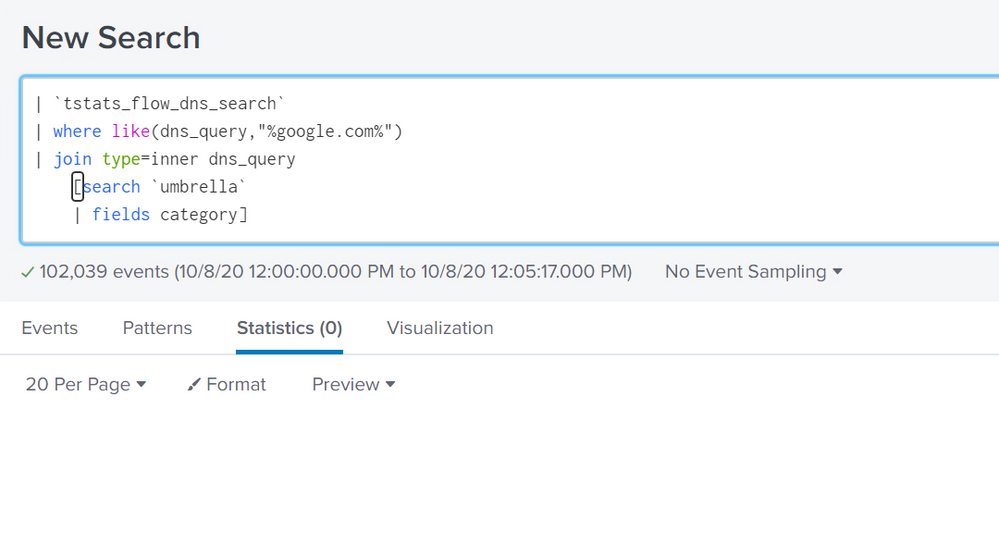
Any ideas what can be wrong?
- Mark as New
- Bookmark Message
- Subscribe to Message
- Mute Message
- Subscribe to RSS Feed
- Permalink
- Report Inappropriate Content

1st search result dns_query:
XXX.google.com
2nd search result dns_query:
XXX.google.com.
There is extra asterisk on 2nd search.
[search `umbrella`|fields category dns_query| eval dns_query=dns_query."."]how about this?
- Mark as New
- Bookmark Message
- Subscribe to Message
- Mute Message
- Subscribe to RSS Feed
- Permalink
- Report Inappropriate Content


While google.com exists in the dns_query fields, there isn't a complete match hence no results. You should evaluate the presence of google.com into another field in both searches and join on that field.
| rex field=dns_query "(?<google>google.com)"- Mark as New
- Bookmark Message
- Subscribe to Message
- Mute Message
- Subscribe to RSS Feed
- Permalink
- Report Inappropriate Content
Hi @user2020dy
You need to specify dns_query in the second search
[search `umbrella`|fields category dns_query]- Mark as New
- Bookmark Message
- Subscribe to Message
- Mute Message
- Subscribe to RSS Feed
- Permalink
- Report Inappropriate Content
Have tried already both variants, not working 😞


Join the Splunk Community Slack to learn, troubleshoot, and make connections with fellow Splunk practitioners in real time!
Join Splunk User Groups to connect and learn in-person by region or remotely by topic or industry.
Self-Healing Pipeline Is Now Generally Available: AI-Powered CIM Compliance
Meet Splunk Observability Studio: AI-Assisted OpenTelemetry Instrumentation Without ...
Federated Search for Cisco Security and Analytics Logging (SAL) is now GA on Splunk ...
