
Join the Conversation
- Find Answers
- :
- Using Splunk
- :
- Splunk Search
- :
- Re: Java SDK: how do you return lookup fields in s...
- Subscribe to RSS Feed
- Mark Topic as New
- Mark Topic as Read
- Float this Topic for Current User
- Bookmark Topic
- Subscribe to Topic
- Mute Topic
- Printer Friendly Page
- Mark as New
- Bookmark Message
- Subscribe to Message
- Mute Message
- Subscribe to RSS Feed
- Permalink
- Report Inappropriate Content

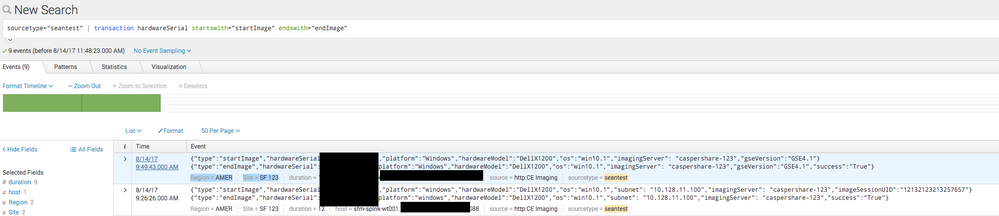
How do I receive lookup values in results from the Java SDK? When I run this query in the GUI, I see my lookup fields in grey as highlighted:
You can see the Region and Site fields.
However, I cannot see these fields in the event result in Java:
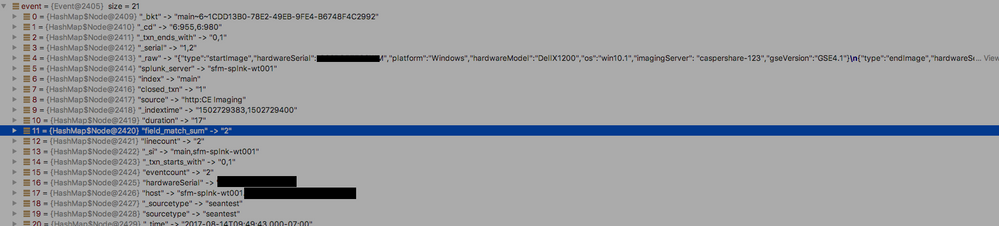
I added the setEnableLookups to the job arguments:
jobargs.setEnableLookups(true);
But still, they cannot be found. Am I looking in the wrong place? Do I need to enable something else?
Thanks,
- Mark as New
- Bookmark Message
- Subscribe to Message
- Mute Message
- Subscribe to RSS Feed
- Permalink
- Report Inappropriate Content


There are a few routes here to take.
As @acruise mentions, you can |table Region Site * to explicitly declare the fields within the search.
You may also be experiencing a permissions issue with the lookups being in a different app context then where the search is being run. Check permissions, or use a different namespace in the JAVA.
Thirdly, You can try setting a jobArg with required fields. As documented, the events should return the fields, whether they are used or not.
jobArgs.setRequiredFieldList(java.lang.String[] requiredFieldList)
Sets one or more required fields to the search. These fields, even if not referenced or used directly by the search, are still included by the events and summary endpoints. Splunk Web uses these fields to prepopulate panels in the Search view.
http://docs.splunk.com/DocumentationStatic/JavaSDK/1.6.0/index.html?com/splunk/JobArgs.html
- Mark as New
- Bookmark Message
- Subscribe to Message
- Mute Message
- Subscribe to RSS Feed
- Permalink
- Report Inappropriate Content
There are a few routes here to take.
As @acruise mentions, you can |table Region Site * to explicitly declare the fields within the search.
You may also be experiencing a permissions issue with the lookups being in a different app context then where the search is being run. Check permissions, or use a different namespace in the JAVA.
Thirdly, You can try setting a jobArg with required fields. As documented, the events should return the fields, whether they are used or not.
jobArgs.setRequiredFieldList(java.lang.String[] requiredFieldList)
Sets one or more required fields to the search. These fields, even if not referenced or used directly by the search, are still included by the events and summary endpoints. Splunk Web uses these fields to prepopulate panels in the Search view.
http://docs.splunk.com/DocumentationStatic/JavaSDK/1.6.0/index.html?com/splunk/JobArgs.html
- Mark as New
- Bookmark Message
- Subscribe to Message
- Mute Message
- Subscribe to RSS Feed
- Permalink
- Report Inappropriate Content
Thanks for these tips. I eventually found the problem, and as you pointed out, it was to do with permissions. I had already set the permissions for the Lookup Table File and the definition to Global everyone, but, it turned out that I also needed to set this permission for the Automatic Lookup setting, as well! It's working perfectly now - thanks so much. And thanks @acruise, too!
Cheers
- Mark as New
- Bookmark Message
- Subscribe to Message
- Mute Message
- Subscribe to RSS Feed
- Permalink
- Report Inappropriate Content


I believe what you're seeing is due to Field Discovery -- search will show you fields that wouldn't be auto-extracted when you use lower-level query APIs. If you specifically request the fields you're looking for by name, It Should Just Work™! 🙂
- Mark as New
- Bookmark Message
- Subscribe to Message
- Mute Message
- Subscribe to RSS Feed
- Permalink
- Report Inappropriate Content
Thanks @acruise. I added my response to alacercogitatus's Answer




Join the Splunk Community Slack to learn, troubleshoot, and make connections with fellow Splunk practitioners in real time!
Join Splunk User Groups to connect and learn in-person by region or remotely by topic or industry.
SOC4Kafka - New Kafka Connector Powered by OpenTelemetry
Event Series: Level up your SOC: Advancing with Splunk Enterprise Security
Announcing Modern Navigation: A New Era of Splunk User Experience
