
Join the Conversation
- Find Answers
- :
- Using Splunk
- :
- Splunk Search
- :
- Issue while using log mode in column chart
- Subscribe to RSS Feed
- Mark Topic as New
- Mark Topic as Read
- Float this Topic for Current User
- Bookmark Topic
- Subscribe to Topic
- Mute Topic
- Printer Friendly Page
- Mark as New
- Bookmark Message
- Subscribe to Message
- Mute Message
- Subscribe to RSS Feed
- Permalink
- Report Inappropriate Content
Issue while using log mode in column chart

I have created a metrics dashboard in which I have configured column chart. By default scale used is "Linear", this had issues as lower values were not plotted. As a fix configured the metrics to use "Log" scale, which did meet requirements. But the issue now is that when the count value spans around 1,3,7,14 all these values are maxed at 1. It's weird because expectation is that the plotting would be 0,1,10,100 and the values should have been plotted accordingly. Not sharing query as this is purely based on the count value. Would someone know if this is expected behavior or is there some config that should be tweaked which i might have missed. Metrics dashboard config mentioned below if it helps.:
<row>
<panel>
<title>Metrics Panel</title>
<chart>
<search>
<query>index=abcx "logData.logType"=INFO | timechart span=$slice$ count(feedName) </query>
<earliest>$time_range$</earliest>
<latest>now</latest>
</search>
<option name="charting.chart">column</option>
<option name="charting.axisTitleX.text">Timestamp</option>
<option name="charting.axisY.scale">log</option>
<option name="charting.chart.showDataLabels">all</option>
</chart>
</panel>
</row>
- Mark as New
- Bookmark Message
- Subscribe to Message
- Mute Message
- Subscribe to RSS Feed
- Permalink
- Report Inappropriate Content


Never had a problem with using log and just with a simple example based on your example, the values don't behave as you describe, i.e. all numbers appeared to plot sensible on log scale, including the numbers you mention.
<dashboard>
  <row>
    <panel>
      <title>Metrics Panel</title>
      <chart>
        <search>
          <query>index=_internal
          | timechart span=1s count</query>
          <earliest>-10s</earliest>
          <latest>now</latest>
        </search>
        <option name="charting.chart">column</option>
        <option name="charting.axisTitleX.text">Timestamp</option>
        <option name="charting.axisY.scale">log</option>
        <option name="charting.chart.showDataLabels">all</option>
      </chart>
    </panel>
  </row>
</dashboard>
- Mark as New
- Bookmark Message
- Subscribe to Message
- Mute Message
- Subscribe to RSS Feed
- Permalink
- Report Inappropriate Content
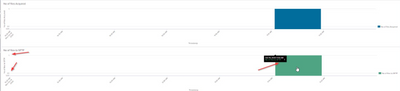
I am trying this on splunk version 7.2.7. May I know the version on which you tried, just trying to understand the difference. Snapshot attached below for your reference.
- Mark as New
- Bookmark Message
- Subscribe to Message
- Mute Message
- Subscribe to RSS Feed
- Permalink
- Report Inappropriate Content
It's 8.0.1
It looks like Splunk thinks your Y-axis has a max value of 1. Note the black box showing the uptick mark with the value 7 - which is showing it is off the Y-axis scale. I forced my Y axis to be max 1 and get the same type of display, i.e. below it shows 3 and my scale is max 1.
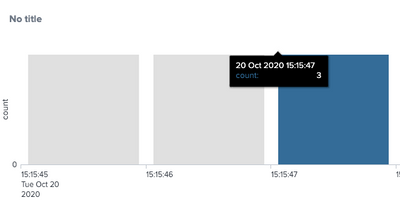
Have you tried checking your Y axis and forcing it to be some value > 1
- Mark as New
- Bookmark Message
- Subscribe to Message
- Mute Message
- Subscribe to RSS Feed
- Permalink
- Report Inappropriate Content
Yes have verified both minimum and max value. Both are blank. This behavior is observed only when the value is less than 14. Snapshot attached below for your reference.



Join the Splunk Community Slack to learn, troubleshoot, and make connections with fellow Splunk practitioners in real time!
Join Splunk User Groups to connect and learn in-person by region or remotely by topic or industry.
Painting a Clearer Picture: Unifying Your Investigations with Cisco AI Canvas
Hello POJO, meet nocode
Announcing Modern Navigation: A New Era of Splunk User Experience
