
Join the Conversation
- Find Answers
- :
- Using Splunk
- :
- Splunk Search
- :
- Re: Issue using sort command with inputlookup comm...
- Subscribe to RSS Feed
- Mark Topic as New
- Mark Topic as Read
- Float this Topic for Current User
- Bookmark Topic
- Subscribe to Topic
- Mute Topic
- Printer Friendly Page
- Mark as New
- Bookmark Message
- Subscribe to Message
- Mute Message
- Subscribe to RSS Feed
- Permalink
- Report Inappropriate Content

I have a lookup file with 3 fields - source, status, timestamp. Timestamp is saved as per below:
eval timestamp=strftime(_time,"%d%m%y %H:%M:%S")
Sample data:
ABC, 1, 20/03/21 04:45:46
ABC, 0, 27/03/21 11:17:31
ABC, 1, 29/03/21 14:33:06
ABC, 0, 01/04/21 12:56:41
Search query I am using is - | inputlookup test.csv | sort -TIMESTAMP
result as below:
ABC, 1, 29/03/21 14:33:06
ABC, 0, 27/03/21 11:17:31
ABC, 1, 20/03/21 04:45:46
ABC, 0, 01/04/21 12:56:41
and when I use query - |inputlookup test.csv | sort TIMESTAMP
ABC, 0, 01/04/21 12:56:41
ABC, 1, 20/03/21 04:45:46
ABC, 0, 27/03/21 11:17:31
ABC, 1, 29/03/21 14:33:06
This is weird because sort is happening just based on date! I am not even able to use eval on TIMESTAMP field(result is always empty). Have tried addinfo, where timestamp>now-xxx with no luck.
- Mark as New
- Bookmark Message
- Subscribe to Message
- Mute Message
- Subscribe to RSS Feed
- Permalink
- Report Inappropriate Content


Not sure I can see the image perfectly but are you doing
strptime(TIMESTAMP, "%d%m%y...")If so, you are missing the / character in your dates between day month year
Also, reiterating the others, whenever dealing with dates, use epoch for calculations or if using strings, always use %F %T (shorthand for %Y-%m-%d %H:%M:%S) as that will give you consistency if having to treat them as strings
- Mark as New
- Bookmark Message
- Subscribe to Message
- Mute Message
- Subscribe to RSS Feed
- Permalink
- Report Inappropriate Content

Hi @sdkp03,
Since TIMESTAMP values are string , in order to be sort as time you need to change to epoc or %Y%m%d%H%M%S. Epoc is easier for your case, please try below;
| inputlookup test.csv
| eval timestamp=strptime(TIMESTAMP,"%d%m%y %H:%M:%S")
| sort - timestamp
| fields - timestamp- Mark as New
- Bookmark Message
- Subscribe to Message
- Mute Message
- Subscribe to RSS Feed
- Permalink
- Report Inappropriate Content
As posted in the description eval on TIMESTAMP isn't working. Please see below attached snapshot, eval timestamp is blank.
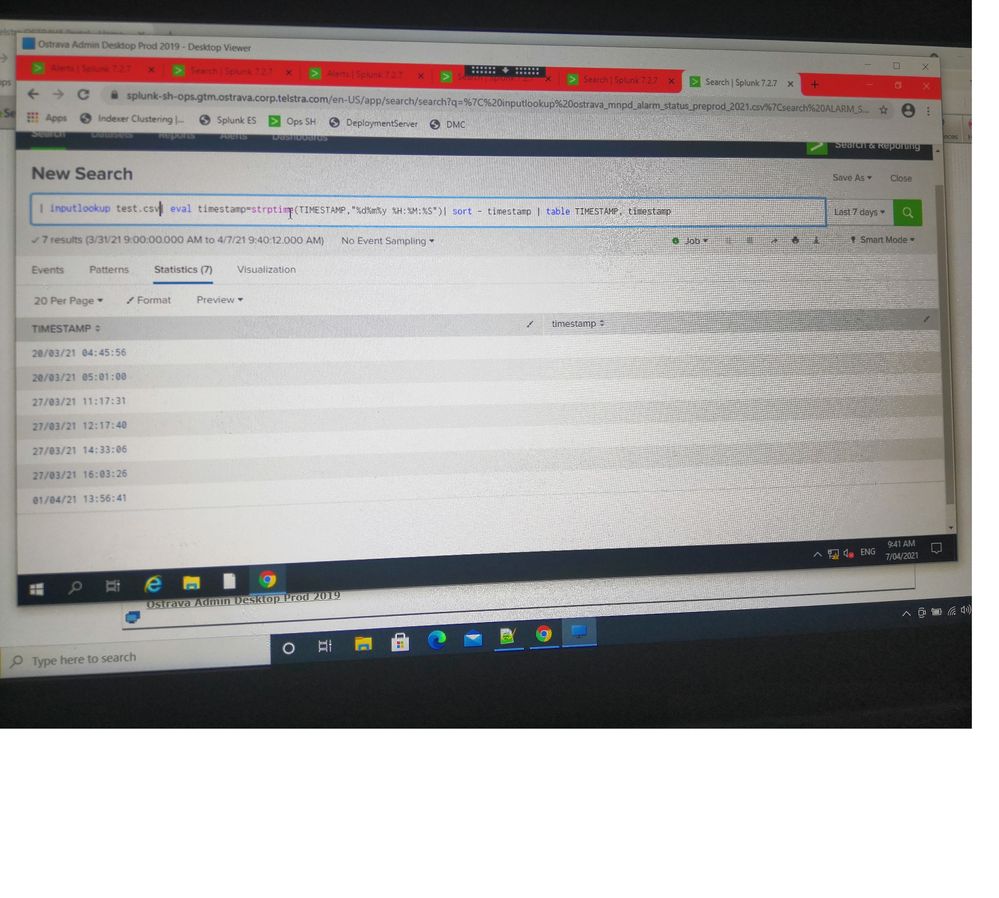
- Mark as New
- Bookmark Message
- Subscribe to Message
- Mute Message
- Subscribe to RSS Feed
- Permalink
- Report Inappropriate Content
Not sure I can see the image perfectly but are you doing
strptime(TIMESTAMP, "%d%m%y...")If so, you are missing the / character in your dates between day month year
Also, reiterating the others, whenever dealing with dates, use epoch for calculations or if using strings, always use %F %T (shorthand for %Y-%m-%d %H:%M:%S) as that will give you consistency if having to treat them as strings
- Mark as New
- Bookmark Message
- Subscribe to Message
- Mute Message
- Subscribe to RSS Feed
- Permalink
- Report Inappropriate Content
Missing / was the issue. Thanks for pointing that out. Its working as expected now 🙂
- Mark as New
- Bookmark Message
- Subscribe to Message
- Mute Message
- Subscribe to RSS Feed
- Permalink
- Report Inappropriate Content

What he said above.... However, if you want to display the timestamp in Human readable then I would do a
| sort -timestamp
| table TIMESTAMP

Join the Splunk Community Slack to learn, troubleshoot, and make connections with fellow Splunk practitioners in real time!
Join Splunk User Groups to connect and learn in-person by region or remotely by topic or industry.
[Puzzles] Solve, Learn, Reuse: Word-play
Tuning Edge Processor in Hybrid Mode: What Limits Each Data Path
Best Practices: Splunk auto adjust pipeline queue
