
Join the Conversation
- Find Answers
- :
- Using Splunk
- :
- Splunk Search
- :
- Interesting fields count and percentage incorrect
- Subscribe to RSS Feed
- Mark Topic as New
- Mark Topic as Read
- Float this Topic for Current User
- Bookmark Topic
- Subscribe to Topic
- Mute Topic
- Printer Friendly Page
- Mark as New
- Bookmark Message
- Subscribe to Message
- Mute Message
- Subscribe to RSS Feed
- Permalink
- Report Inappropriate Content

I have encountered a strange issue when clicking on an "interesting field" in the left side bar under the events tab, usually the pop out menu would show me up to 10 values, along with a count and percentage of the events returned which have the value.
I am seeing the top values that the returned events have, but the count and percent is wrong.
My search returns 135 events, when I click on the result field, I am shown a row for each of the values:
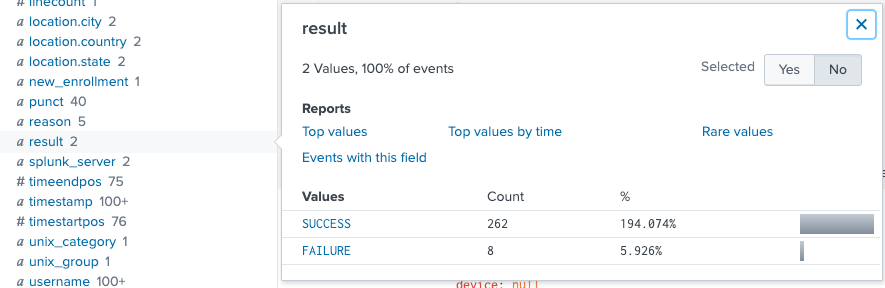
I have never seen more than 100% displayed in the % column of this pop out menu.
Has anyone come across this before? I'm worried we've misconfigured something somewhere which might be causing this.
Thanks

- Mark as New
- Bookmark Message
- Subscribe to Message
- Mute Message
- Subscribe to RSS Feed
- Permalink
- Report Inappropriate Content


My guess is that this is a multivalue field. Most of your results probably either have two fields named "result" (it appears to be json in the background) or use both indexed and search time extraction on the result field (happens easily with json too if you're not paying attention). You can check this if you table your results like
| table _time results
and look at that table for rows containing SUCCESS or FAILURE in that column twice.
- Mark as New
- Bookmark Message
- Subscribe to Message
- Mute Message
- Subscribe to RSS Feed
- Permalink
- Report Inappropriate Content
My guess is that this is a multivalue field. Most of your results probably either have two fields named "result" (it appears to be json in the background) or use both indexed and search time extraction on the result field (happens easily with json too if you're not paying attention). You can check this if you table your results like
| table _time results
and look at that table for rows containing SUCCESS or FAILURE in that column twice.

Join the Splunk Community Slack to learn, troubleshoot, and make connections with fellow Splunk practitioners in real time!
Join Splunk User Groups to connect and learn in-person by region or remotely by topic or industry.
Announcing Modern Navigation: A New Era of Splunk User Experience
Modernize your Splunk Apps – Introducing Python 3.13 in Splunk
Step into “Hunt the Insider: An Splunk ES Premier Mystery” to catch a cybercriminal ...
