
Join the Conversation
- Find Answers
- :
- Using Splunk
- :
- Splunk Search
- :
- How to write a search to organize data from a CSV ...
- Subscribe to RSS Feed
- Mark Topic as New
- Mark Topic as Read
- Float this Topic for Current User
- Bookmark Topic
- Subscribe to Topic
- Mute Topic
- Printer Friendly Page
- Mark as New
- Bookmark Message
- Subscribe to Message
- Mute Message
- Subscribe to RSS Feed
- Permalink
- Report Inappropriate Content

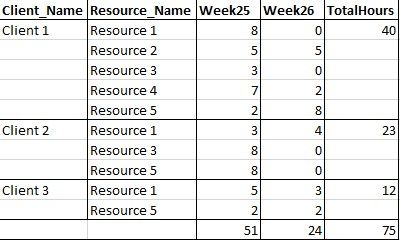
I am trying to arrange some information received in a CSV file in a table format (as per example)
The two searches I used was as follow:
Search 1
index="labour" | stats sum(Hours) as TotalHours BY Client_Name, Resource | streamstats sum(Hours) BY Client_Name, Resource | stats list(Resource) as Resource_Name, list(TotalHours) as "Per Resource", sum(TotalHours) as TotalHours by Client_Name
Result:
Client_Name Resource_Name    Per Resource     TotalHours
Client 3        Resource 1          8              12
             Resource 5             4
Search 2
index="labour" | stats first(Tper) as Week by Hours, Client_Name, Resource | xyseries Client_Name Week Hours | addtotals
Result:
Client_Name Week25    Week26    Total
Client 3         6       6       12
Hope someone can make sense of this to assist me please.
Thanks in advance!

- Mark as New
- Bookmark Message
- Subscribe to Message
- Mute Message
- Subscribe to RSS Feed
- Permalink
- Report Inappropriate Content

Like this:
... | stats sum(Hours) as TotalHours BY Client_Name, Resource, Tper
| eval host=Client_Name . "::" . Resource | fields - Client_Name Resource
| xyseries host Tper TotalHours
| rex field=host "^(?<Client_Name>.*)::(?<Resource>.*)$" | fields - host
| eval BothHours=0 | foreach 2* [ eval BothHours = BothHours + $<<FIELD>>$ ]
| stats sum(BothHours) AS TotalHours list(2015*) AS week* sum(2015*) AS sum* list(Resource) AS Resource BY Client_Name
| addtotals row=f col=t
| fillnull value="CLIENT_TOTALS"
| foreach week* [ eval <<FIELD>> = if((Client_Name = "CLIENT_TOTALS"), $sum<<MATCHSTR>>$, $<<FIELD>>$) ]
| fields - sum*
- Mark as New
- Bookmark Message
- Subscribe to Message
- Mute Message
- Subscribe to RSS Feed
- Permalink
- Report Inappropriate Content
Like this:
... | stats sum(Hours) as TotalHours BY Client_Name, Resource, Tper
| eval host=Client_Name . "::" . Resource | fields - Client_Name Resource
| xyseries host Tper TotalHours
| rex field=host "^(?<Client_Name>.*)::(?<Resource>.*)$" | fields - host
| eval BothHours=0 | foreach 2* [ eval BothHours = BothHours + $<<FIELD>>$ ]
| stats sum(BothHours) AS TotalHours list(2015*) AS week* sum(2015*) AS sum* list(Resource) AS Resource BY Client_Name
| addtotals row=f col=t
| fillnull value="CLIENT_TOTALS"
| foreach week* [ eval <<FIELD>> = if((Client_Name = "CLIENT_TOTALS"), $sum<<MATCHSTR>>$, $<<FIELD>>$) ]
| fields - sum*
- Mark as New
- Bookmark Message
- Subscribe to Message
- Mute Message
- Subscribe to RSS Feed
- Permalink
- Report Inappropriate Content
Show CSV file (just the 4 fields: Client_Name, Resource, Tper, Hours) data as comment under this and I will help you.
- Mark as New
- Bookmark Message
- Subscribe to Message
- Mute Message
- Subscribe to RSS Feed
- Permalink
- Report Inappropriate Content
Thanks for the reply.
You can use this example csv:
Client_Name,Resource_Name,Text,Activity,Activity_Description,Time_Code,Time_Code_Description,Tper,Date,Month,Month_Description,Unit_Description,Hours,Percentage
Client 1,Resource 1,Documentation,CON,Consulting,0,Regular Hours,201525,2015-08-31,201508,15-Aug,Hours,1,0.6
Client 1,Resource 2,Documentation,SUP,Client Support,0,Regular Hours,201526,2015-08-11,201508,15-Aug,Hours,5,3
Client 1,Resource 3,Documentation,CON,Consulting,0,Regular Hours,201525,2015-08-04,201508,15-Aug,Hours,2,1.2
Client 1,Resource 4,Documentation,TRA,Travel,0,Regular Hours,201526,2015-08-04,201508,15-Aug,Hours,2,1.2
Client 1,Resource 5,Documentation,CON,Consulting,0,Regular Hours,201525,2015-08-12,201508,15-Aug,Hours,2,1.2
Client 2,Resource 1,Documentation,CON,Consulting,0,Regular Hours,201526,2015-08-19,201508,15-Aug,Hours,6,3.6
Client 2,Resource 3,Documentation,TRA,Travel,0,Regular Hours,201525,2015-08-19,201508,15-Aug,Hours,1,0.6
Client 2,Resource 5,Documentation,PRM,Project Management,0,Regular Hours,201526,2015-08-26,201508,15-Aug,Hours,2,1.2
Client 3,Resource 1,Documentation,TRA,Travel,0,Regular Hours,201525,2015-08-13,201508,15-Aug,Hours,1,0.6
Client 3,Resource 5,Documentation,CON,Consulting,0,Regular Hours,201526,2015-08-13,201508,15-Aug,Hours,5,3

.conf25 technical session recap of Observability for Gen AI: Monitoring LLM ...
A Season of Skills: New Splunk Courses to Light Up Your Learning Journey
Announcing the Migration of the Splunk Add-on for Microsoft Azure Inputs to ...
