
Join the Conversation
- Find Answers
- :
- Using Splunk
- :
- Splunk Search
- :
- How to use multiple saved searches for a single ta...
- Subscribe to RSS Feed
- Mark Topic as New
- Mark Topic as Read
- Float this Topic for Current User
- Bookmark Topic
- Subscribe to Topic
- Mute Topic
- Printer Friendly Page
- Mark as New
- Bookmark Message
- Subscribe to Message
- Mute Message
- Subscribe to RSS Feed
- Permalink
- Report Inappropriate Content
How to use multiple saved searches for a single table

Hi,
We are using a table in our dashboard and its output is based on multiple saved search.
How can I run multiple saved search in parallel and combined its result in a single table?
I have created below search which works fine but I am not be able to use in my dashboard.
| makeresults
| eval ALERT="KPI_MXTIMING_MEM_LIVEBOOK_SESSION_FUNCTION"
| append
    [ makeresults
    | eval ALERT="KPI_MXTIMING_LIVEBOOK_SESSION_CC_1MIN_FUNCTION"]
| table ALERT
| map  search="| savedsearch "$ALERT$" host_token=MX_Archival41 earliest_time_token=-10d"
When I add this search in the dashboard it says waiting for input. Reason is $ALERT$ in search which takes results from the first part of the search but on dashboard, even the first part won't run if there is any unassigned token present in search.
If I run this search directly it's working but not on the dashboard.
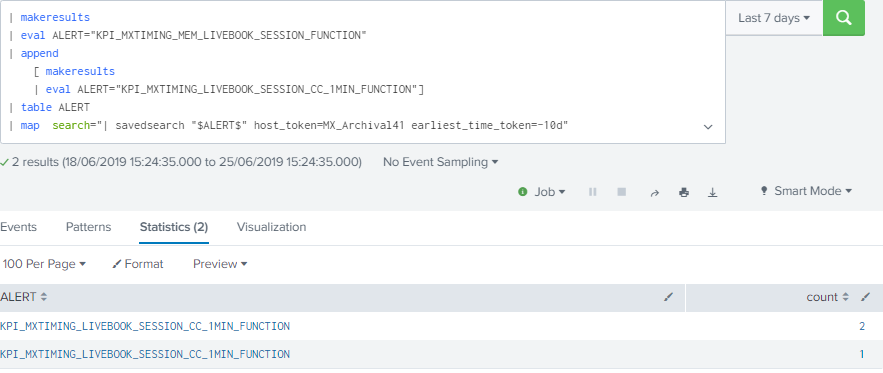
I am using mapping instead of append as there could be 10 saved searches and it will take longer to execute.
So I'm looking for a solution to run these saved search in parallel and produce results in a single table.

- Mark as New
- Bookmark Message
- Subscribe to Message
- Mute Message
- Subscribe to RSS Feed
- Permalink
- Report Inappropriate Content

Try this
| makeresults
 | eval ALERT="KPI_MXTIMING_MEM_LIVEBOOK_SESSION_FUNCTION"
 | append
     [ makeresults
     | eval ALERT="KPI_MXTIMING_LIVEBOOK_SESSION_CC_1MIN_FUNCTION"]
 | table ALERT
 | map  search="| savedsearch "$$ALERT$$" host_token=MX_Archival41 earliest_time_token=-10d"
- Mark as New
- Bookmark Message
- Subscribe to Message
- Mute Message
- Subscribe to RSS Feed
- Permalink
- Report Inappropriate Content
Brilliant !! @somesoni2 : Thank you. please update this as answer.

Join the Splunk Community Slack to learn, troubleshoot, and make connections with fellow Splunk practitioners in real time!
Join Splunk User Groups to connect and learn in-person by region or remotely by topic or industry.
Observability Simplified: Combining User Experience, Application Performance & ...
Event Series May & June: From Network Visibility to Service Intelligence
Global Splunk User Group Events: May + June 2026
