
Join the Conversation
- Find Answers
- :
- Using Splunk
- :
- Splunk Search
- :
- Re: How to update/edit multiple fields in lookup w...
- Subscribe to RSS Feed
- Mark Topic as New
- Mark Topic as Read
- Float this Topic for Current User
- Bookmark Topic
- Subscribe to Topic
- Mute Topic
- Printer Friendly Page
- Mark as New
- Bookmark Message
- Subscribe to Message
- Mute Message
- Subscribe to RSS Feed
- Permalink
- Report Inappropriate Content
How to update/edit multiple fields in lookup without making duplicates rows?

Hi !
I have this search:
| makeresults
| eval customField="$Soc3$" , soc3dField="$multi$"
| table customField soc3dField
| makemv soc3dField delim=","
| mvexpand soc3dField
| append [
   | inputlookup append=t $Lookup$
   | where soc3dField != "$multi$"] ]
$multi$ - could contain multiple values that I get from multiselect
The table I get is with duplicate rows:
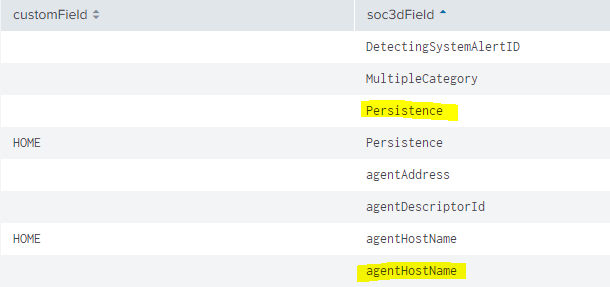
What I'm trying to do is to take all the values in the $multi$ (contain the soc3dField) ---> update the customField in the lookup
As you can see below, I've tried the same search with no tokens and It worked good!
| makeresults
| eval customField="f43256" , soc3dField="bytesIn,bytesOut"
| table customField soc3dField
| makemv soc3dField delim=","
| mvexpand soc3dField

| append
[| inputlookup append=f Test.csv
   | where soc3dField != "bytesIn" AND soc3dField != "bytesOut"]
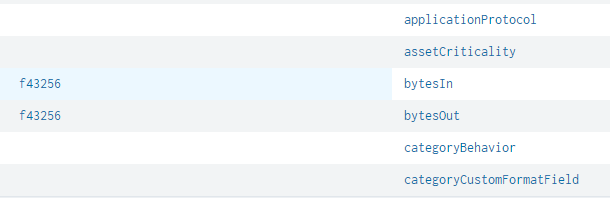
Thank you !!
- Mark as New
- Bookmark Message
- Subscribe to Message
- Mute Message
- Subscribe to RSS Feed
- Permalink
- Report Inappropriate Content


Hi @hketer ,
Did you have a chance to check out any answers? If it worked, please resolve this post by approving it! If your problem is still not solved, keep us updated so that someone else can help you.
Thanks for posting!
- Mark as New
- Bookmark Message
- Subscribe to Message
- Mute Message
- Subscribe to RSS Feed
- Permalink
- Report Inappropriate Content

@hketer in order to set the tokens from multiselect input you would need to use
1) Either an independent search to set the required tokens using SPL as per requirement.
2) Simple XML JS extension to handle multiselect change and set the required tokens using SplunkJS
PS: Refer to one of my older answer for details on both approach: https://answers.splunk.com/answers/681099/multiselect-option-not-getting-displayed-if-the-op.html
For your use-case following is a run anywhere example with Simple XML dashboard with independent search to set the two required tokens i.e.
1. $tokSoc3Fields$: "bytesIn,bytesOut"
2. $tokSoc3FieldsNotEqual$: soc3dField!="bytesIn" AND soc3dField!="bytesOut"
You can use the above tokens in your final SPL which works for you with static code.
Please try the following run anywhere search
<form>
  <label>Multiselect multiple tokens for search</label>
  <fieldset submitButton="false">
    <input type="multiselect" token="multi" searchWhenChanged="true">
      <label>Multiselect</label>
      <choice value="bytesIn">Bytes In</choice>
      <choice value="bytesOut">Bytes Out</choice>
    </input>
  </fieldset>
  <!-- Independent search to set multiple tokens from Multiselect -->
  <search>
    <query>| makeresults
| eval multi="$multi$"
| eval soc3Fields="\"".replace(multi," ",",")."\""
| eval soc3FieldsNotEqual="soc3dField!=".replace(soc3Fields,",","\" AND soc3dField!=\"")
    </query>
    <progress>
      <set token="tokSoc3Fields">$result.soc3Fields$</set>
      <set token="tokSoc3FieldsNotEqual">$result.soc3FieldsNotEqual$</set>
    </progress>
  </search>
  <row>
    <panel>
      <html>
        <div><b>tokSoc3Fields:</b> <code>$tokSoc3Fields$</code></div>
        <div><b>tokSoc3FieldsNotEqual:</b> <code>$tokSoc3FieldsNotEqual$</code></div>
      </html>
    </panel>
  </row>
</form>
| makeresults | eval message= "Happy Splunking!!!"




Join the Splunk Community Slack to learn, troubleshoot, and make connections with fellow Splunk practitioners in real time!
Join Splunk User Groups to connect and learn in-person by region or remotely by topic or industry.
How much can you really learn in 3 minutes?
Event Series: The Agentic SOC: Trust Before Autonomy
Free Professional Services for .conf26 Attendees
