
Join the Conversation
- Find Answers
- :
- Using Splunk
- :
- Splunk Search
- :
- Re: chart by 2 fields
- Subscribe to RSS Feed
- Mark Topic as New
- Mark Topic as Read
- Float this Topic for Current User
- Bookmark Topic
- Subscribe to Topic
- Mute Topic
- Printer Friendly Page
- Mark as New
- Bookmark Message
- Subscribe to Message
- Mute Message
- Subscribe to RSS Feed
- Permalink
- Report Inappropriate Content
How to run a chart command grouped by 2 fields?

Hello
Im trying to run a chart command grouped by 2 fields but im getting an error:
this is my query :
| chart values(SuccessRatioBE) as SuccessRatioBE over _time by UserAgent LoginType
and im getting this error :
"Error in 'chart' command: The argument 'LoginType' is invalid."
I also tried with comma to separate between the fields and ticks also
- Mark as New
- Bookmark Message
- Subscribe to Message
- Mute Message
- Subscribe to RSS Feed
- Permalink
- Report Inappropriate Content


Hi @sarit_s
chart command will not work with multiple fileds , try using stats
- Mark as New
- Bookmark Message
- Subscribe to Message
- Mute Message
- Subscribe to RSS Feed
- Permalink
- Report Inappropriate Content
but then it won't be by time also , no ?
- Mark as New
- Bookmark Message
- Subscribe to Message
- Mute Message
- Subscribe to RSS Feed
- Permalink
- Report Inappropriate Content
The best way to understand the choice made by chart command is to draw a chart manually. If you cannot draw a chart with two group-by series, chart is correct. (Same with timechart. I also wonder why you opt to use chart over _time instead of just timechart.) If you can draw such a chart, chances are that it should either be a stats chart as @SanjayReddy suggested - stats can also use _time, just not in the same form as chart over _time; or it would be something like @gcusello suggested, i.e., "banding" two series into a single series.
- Mark as New
- Bookmark Message
- Subscribe to Message
- Mute Message
- Subscribe to RSS Feed
- Permalink
- Report Inappropriate Content

To chart over time you use the timechart command. It is a functional equivalent of charting over _time with a bin command applied beforehand. It's just shorter and more straightforward.
But both timechart and chart work over only one category field. If you want to analyze time series over more than one variable fields you need to combine them into a single artificial field. For example (yes, I know this particular search would be more effective with tstats insteads of stats but that's just to show the general idea):
index=_internal earliest=-2h
| eval series=sourcetype."-".host
| timechart span=10m count by series
- Mark as New
- Bookmark Message
- Subscribe to Message
- Mute Message
- Subscribe to RSS Feed
- Permalink
- Report Inappropriate Content

Hi @sarit_s,
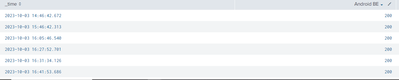
in the chart command you can use only one field for the OVER or the BY option, you cannot use two fields.
the only way (if acceptable) is concatenate the two fields in one:
| eval Column=UserAgent."|".LoginType
|  chart values(SuccessRatioBE) AS SuccessRatioBE over _time BY Column
Ciao.
Giuseppe
- Mark as New
- Bookmark Message
- Subscribe to Message
- Mute Message
- Subscribe to RSS Feed
- Permalink
- Report Inappropriate Content
its returns very weird results:
- Mark as New
- Bookmark Message
- Subscribe to Message
- Mute Message
- Subscribe to RSS Feed
- Permalink
- Report Inappropriate Content
Hi @sarit_s ,
as I said, I don't know if the solution is acceptable for you, this is a workaround because it isn't possible to group from more than one field.
Ciao.
Giuseppe
- Mark as New
- Bookmark Message
- Subscribe to Message
- Mute Message
- Subscribe to RSS Feed
- Permalink
- Report Inappropriate Content
Maybe you can illustrate your sample data in text (anonymize as needed) and explain why the result is "weird"? (I.e., explain the logic between your data and desired output.) What is the desired result? (I.e., manually chart the result yourself as I suggested above.)
Also, do UserAgent and LoginType always appear in the same event?

Join the Splunk Community Slack to learn, troubleshoot, and make connections with fellow Splunk practitioners in real time!
Join Splunk User Groups to connect and learn in-person by region or remotely by topic or industry.
Index This | What travels the world but is also stuck in place?
Discover New Use Cases: Unlock Greater Value from Your Existing Splunk Data
Continue Your Journey: Join Session 2 of the Data Management and Federation Bootcamp ...
