
Join the Conversation
- Find Answers
- :
- Using Splunk
- :
- Splunk Search
- :
- Re: how to rex
- Subscribe to RSS Feed
- Mark Topic as New
- Mark Topic as Read
- Float this Topic for Current User
- Bookmark Topic
- Subscribe to Topic
- Mute Topic
- Printer Friendly Page
- Mark as New
- Bookmark Message
- Subscribe to Message
- Mute Message
- Subscribe to RSS Feed
- Permalink
- Report Inappropriate Content

I have 2 kind of logs where there are two types of uri which i want to rex into different fields
{logType=DOWNSTREAM_RESPONSE, requestUri=https://google.come.com:8000/google/api/updateapi?&lo=en_US&sc=RT, duration=22, requestId=znXdSxbJQw6iVTtEeykZVA, globalTrackingId=null, requestTrackingId=null, request={body={"a":{"b":{"country":"US", }}}, method=POST, requestUri=https://google.come.com:443/google/api/updateapi?&lo=en_US&sc=RT}, response=(200 OK, { "body="{} }, "headers="{}, "statusCode=OK", statusCodeValue=200}")"}
{logType=DOWNSTREAM_RESPONSE, requestUri=https://google.come.com:8000/google/api/deleteapi, duration=33, requestId=asdasd, globalTrackingId=null, requestTrackingId=null, request={body={"a":{"b":{"country":"US", }}}, method=POST, requestUri=https://google.come.com:443/google/api/updateapi?&lo=en_US&sc=RT}, response=(200 OK, { "body="{} }, "headers="{}, "statusCode=OK", statusCodeValue=200}")"}
http= https
URL= google.come.com:8000
service = /google
api= /api/updateapi
api= /api/deleteapi
params= ?&lo=en_US&sc=RT
is there a way to regex this?
- Mark as New
- Bookmark Message
- Subscribe to Message
- Mute Message
- Subscribe to RSS Feed
- Permalink
- Report Inappropriate Content

Hi,
Yes you can extract those fields using | rex.
Try this:
| rex max_match=0 "(?<http>https?)\:\/\/(?<URL>[^\/]*)(?<service>/[^\/]*)(?<api>[^\?\,\}]*)(?:\?(?<params>[^\,\}]*))?"This will extract all URLs in the _raw event into those fields that you suggested. If you want to run this on a specific field then you could add the field=<<field>> argument to the | rex command.
- Mark as New
- Bookmark Message
- Subscribe to Message
- Mute Message
- Subscribe to RSS Feed
- Permalink
- Report Inappropriate Content


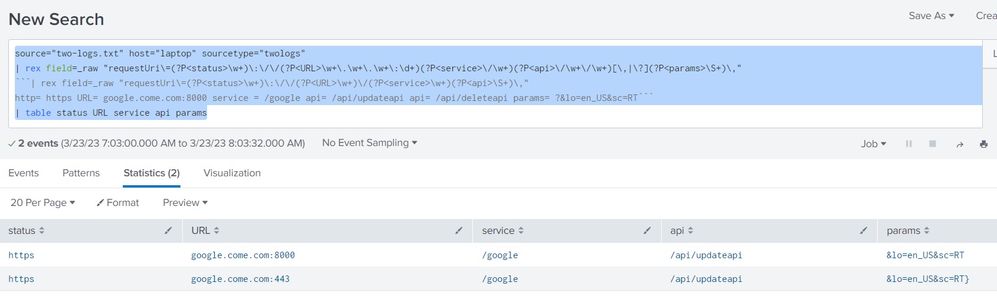
Hi @mikeyty07 ... its pretty simple actually.. check this out..
source="two-logs.txt" host="laptop" sourcetype="twologs"
| rex field=_raw "requestUri\=(?P<status>\w+)\:\/\/(?P<URL>\w+\.\w+\.\w+\:\d+)(?P<service>\/\w+)(?P<api>\/\w+\/\w+)[\,|\?](?P<params>\S+)\,"
| table status URL service api params
check the sample run:
- Mark as New
- Bookmark Message
- Subscribe to Message
- Mute Message
- Subscribe to RSS Feed
- Permalink
- Report Inappropriate Content
Hi,
Yes you can extract those fields using | rex.
Try this:
| rex max_match=0 "(?<http>https?)\:\/\/(?<URL>[^\/]*)(?<service>/[^\/]*)(?<api>[^\?\,\}]*)(?:\?(?<params>[^\,\}]*))?"This will extract all URLs in the _raw event into those fields that you suggested. If you want to run this on a specific field then you could add the field=<<field>> argument to the | rex command.
- Mark as New
- Bookmark Message
- Subscribe to Message
- Mute Message
- Subscribe to RSS Feed
- Permalink
- Report Inappropriate Content
if i have to add the duration in same query of rex what would it be?
- Mark as New
- Bookmark Message
- Subscribe to Message
- Mute Message
- Subscribe to RSS Feed
- Permalink
- Report Inappropriate Content
Looking at your sample logs, duration is a separate field and it only seems to be applied in context of one of your URLs so I wouldn't extract it within the same | rex query.
Best-practise here is to set-up search-time field extractions for these fields. Read more here. The general idea is to make your fields extract automatically so that you don't have to run these rex commands for every single-use case that pertains to these logs.
That being said, if you're sure that you want to get this extracted via rex, use a separate command, the following regex will work:
| rex "duration=(?<duration>\d+)"


Join the Splunk Community Slack to learn, troubleshoot, and make connections with fellow Splunk practitioners in real time!
Join Splunk User Groups to connect and learn in-person by region or remotely by topic or industry.
Self-Healing Pipeline Is Now Generally Available: AI-Powered CIM Compliance
Meet Splunk Observability Studio: AI-Assisted OpenTelemetry Instrumentation Without ...
Federated Search for Cisco Security and Analytics Logging (SAL) is now GA on Splunk ...
