
Join the Conversation
- Find Answers
- :
- Using Splunk
- :
- Splunk Search
- :
- Re: How to remove some extra options from a custom...
- Subscribe to RSS Feed
- Mark Topic as New
- Mark Topic as Read
- Float this Topic for Current User
- Bookmark Topic
- Subscribe to Topic
- Mute Topic
- Printer Friendly Page
- Mark as New
- Bookmark Message
- Subscribe to Message
- Mute Message
- Subscribe to RSS Feed
- Permalink
- Report Inappropriate Content

Hello,
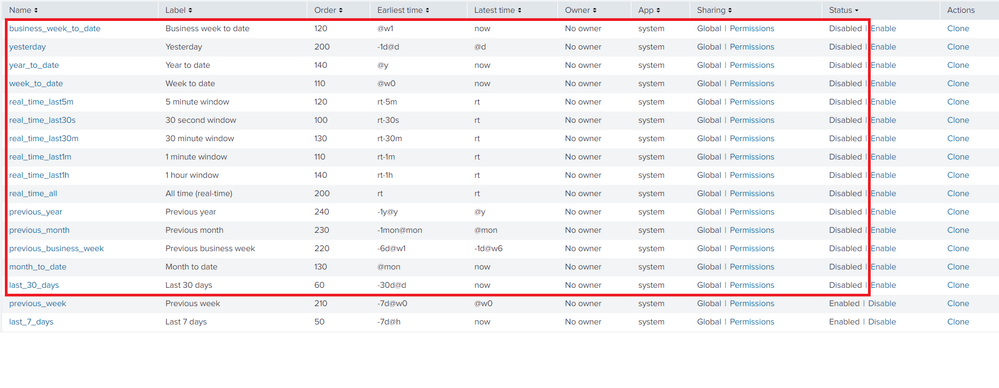
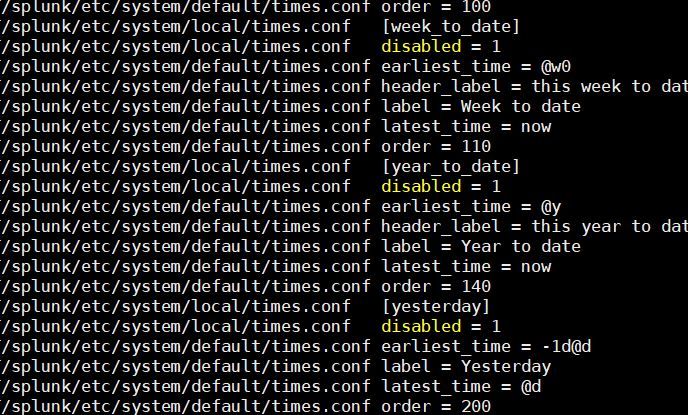
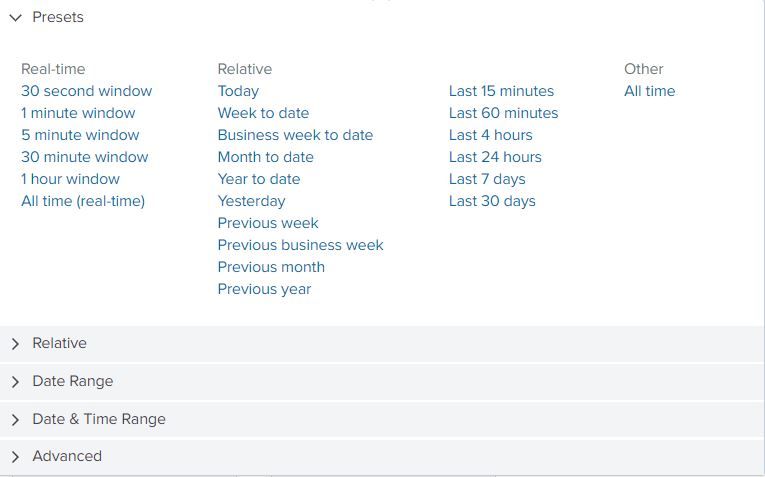
I am looking to remove some extra options from Time picker. I have disabled them through GUI (User Interface >> Time ranges).
When I check using CLI it shows these are disabled but those options are still present. (I have checked by removing brower caching)
PS: I don't have times.conf for App specific. My app using default one.
Please advice if I am missing something.
Thanks


- Mark as New
- Bookmark Message
- Subscribe to Message
- Mute Message
- Subscribe to RSS Feed
- Permalink
- Report Inappropriate Content
Not sure why disable doesn't work but removing entries from below file worked for me.
splunk/etc/system/default/times.conf
- Mark as New
- Bookmark Message
- Subscribe to Message
- Mute Message
- Subscribe to RSS Feed
- Permalink
- Report Inappropriate Content
Not sure why disable doesn't work but removing entries from below file worked for me.
splunk/etc/system/default/times.conf
- Mark as New
- Bookmark Message
- Subscribe to Message
- Mute Message
- Subscribe to RSS Feed
- Permalink
- Report Inappropriate Content

You can try this option of creating CSS:
https://simonduff.net/splunk_restrict_time_range_picker/
- Mark as New
- Bookmark Message
- Subscribe to Message
- Mute Message
- Subscribe to RSS Feed
- Permalink
- Report Inappropriate Content
Thanks, I think it's for older Splunk versions. I have latest Splunk v7.x.
Like
Old version
div[id^='realtime_view']
New Version
div[data-test-panel-id^='real']
Not sure about sytax for individal item in newer version
Old Version
a[data-earliest="@d"][data-latest="now"]
New
??
- Mark as New
- Bookmark Message
- Subscribe to Message
- Mute Message
- Subscribe to RSS Feed
- Permalink
- Report Inappropriate Content
Thanks, Actually I have removed the entries from and it worked.
splunk/etc/system/default/times.conf
- Mark as New
- Bookmark Message
- Subscribe to Message
- Mute Message
- Subscribe to RSS Feed
- Permalink
- Report Inappropriate Content
Hey @agoyal,
Refer this answer:
https://answers.splunk.com/answers/222650/limit-choices-in-default-timepicker.html
Let me know if this helps!!
- Mark as New
- Bookmark Message
- Subscribe to Message
- Mute Message
- Subscribe to RSS Feed
- Permalink
- Report Inappropriate Content
Thanks. it's useful but doen't sovle my problem.
The other post is to hide the full sections like it I want to remove full section out of Presents, Relative, Date range etc. My requirement is to remove some options from Presents section. (Attached screenshot in main question)
Ex. this code worked for remove full real-time section.
div[data-test-panel-id^='real'] {
display: none !important;
}
- Mark as New
- Bookmark Message
- Subscribe to Message
- Mute Message
- Subscribe to RSS Feed
- Permalink
- Report Inappropriate Content
Thanks, Actually I have removed the entries from and it worked.
splunk/etc/system/default/times.conf

Splunk Observability for AI
[Puzzles] Solve, Learn, Repeat: Dereferencing XML to Fixed-length events
Stay Connected: Your Guide to December Tech Talks, Office Hours, and Webinars!
