
Join the Conversation
- Find Answers
- :
- Using Splunk
- :
- Splunk Search
- :
- How to make a bar graph with multiple bars for a c...
- Subscribe to RSS Feed
- Mark Topic as New
- Mark Topic as Read
- Float this Topic for Current User
- Bookmark Topic
- Subscribe to Topic
- Mute Topic
- Printer Friendly Page
- Mark as New
- Bookmark Message
- Subscribe to Message
- Mute Message
- Subscribe to RSS Feed
- Permalink
- Report Inappropriate Content

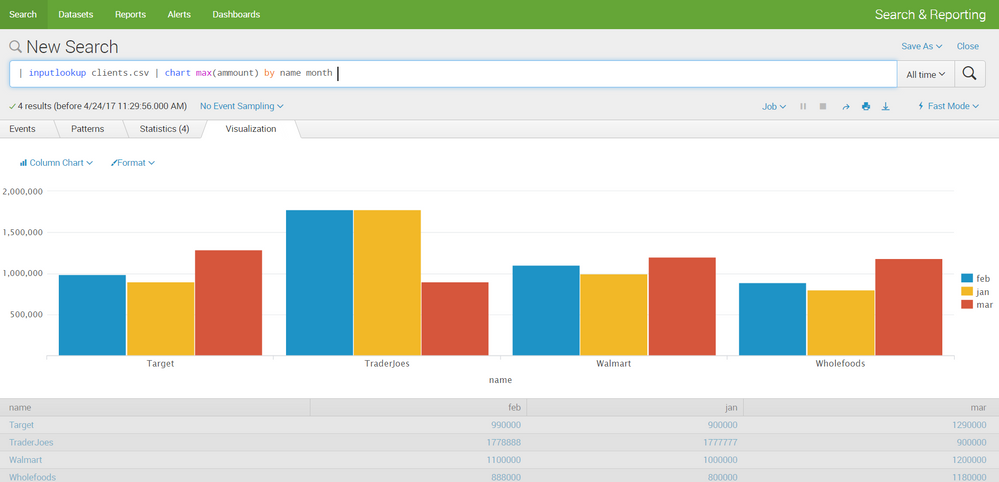
I have a .csv file that graphs the number of sales for three different businesses per month. has the columns, (Name, Month, Amount) with each row containing a business, a month, and how much they sold in that month. For example (Walmart, Jan, 210231024). I would like to make a bar graph which has each business on the X-axis and transaction amounts on the Y-axis. Then for each business on the X-axis, have a bar for each month. In my specific case, there are only 3 months to worry about (Jan, Feb, March). Can anyone help me make a query for this?
I'm new to Splunk and have to put together a demo quickly, so I'd appreciate the help.
- Mark as New
- Bookmark Message
- Subscribe to Message
- Mute Message
- Subscribe to RSS Feed
- Permalink
- Report Inappropriate Content


Hi sakeebhossain,
try something like this
your search
| chart sum(Amount) over Name by Month
Bye.
Giuseppe
- Mark as New
- Bookmark Message
- Subscribe to Message
- Mute Message
- Subscribe to RSS Feed
- Permalink
- Report Inappropriate Content


- Mark as New
- Bookmark Message
- Subscribe to Message
- Mute Message
- Subscribe to RSS Feed
- Permalink
- Report Inappropriate Content
When one of the month data is not available in one of the name.. i am seeing empty space in between bars.. is there any way we can avoid that space
- Mark as New
- Bookmark Message
- Subscribe to Message
- Mute Message
- Subscribe to RSS Feed
- Permalink
- Report Inappropriate Content
Hi sakeebhossain,
try something like this
your search
| chart sum(Amount) over Name by Month
Bye.
Giuseppe
- Mark as New
- Bookmark Message
- Subscribe to Message
- Mute Message
- Subscribe to RSS Feed
- Permalink
- Report Inappropriate Content
Excellent, thank you!

Join the Splunk Community Slack to learn, troubleshoot, and make connections with fellow Splunk practitioners in real time!
Join Splunk User Groups to connect and learn in-person by region or remotely by topic or industry.
[Puzzles] Solve, Learn, Repeat: Character substitutions with Regular Expressions
Splunk Community Badges!
[Puzzles] Solve, Learn, Repeat: Matching cron expressions
