
Join the Conversation
- Find Answers
- :
- Using Splunk
- :
- Splunk Search
- :
- Re: How to make a Splunk table visualization more ...
- Subscribe to RSS Feed
- Mark Topic as New
- Mark Topic as Read
- Float this Topic for Current User
- Bookmark Topic
- Subscribe to Topic
- Mute Topic
- Printer Friendly Page
- Mark as New
- Bookmark Message
- Subscribe to Message
- Mute Message
- Subscribe to RSS Feed
- Permalink
- Report Inappropriate Content

Hi,
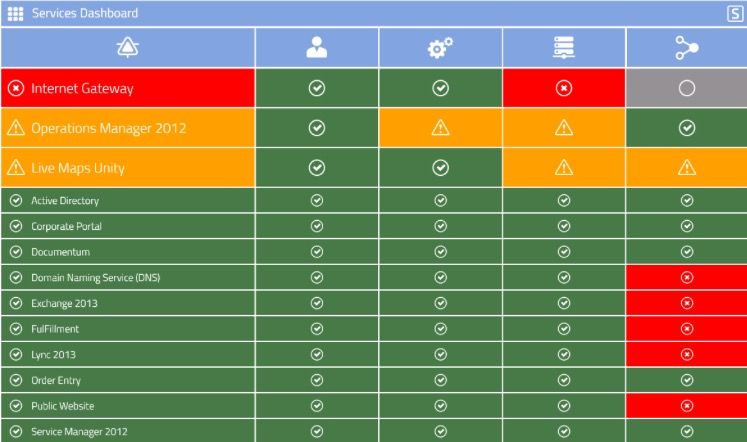
We are thinking of using Splunk to display data from many sources in a table view.
I searched a lot and didn't find anyone who converted a Splunk formal table to a nicer one based on HTML \ JavaScript extensions.
The only things I found were to highlight a row or to insert an icon in a row - I want to use Splunk table values, but to display them in a completely different custom table.
Anyone maybe know how it can be done?
Thanks,
Omer Rudik.
- Mark as New
- Bookmark Message
- Subscribe to Message
- Mute Message
- Subscribe to RSS Feed
- Permalink
- Report Inappropriate Content


This is pretty straightforward: you can just fetch the search results from the search manager in javascript either as an array or as JSON and from there do whatever you like. The basics are this Simple XML:
<dashboard script="some_js.js">
  <search id="some_search">
  <query>index=foo | table field_a field_b</query>
  ...
And in your app_folder/appserver/static folder, you place a some_js.js with content such as this:
require([
    'splunkjs/mvc',
    'splunkjs/mvc/searchmanager',
    'splunkjs/mvc/simplexml/ready!',
    'splunkjs/ready!'
], function (mvc, SearchManager) {
    // Get the search manager
    var manager = mvc.Components.get("some_search");

    // Get the search results from the manager for JSON
    var data = manager.data("results", {
        output_mode: "json_rows"
    });

    // To get results as array, use:
    // var data = manager.data("results");

    var workWithResults = function(results) {
        // Make sure there is data on callback
        if (!data.hasData()) {
            return;
        }

        // Convert results to json
        var collection = results.collection().toJSON();

        // Do whatever needs to be done with your data:
        console.log(collection);
    };
    data.on("data", workWithResults);
});
That should get you going. From here on, you need to use whatever library/extension/tool you use for visualizations.
- Mark as New
- Bookmark Message
- Subscribe to Message
- Mute Message
- Subscribe to RSS Feed
- Permalink
- Report Inappropriate Content
This is pretty straightforward: you can just fetch the search results from the search manager in javascript either as an array or as JSON and from there do whatever you like. The basics are this Simple XML:
<dashboard script="some_js.js">
  <search id="some_search">
  <query>index=foo | table field_a field_b</query>
  ...
And in your app_folder/appserver/static folder, you place a some_js.js with content such as this:
require([
    'splunkjs/mvc',
    'splunkjs/mvc/searchmanager',
    'splunkjs/mvc/simplexml/ready!',
    'splunkjs/ready!'
], function (mvc, SearchManager) {
    // Get the search manager
    var manager = mvc.Components.get("some_search");

    // Get the search results from the manager for JSON
    var data = manager.data("results", {
        output_mode: "json_rows"
    });

    // To get results as array, use:
    // var data = manager.data("results");

    var workWithResults = function(results) {
        // Make sure there is data on callback
        if (!data.hasData()) {
            return;
        }

        // Convert results to json
        var collection = results.collection().toJSON();

        // Do whatever needs to be done with your data:
        console.log(collection);
    };
    data.on("data", workWithResults);
});
That should get you going. From here on, you need to use whatever library/extension/tool you use for visualizations.
- Mark as New
- Bookmark Message
- Subscribe to Message
- Mute Message
- Subscribe to RSS Feed
- Permalink
- Report Inappropriate Content
- Mark as New
- Bookmark Message
- Subscribe to Message
- Mute Message
- Subscribe to RSS Feed
- Permalink
- Report Inappropriate Content

Have you looked at HTML dashboards?
- Mark as New
- Bookmark Message
- Subscribe to Message
- Mute Message
- Subscribe to RSS Feed
- Permalink
- Report Inappropriate Content


Could you provide more details on what type of interactivity and Javascript extensions you have in mind?



Join the Splunk Community Slack to learn, troubleshoot, and make connections with fellow Splunk practitioners in real time!
Join Splunk User Groups to connect and learn in-person by region or remotely by topic or industry.
SOC4Kafka - New Kafka Connector Powered by OpenTelemetry
Rounding off the Splunk Dashboard Contest
A Four Part Event Series: AI + Observability: AI Agents, LLMs, Apps, & Infrastructure
