
Join the Conversation
- Find Answers
- :
- Using Splunk
- :
- Splunk Search
- :
- How to list datamodel name in a Table
- Subscribe to RSS Feed
- Mark Topic as New
- Mark Topic as Read
- Float this Topic for Current User
- Bookmark Topic
- Subscribe to Topic
- Mute Topic
- Printer Friendly Page
- Mark as New
- Bookmark Message
- Subscribe to Message
- Mute Message
- Subscribe to RSS Feed
- Permalink
- Report Inappropriate Content

I am trying to list certain datamodels in a table along with their log count but I can't seem to find how to list the datamodel name itself in the table. I tried displayName and datamodelName. The query lists everything I want except for the datamodel so it's difficult to tell which data belongs to which datamodel.
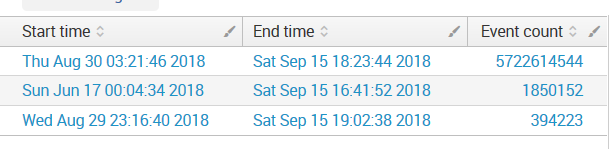
| tstats summariesonly=t min(_time) as min, max(_time) as max count from datamodel=Web
| append
    [| tstats summariesonly=t min(_time) as min, max(_time) as max count from datamodel=Malware]
| append
    [| tstats summariesonly=t min(_time) as min, max(_time) as max count from datamodel=Intrusion_Detection ]
| eval "Start time"=strftime(min, "%c")
| eval "End time"=strftime(max, "%c")
| eval "Event count" = count
| fields "Start time" "End time" "Event count"
FINAL SOLUTION
| tstats summariesonly=t min(_time) as min, max(_time) as max count from datamodel=Web
| appendcols
    [| datamodel Web
    | spath displayName
    | table displayName]
| eval datamodel_name = Web
| append
    [| tstats summariesonly=t min(_time) as min, max(_time) as max count from datamodel=Malware
    | appendcols
        [| datamodel Malware
        | spath displayName
        | table displayName]
    | eval datamodel_name = Malware]
| append
    [| tstats summariesonly=t min(_time) as min, max(_time) as max count from datamodel=Intrusion_Detection
    | appendcols
        [| datamodel Intrusion_Detection
        | spath displayName
        | table displayName]
    | eval datamodel_name = Intrusion_Detection]
| eval "Start time"=strftime(min, "%c")
| eval "End time"=strftime(max, "%c")
| eval "Event count" = count
| fields "Start time" "End time" "Event count" displayName

- Mark as New
- Bookmark Message
- Subscribe to Message
- Mute Message
- Subscribe to RSS Feed
- Permalink
- Report Inappropriate Content

You can try adding the following against each entry:
| appendcols [| datamodel <>|spath displayName | table displayName]
for example:
| tstats summariesonly=t min(_time) as min, max(_time) as max count from datamodel=Web | appendcols [| datamodel Web |spath displayName | table displayName]
| append
[| tstats summariesonly=t min(_time) as min, max(_time) as max count from datamodel=Malware| appendcols [| datamodel Malware |spath displayName | table displayName]]
| append ...
|eval ...
- Mark as New
- Bookmark Message
- Subscribe to Message
- Mute Message
- Subscribe to RSS Feed
- Permalink
- Report Inappropriate Content
You can try adding the following against each entry:
| appendcols [| datamodel <>|spath displayName | table displayName]
for example:
| tstats summariesonly=t min(_time) as min, max(_time) as max count from datamodel=Web | appendcols [| datamodel Web |spath displayName | table displayName]
| append
[| tstats summariesonly=t min(_time) as min, max(_time) as max count from datamodel=Malware| appendcols [| datamodel Malware |spath displayName | table displayName]]
| append ...
|eval ...
- Mark as New
- Bookmark Message
- Subscribe to Message
- Mute Message
- Subscribe to RSS Feed
- Permalink
- Report Inappropriate Content
This worked! I will add the working query to the initial question. Thank you @pramit46
- Mark as New
- Bookmark Message
- Subscribe to Message
- Mute Message
- Subscribe to RSS Feed
- Permalink
- Report Inappropriate Content
Good to know that!!!.. Happy Splunking 🙂
- Mark as New
- Bookmark Message
- Subscribe to Message
- Mute Message
- Subscribe to RSS Feed
- Permalink
- Report Inappropriate Content

Can you try below one
 tstats summariesonly=t min(_time) as min, max(_time) as max count from datamodel=Web |eval datamodel=Web
 | append
     [| tstats summariesonly=t min(_time) as min, max(_time) as max count from datamodel=Malwareeval|eval datamodel=Malwareeval]
 | append
     [| tstats summariesonly=t min(_time) as min, max(_time) as max count from datamodel=Intrusion_Detection| eval datamodel= Intrusion_Detection]
 | eval "Start time"=strftime(min, "%c")
 | eval "End time"=strftime(max, "%c")
 | eval "Event count" = count
 | fields "Start time" "End time" "Event count" datamodel
- Mark as New
- Bookmark Message
- Subscribe to Message
- Mute Message
- Subscribe to RSS Feed
- Permalink
- Report Inappropriate Content
@Ravan I tried your solution, but it returned the same thing I have now, no datamodel name listed in the table.

Join the Splunk Community Slack to learn, troubleshoot, and make connections with fellow Splunk practitioners in real time!
Join Splunk User Groups to connect and learn in-person by region or remotely by topic or industry.
Index This | What travels the world but is also stuck in place?
Discover New Use Cases: Unlock Greater Value from Your Existing Splunk Data
Continue Your Journey: Join Session 2 of the Data Management and Federation Bootcamp ...
