
Join the Conversation
- Find Answers
- :
- Using Splunk
- :
- Splunk Search
- :
- Re: How to extract multiple fields from one regex
- Subscribe to RSS Feed
- Mark Topic as New
- Mark Topic as Read
- Float this Topic for Current User
- Bookmark Topic
- Subscribe to Topic
- Mute Topic
- Printer Friendly Page
- Mark as New
- Bookmark Message
- Subscribe to Message
- Mute Message
- Subscribe to RSS Feed
- Permalink
- Report Inappropriate Content
How to extract multiple fields from one regex

I try to extract several fields from my log but for some reason it does not work 😞
Here is my props:
[ev_event]
EXTRACT-sourceTask,groupName,virusName,targetUser,targetUserType,infectedObject = wstrTaskDisplayName="(?P[^"]+)", wstrGroupName="(?P[^"]+)".*strEventType="GNRL_EV_VIRUS_FOUND", wstrDescription="Результат:\s+Обнаружено:\s((?P[^\n]+))\nПользователь:\s+(?P[^()]+)\s\((?P[^)]+)\)\nОбъект:\s+(?P[^"]+)
There are Russian letters, but it's ok. Regex is 100% valid, I created it via Splunk Field Extractor, but I don't see these fields in the fields list on the left and can't search its values. However, when I open 'extract new fields' again, my fields are highlighted. What did I do wrong?
Here is log example:
"2016-04-27 10:56:35" nSeverity="4", wstrTaskDisplayName="Файловый Антивирус", wstrGroupName="OFFICE", wstrProductBuildNumber="10.2.4.674", strEventType="GNRL_EV_VIRUS_FOUND", wstrDescription="Результат:     Обнаружено: EICAR-Test-File
Пользователь:     DOMAIN\TEST_USER (Инициатор)
Объект:     C:\users\test_user\desktop\11.txt", wstrPar1="NULL", wstrPar2="C:\Users\test_user\Desktop\11.txt", wstrPar3="NULL", hostName="USER-COMP", domainName="domain.ru", tmRegistrationTime="2016-04-27 10:56:35.68", nId="1944850"

- Mark as New
- Bookmark Message
- Subscribe to Message
- Mute Message
- Subscribe to RSS Feed
- Permalink
- Report Inappropriate Content


Try this in your props please:
[ev_event]
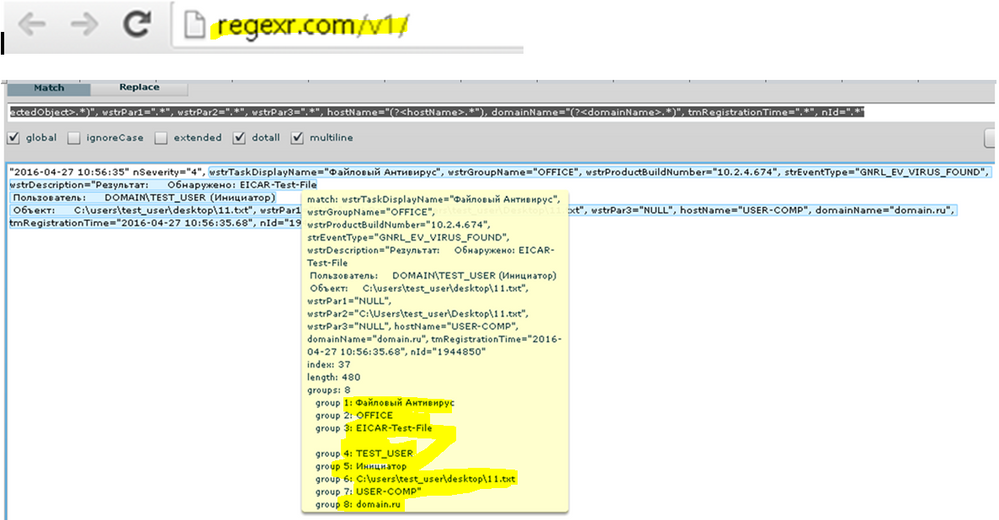
EXTRACT-anExtractionName=(?ms)wstrTaskDisplayName="(?<sourceTask>.*)", wstrGroupName="(?<groupName>.*)", wstrProductBuildNumber=".*", strEventType=".*", wstrDescription="\W+(?<virusName>.*).*Пользователь:.*\\(?<targetUser>.*).\((?<targetUserType>.*)\).*Объект:\s+(?<infectedObject>.*)", wstrPar1=".*", wstrPar2=".*", wstrPar3=".*", hostName="(?<hostName>.*"), domainName="(?<domainName>.*)", tmRegistrationTime=".*", nId=".*"
Also make sure this props.conf is in the app you're using when you're doing the search, because this is a search time extraction and its scoped to the app unless you're putting it in /etc/system/local. I took the liberty of extrainign hostName and domainName as well. Hopefully you can use my example to expand upon your extraction as you wish.
- Mark as New
- Bookmark Message
- Subscribe to Message
- Mute Message
- Subscribe to RSS Feed
- Permalink
- Report Inappropriate Content

this might sound stupid but did you use smart or verbose search mode and not fast mode when you where searching?




Join the Splunk Community Slack to learn, troubleshoot, and make connections with fellow Splunk practitioners in real time!
Join Splunk User Groups to connect and learn in-person by region or remotely by topic or industry.
Persistent Queue at TcpOut — One of Splunk's Most Practical Features
Skip the Awkward Silence: Have a .conf-ersation at .conf26
Rethinking Zero Trust: From Product Purchases to Logical Control Evidence
