
Join the Conversation
- Find Answers
- :
- Using Splunk
- :
- Splunk Search
- :
- How to exclude a particular value from results whe...
- Subscribe to RSS Feed
- Mark Topic as New
- Mark Topic as Read
- Float this Topic for Current User
- Bookmark Topic
- Subscribe to Topic
- Mute Topic
- Printer Friendly Page
- Mark as New
- Bookmark Message
- Subscribe to Message
- Mute Message
- Subscribe to RSS Feed
- Permalink
- Report Inappropriate Content

The field extractor wizard came up with the following:
(?=[^f]*(?:firewall:|f.*firewall:))^(?:[^"\n]*"){2}\s+(?P[^ ]+)(?:[^ \n]* ){4}(?P[^ ]+)(?:[^ \n]* ){3}(?P[^ ]+)\s+(?P[^ ]+)\s+\d+\s+(?P[^ ]+)[^"\n]*"(?P[^"]+)(?:[^ \n]* ){2}\((?P[^\)]+)
It sometimes interprets a field labeled msg (ex. msg="ip scan" is interpreted as user) as user for some reason (rare). When it does this, it always has a PolicyName="Internal Policy". It seems the easiest way to resolve the issue is to ignore any events having a PolicyName of 'Internal Policy'. How can I modify this regex/rex to accomplish that?
- Mark as New
- Bookmark Message
- Subscribe to Message
- Mute Message
- Subscribe to RSS Feed
- Permalink
- Report Inappropriate Content


When you're using the field extractor, sometimes you get weird values like you mentioned.
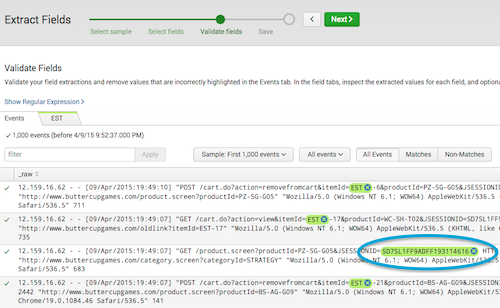
What you can do is click on the little X on the right side of the field that was incorrectly extracted.
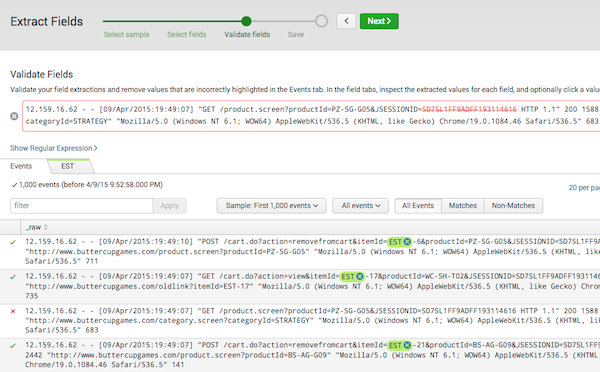
After that, Splunk will try to recreate the the regular expression to exclude that value.
There is also a "require" option for selections in the field extractor. Adding more of these might help you filter out what you don't want.
Alternatively, as you mentioned, you can edit the regular expression. It becomes extra difficult since it is a machine generated regular expression, and often becomes easier to just write the regular expression (or multiple, simpler ones) instead of using the machine generated one. Either way, in that case, post some examples of the data (so someone could attempt to filter out the events with PolicyName or define the fields you want to try to extract)


- Mark as New
- Bookmark Message
- Subscribe to Message
- Mute Message
- Subscribe to RSS Feed
- Permalink
- Report Inappropriate Content
When you're using the field extractor, sometimes you get weird values like you mentioned.
What you can do is click on the little X on the right side of the field that was incorrectly extracted.
After that, Splunk will try to recreate the the regular expression to exclude that value.
There is also a "require" option for selections in the field extractor. Adding more of these might help you filter out what you don't want.
Alternatively, as you mentioned, you can edit the regular expression. It becomes extra difficult since it is a machine generated regular expression, and often becomes easier to just write the regular expression (or multiple, simpler ones) instead of using the machine generated one. Either way, in that case, post some examples of the data (so someone could attempt to filter out the events with PolicyName or define the fields you want to try to extract)
- Mark as New
- Bookmark Message
- Subscribe to Message
- Mute Message
- Subscribe to RSS Feed
- Permalink
- Report Inappropriate Content
Thanks. I was able how to use the method you described in the validate fields step correctly. I filtered on the unwanted value then excluded it.

Join the Splunk Community Slack to learn, troubleshoot, and make connections with fellow Splunk practitioners in real time!
Join Splunk User Groups to connect and learn in-person by region or remotely by topic or industry.
Agent Mode Engaged! Enchaining Agentic Operations with Splunk AI Assistant 2.0
Announcing Modern Navigation: A New Era of Splunk User Experience
Modernize your Splunk Apps – Introducing Python 3.13 in Splunk
