
Join the Conversation
- Find Answers
- :
- Using Splunk
- :
- Splunk Search
- :
- Re: How to edit my search to use a macro to return...
- Subscribe to RSS Feed
- Mark Topic as New
- Mark Topic as Read
- Float this Topic for Current User
- Bookmark Topic
- Subscribe to Topic
- Mute Topic
- Printer Friendly Page
- Mark as New
- Bookmark Message
- Subscribe to Message
- Mute Message
- Subscribe to RSS Feed
- Permalink
- Report Inappropriate Content

Tried doing this via the Splunk docs and the macro is not being processed.
My example ...
My macro is named wordweight02 and takes a single argument which I identify as named "words" in the macro definition. I expect it to return an integer value. Source for macro follows ...
if(like($words$, "% dog %"), 10 ,0) + if(like($words$, "% cat %"), 10 ,0) +     if(like($words$, "% snake %"), 15 ,0) +
if(like($words$, "% chicken %"), 20 ,0) + if(like($words$, "% truck %"), 25 ,0) + if(like($words$, "% car %"), 25 ,0) +
if(like($words$, "% rocket %"), 25 ,0) + if(like($words$, "% and %"), 1 ,0) + if(like($words$, "% he %"), 5 ,0) +
if(like($words$, "% she %"), 5 ,0) +    if(like($words$, "% they %"), 5 ,0)
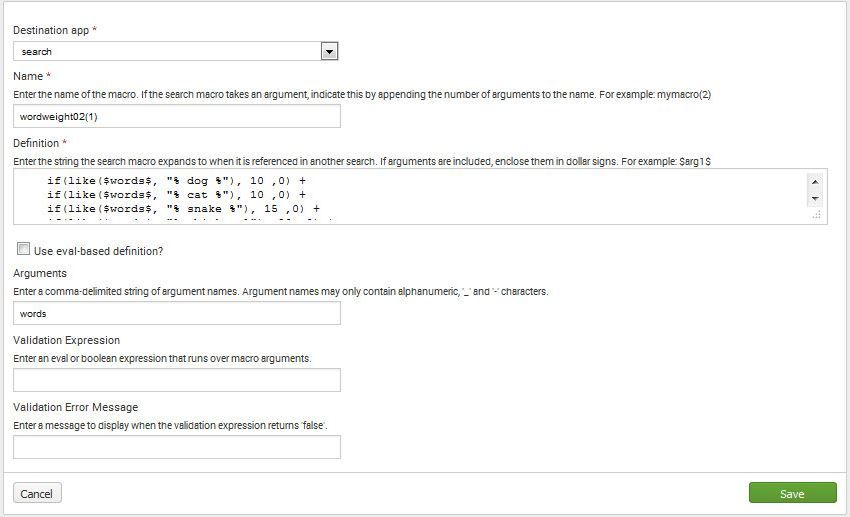
So now I want to use my macro to return a word weight for selected words occurring in a sentence. The sentences are being captured in an index in a field called "sentence". In my example, I can have duplicate values in "sentence" so ...
index=myindex |
 eval lcsentence=lower(sentence) |
 eval wordweight=('wordweight02(words=$lcsentence$)') |
  search wordweight>0 |
  stats count(sentence) as countsentence, by wordweight, sentence |
  eval sentencewordscore=wordweight*countsentence |
  sort -sentencewordscore
The macro never seems to return a value ... Any ideas? Splunk docs are a little light on this stuff.

- Mark as New
- Bookmark Message
- Subscribe to Message
- Mute Message
- Subscribe to RSS Feed
- Permalink
- Report Inappropriate Content

Try just using the field name when you pass it to the macro. Like this | eval wordweight='wordweight02(lcsentence)'
- Mark as New
- Bookmark Message
- Subscribe to Message
- Mute Message
- Subscribe to RSS Feed
- Permalink
- Report Inappropriate Content

You might want to look into the Machine Learning Tool Kit and TF IDF. I am not familiar with this tool yet... but it sounds like where you are headed based on docs and machine learning course I am taking.
https://docs.splunk.com/Documentation/MLApp/2.0.0/User/Algorithms
- Mark as New
- Bookmark Message
- Subscribe to Message
- Mute Message
- Subscribe to RSS Feed
- Permalink
- Report Inappropriate Content
Try just using the field name when you pass it to the macro. Like this | eval wordweight='wordweight02(lcsentence)'
- Mark as New
- Bookmark Message
- Subscribe to Message
- Mute Message
- Subscribe to RSS Feed
- Permalink
- Report Inappropriate Content
That does work ... It seems that the macro name delimiter/enclosing character must be the " ` " character (ASCII 96) and not the standard single quote " ' " (ASCII 39). My particular issue is the browser I am using to get to Splunk Enterprise is Firefox and for some weird reason it does not show the ASCII 96 character on the screen. Always an adventure ... Thanks ...

Data Management Digest – December 2025
Index This | What is broken 80% of the time by February?
Unlock Faster Time-to-Value on Edge and Ingest Processor with New SPL2 Pipeline ...
