
Join the Conversation
- Find Answers
- :
- Using Splunk
- :
- Splunk Search
- :
- How to do a timechart of a week with a timewrap on...
- Subscribe to RSS Feed
- Mark Topic as New
- Mark Topic as Read
- Float this Topic for Current User
- Bookmark Topic
- Subscribe to Topic
- Mute Topic
- Printer Friendly Page
- Mark as New
- Bookmark Message
- Subscribe to Message
- Mute Message
- Subscribe to RSS Feed
- Permalink
- Report Inappropriate Content

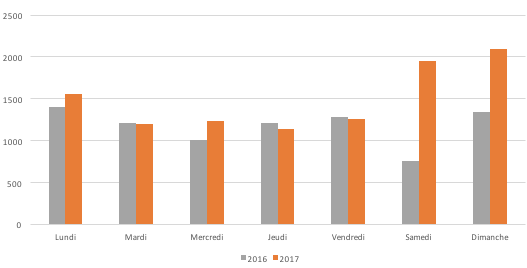
Hi ! I am trying to display a timechart that gives the data of a week, and the data of the same week but one year earlier.
I have done something with timechart and timewrap that gives me that comparison, but also gives me the comparison of all the rest of the year. How can I just isolate a specific week ? Thanks !
My current request :
index="sales_2017" OR index="sales_2018"
| timechart span=d count
| timewrap y
What I got :

What I would like to have :


- Mark as New
- Bookmark Message
- Subscribe to Message
- Mute Message
- Subscribe to RSS Feed
- Permalink
- Report Inappropriate Content


If you know the week number in the year you can try this:
index="sales_2017" OR index="sales_2018"
| eval date_week_of_year = strftime(_time, "%U")
| where date_week_of_year = "<week you are after>"
| timechart span=d count
| timewrap w
Hope I was able to help you. If so, some karma would be appreciated.
- Mark as New
- Bookmark Message
- Subscribe to Message
- Mute Message
- Subscribe to RSS Feed
- Permalink
- Report Inappropriate Content
If you know the week number in the year you can try this:
index="sales_2017" OR index="sales_2018"
| eval date_week_of_year = strftime(_time, "%U")
| where date_week_of_year = "<week you are after>"
| timechart span=d count
| timewrap w
Hope I was able to help you. If so, some karma would be appreciated.
- Mark as New
- Bookmark Message
- Subscribe to Message
- Mute Message
- Subscribe to RSS Feed
- Permalink
- Report Inappropriate Content
I think the week numbers are different from one year to the other in my case so it doesn't work
- Mark as New
- Bookmark Message
- Subscribe to Message
- Mute Message
- Subscribe to RSS Feed
- Permalink
- Report Inappropriate Content
You said you want "the data of a week, and the data of the same week but one year earlier"
For a moment forget about splunk. how do you accomplish this on paper, if not looking at the week number in the year? If i recall correctly all years have 52 weeks. This doesn't change regardless of the year. What does change is the day of the week a year starts.
This | eval date_week_of_year = strftime(_time, "%U") takes that in consideration by giving you the number of the week starting on Sunday and considering all theother days before the 1st Sunday as week 0.
If you want your week to start on monday you can switch %U to %W in this expression.
Hope I was able to help you. If so, some karma would be appreciated.

.conf25 technical session recap of Observability for Gen AI: Monitoring LLM ...
A Season of Skills: New Splunk Courses to Light Up Your Learning Journey
Announcing the Migration of the Splunk Add-on for Microsoft Azure Inputs to ...
