
Join the Conversation
- Find Answers
- :
- Using Splunk
- :
- Splunk Search
- :
- How to disable the app icon background color in Sp...
- Subscribe to RSS Feed
- Mark Topic as New
- Mark Topic as Read
- Float this Topic for Current User
- Bookmark Topic
- Subscribe to Topic
- Mute Topic
- Printer Friendly Page
- Mark as New
- Bookmark Message
- Subscribe to Message
- Mute Message
- Subscribe to RSS Feed
- Permalink
- Report Inappropriate Content
How to disable the app icon background color in Splunkbase later on?

In our inital release version 0.9.0 (https://splunkbase.splunk.com/app/4317/) we intentionally adjusted the app navigation bar color according to the Splunk manual http://dev.splunk.com/view/SP-CAAAEP9
When we realized that it doesn't look good in Splunk Enterprise 7.2.1, we changed the icon and removed the color to have a transparent background in version 0.9.1 - which in Splunk Enterprise works fine.
But in Splunkbase this is the current state on https://splunkbase.splunk.com/apps/#/search/Vynamic/ (even after cleaning the browser cache and using Chrome and Internet Explorer)
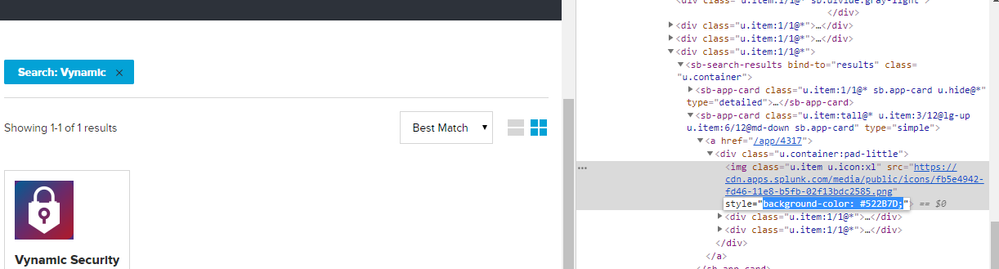
And the following is what I expected to happen, as I removed the color attribute from XML element in version 0.9.1 (I manipulated the HTML using Google Chrome Dev Tools to achieve this)
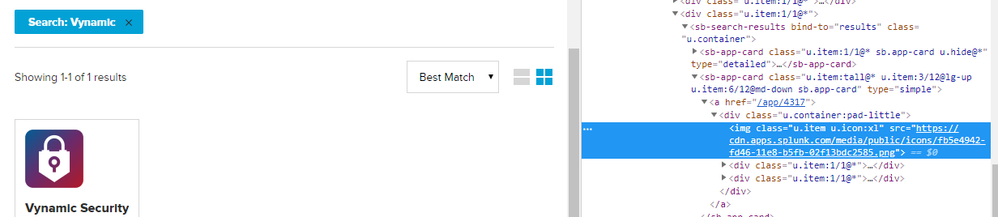
Changing version 0.9.0 to invisible didn't have any effect, so can I e.g. request the deletion of just version 0.9.0 to have 0.9.1 as initial version? Because I don't want a deletion of the whole add-on - unfortunately the id '4317' is already mentioned in the manuals of our main product.


Splunk Search APIを使えば調査過程が残せます
Integrating Splunk Search API and Quarto to Create Reproducible Investigation ...
Congratulations to the 2025-2026 SplunkTrust!
