
Join the Conversation
- Find Answers
- :
- Using Splunk
- :
- Splunk Search
- :
- How to delete everything before and including stri...
- Subscribe to RSS Feed
- Mark Topic as New
- Mark Topic as Read
- Float this Topic for Current User
- Bookmark Topic
- Subscribe to Topic
- Mute Topic
- Printer Friendly Page
- Mark as New
- Bookmark Message
- Subscribe to Message
- Mute Message
- Subscribe to RSS Feed
- Permalink
- Report Inappropriate Content

Dear Community, I have the following search query:
index="myIndex"
host="myHost"
source="mySource.log"
2021081105302743
"started with profile"
The above gives me the following result:
Progam has run, 2021081105302743 started with profile TEST_PROFILE_01
I would like to remove everything before TEST_PROFILE_01 , giving me just the profile. Beforehand I do not know what profile is used. Therefore I guess what I want is:
- Remove everything before "profile"
- Also remove "profile"
Then, I want to display the profile in a "Single Value".
I have used the below in a table before, but now that I am using Single Value, I don't know which field to use. Also if I use a string instead of the # below in the table, it won't work.
| eval _raw = replace(_raw,"^[^#]*#", "")
I have 2 questions:
- When using a Single Value Panel, what field do I use in the above search at the position _raw (what to replace it with)? When I search for the data as shown in the query located at the top, the data is shown in the "Event" field. Is this the field I should use?
- At the position of the # I would like to use "profile", but I don't know how to edit the regex accordingly.
I could use some help on this matter. Thanks in advance.
- Mark as New
- Bookmark Message
- Subscribe to Message
- Mute Message
- Subscribe to RSS Feed
- Permalink
- Report Inappropriate Content
Hi Soutame, thanks for your reply.
I got it working thanks to one of my colleagues. We applied the following:
| rex field=_raw "profile\s(?<whatever>[^\s\r]+)"
| stats count by whatever | fields - count
- Mark as New
- Bookmark Message
- Subscribe to Message
- Mute Message
- Subscribe to RSS Feed
- Permalink
- Report Inappropriate Content


Hi
Is it enough that you just get profile name from _raw instead of alter _raw? If this is ok, then you can use the next rex
....
| rex "started with profile (?<profile>[^\n]+)"
And if you also want replace raw then you can add this to next line
...
| eval _raw = profile
r. Ismo
- Mark as New
- Bookmark Message
- Subscribe to Message
- Mute Message
- Subscribe to RSS Feed
- Permalink
- Report Inappropriate Content
Problem is, I am not sure if I am using _raw here or not (In a Single Value Panel). When applying the above in just a search (regardless of a panel) I still get the full search results, where I am just expecting the name of the profile (I have marked some information in red that is not supposed to be shared):
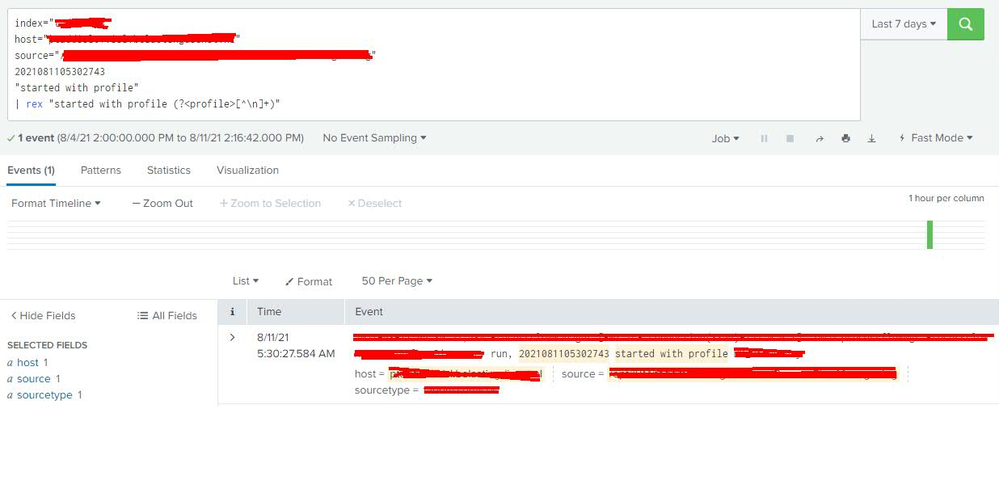
In the regex you use <profile> as I field I think? I am not too sure. But even when replacing <profile> with <event> it still shows everything.
- Mark as New
- Bookmark Message
- Subscribe to Message
- Mute Message
- Subscribe to RSS Feed
- Permalink
- Report Inappropriate Content
If you want to switch _raw also on displayed event then you must do it on props.conf. But I think that still you can see it if you select "Event Actions" -> Show Source. The only way how you can really get rid of it is remove it before you indexing it.
r. Ismo
- Mark as New
- Bookmark Message
- Subscribe to Message
- Mute Message
- Subscribe to RSS Feed
- Permalink
- Report Inappropriate Content
Hi Soutame, thanks for your reply.
I got it working thanks to one of my colleagues. We applied the following:
| rex field=_raw "profile\s(?<whatever>[^\s\r]+)"
| stats count by whatever | fields - count

Join the Splunk Community Slack to learn, troubleshoot, and make connections with fellow Splunk practitioners in real time!
Join Splunk User Groups to connect and learn in-person by region or remotely by topic or industry.
Index This | What travels the world but is also stuck in place?
Discover New Use Cases: Unlock Greater Value from Your Existing Splunk Data
Continue Your Journey: Join Session 2 of the Data Management and Federation Bootcamp ...
