
Join the Conversation
- Find Answers
- :
- Using Splunk
- :
- Splunk Search
- :
- Re: How to create a timechart using eval to create...
- Subscribe to RSS Feed
- Mark Topic as New
- Mark Topic as Read
- Float this Topic for Current User
- Bookmark Topic
- Subscribe to Topic
- Mute Topic
- Printer Friendly Page
- Mark as New
- Bookmark Message
- Subscribe to Message
- Mute Message
- Subscribe to RSS Feed
- Permalink
- Report Inappropriate Content

I think this can be done, but I am having some troubles...
This is what i am starting with, but not sure how to get it more like what I want below:
|gentimes start=-1 | eval temp=100 | eval count="ColumChart2" | table temp count | append [|stats count|eval count="END OF FILE"]
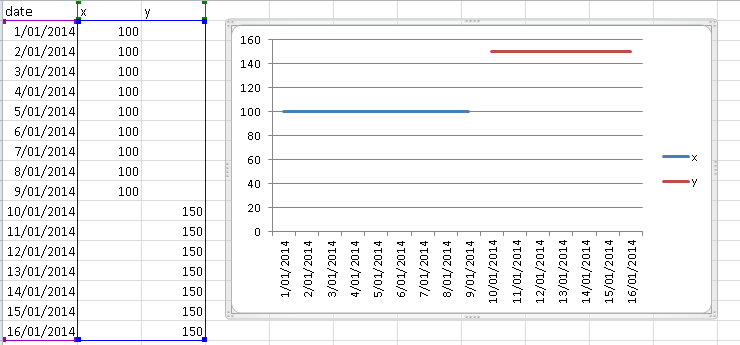
What I am hoping for is something like (excuse my code, it is more an explanation at this stage):
eval x = 100 | where date >=1/1/2014 AND date <=9/1/2014 |
eval y = 150 | where date >=10/1/2014 AND date <=16/1/2014
which I would hope would give me something like this graph:
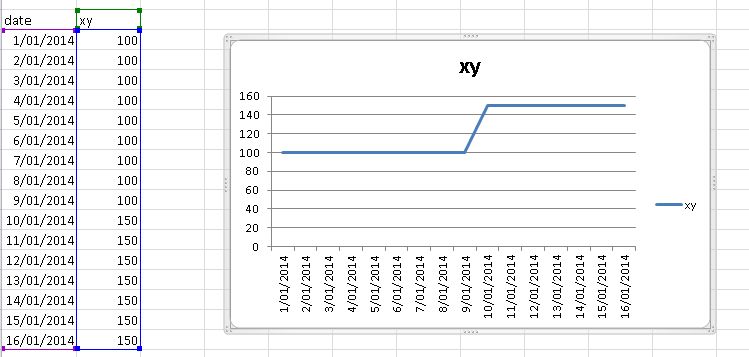
And then ultimately I am holing for something like
- Mark as New
- Bookmark Message
- Subscribe to Message
- Mute Message
- Subscribe to RSS Feed
- Permalink
- Report Inappropriate Content


There's a few ways to do this. Here's one:
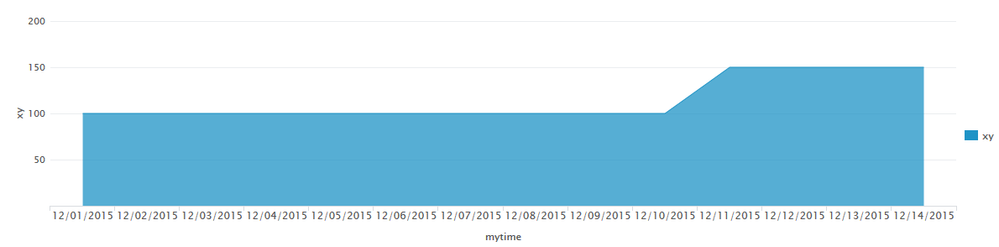
|gentimes start="12/1/2015" end="12/15/2015" | convert timeformat="%m/%d/%Y" ctime(starttime) AS mytime| eval xy=if(mytime>"12/10/2015",150,100) | fields mytime xy
I do a lot of goofiness to get the days in the right format which you shouldn't have to do. The key is the eval statement. All the stuff leading up to that just generates a set of dates through the first half of December, then converts the created "starttime" from a unix epoch value into a "regular date" named mytime (well, regular for North Americans, mostly, but close enough for others to figure it out). I do that mostly so you can see the precise use case you seemed to need, that of doing date comparison.
Then the eval just says if mytime is bigger than 12/10/2015 to make it 150, otherwise make it 100.


For more complex logic, you could use (re-wrapped because it got a bit long)
|gentimes start="12/1/2015" end="12/15/2015"
| convert timeformat="%m/%d/%Y" ctime(starttime) AS mytime
| eval xy=case(mytime>"12/05/2015" AND mytime<"12/10/2015",150,1==1,100)
| fields mytime xy
Case does a "test1", "val1 if test1 was true", test2, "val2 if test2 was true", etc... The "1==1" is always true, so that sets the last one as a default of sorts.

- Mark as New
- Bookmark Message
- Subscribe to Message
- Mute Message
- Subscribe to RSS Feed
- Permalink
- Report Inappropriate Content
There's a few ways to do this. Here's one:
|gentimes start="12/1/2015" end="12/15/2015" | convert timeformat="%m/%d/%Y" ctime(starttime) AS mytime| eval xy=if(mytime>"12/10/2015",150,100) | fields mytime xy
I do a lot of goofiness to get the days in the right format which you shouldn't have to do. The key is the eval statement. All the stuff leading up to that just generates a set of dates through the first half of December, then converts the created "starttime" from a unix epoch value into a "regular date" named mytime (well, regular for North Americans, mostly, but close enough for others to figure it out). I do that mostly so you can see the precise use case you seemed to need, that of doing date comparison.
Then the eval just says if mytime is bigger than 12/10/2015 to make it 150, otherwise make it 100.
For more complex logic, you could use (re-wrapped because it got a bit long)
|gentimes start="12/1/2015" end="12/15/2015"
| convert timeformat="%m/%d/%Y" ctime(starttime) AS mytime
| eval xy=case(mytime>"12/05/2015" AND mytime<"12/10/2015",150,1==1,100)
| fields mytime xy
Case does a "test1", "val1 if test1 was true", test2, "val2 if test2 was true", etc... The "1==1" is always true, so that sets the last one as a default of sorts.
- Mark as New
- Bookmark Message
- Subscribe to Message
- Mute Message
- Subscribe to RSS Feed
- Permalink
- Report Inappropriate Content
beautiful answer, 1 pet hate I have is that date format %m/%d/%Y but thats just me. tks

Join the Splunk Community Slack to learn, troubleshoot, and make connections with fellow Splunk practitioners in real time!
Join Splunk User Groups to connect and learn in-person by region or remotely by topic or industry.
Agent Mode Engaged! Enchaining Agentic Operations with Splunk AI Assistant 2.0
Announcing Modern Navigation: A New Era of Splunk User Experience
Modernize your Splunk Apps – Introducing Python 3.13 in Splunk
