
Join the Conversation
- Find Answers
- :
- Using Splunk
- :
- Splunk Search
- :
- Re: How to convert string time to seconds
- Subscribe to RSS Feed
- Mark Topic as New
- Mark Topic as Read
- Float this Topic for Current User
- Bookmark Topic
- Subscribe to Topic
- Mute Topic
- Printer Friendly Page
- Mark as New
- Bookmark Message
- Subscribe to Message
- Mute Message
- Subscribe to RSS Feed
- Permalink
- Report Inappropriate Content

I have a TimeField with data format is like 4 Days 14 Hours 40 Minutes and sometimes 7 Hours 40 Minutes
| TimeField |
| 4 Days 14 Hours 40 Minutes |
| 7 Hours 40 Minutes |
| 40 Minutes |
I want to convert this field values into seconds so that i can sort my data based on time.
Thanks!
- Mark as New
- Bookmark Message
- Subscribe to Message
- Mute Message
- Subscribe to RSS Feed
- Permalink
- Report Inappropriate Content


Can you please try this?
YOOUR_SEARCH
| rex field=TimeField "(((?<Days>\d.*)\sDays\s)?(?<Hours>\d.*)\sHours\s)?(?<Minutes>\d.*)\sMinutes"
| fillnull value=0
| eval secs=(Days*86400)+(Hours*3600)+(Minutes*60)
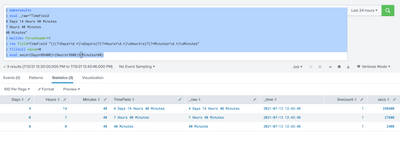
My Sample Search :
| makeresults
| eval _raw="TimeField
4 Days 14 Hours 40 Minutes
7 Hours 40 Minutes
40 Minutes"
| multikv forceheader=1
| rex field=TimeField "(((?<Days>\d.*)\sDays\s)?(?<Hours>\d.*)\sHours\s)?(?<Minutes>\d.*)\sMinutes"
| fillnull value=0
| eval secs=(Days*86400)+(Hours*3600)+(Minutes*60)
Thanks
KV
▄︻̷̿┻̿═━一
If any of my reply helps you to solve the problem Or gain knowledge, an upvote would be appreciated.
- Mark as New
- Bookmark Message
- Subscribe to Message
- Mute Message
- Subscribe to RSS Feed
- Permalink
- Report Inappropriate Content
Can you please try this?
YOOUR_SEARCH
| rex field=TimeField "(((?<Days>\d.*)\sDays\s)?(?<Hours>\d.*)\sHours\s)?(?<Minutes>\d.*)\sMinutes"
| fillnull value=0
| eval secs=(Days*86400)+(Hours*3600)+(Minutes*60)
My Sample Search :
| makeresults
| eval _raw="TimeField
4 Days 14 Hours 40 Minutes
7 Hours 40 Minutes
40 Minutes"
| multikv forceheader=1
| rex field=TimeField "(((?<Days>\d.*)\sDays\s)?(?<Hours>\d.*)\sHours\s)?(?<Minutes>\d.*)\sMinutes"
| fillnull value=0
| eval secs=(Days*86400)+(Hours*3600)+(Minutes*60)
Thanks
KV
▄︻̷̿┻̿═━一
If any of my reply helps you to solve the problem Or gain knowledge, an upvote would be appreciated.
- Mark as New
- Bookmark Message
- Subscribe to Message
- Mute Message
- Subscribe to RSS Feed
- Permalink
- Report Inappropriate Content
I tried your suggestion,
| TimeField | days | hours | minutes | secs |
| 4 Days 14 Hours 40 Minutes | 4 | 0 | 0 | 345600 |
| 6 Hours 20 Minutes | 0 | 6 | 0 | 21600 |
for the first entry giving only days
and for second entry its giving only hours
Thank you!
- Mark as New
- Bookmark Message
- Subscribe to Message
- Mute Message
- Subscribe to RSS Feed
- Permalink
- Report Inappropriate Content

This search sets up your data example then calculates the seconds.
See from the rex statement onwards
| makeresults
| eval _raw="TimeField
4 Days 14 Hours 40 Minutes
7 Hours 40 Minutes
40 Minutes"
| multikv forceheader=1
| table TimeField
| mvexpand TimeField
| rex field=TimeField "((?<days>\d+) Days)?\s*?((?<hours>\d+) Hours)?\s*?((?<minutes>\d+) Minutes)?"
| fillnull value=0
| eval secs=(days*86400)+(hours*3600)+(minutes*60)

Join the Splunk Community Slack to learn, troubleshoot, and make connections with fellow Splunk practitioners in real time!
Join Splunk User Groups to connect and learn in-person by region or remotely by topic or industry.
test 2
test
Join the Hackathon at .conf26 and build a No-Code AI agent
