
Join the Conversation
- Find Answers
- :
- Using Splunk
- :
- Splunk Search
- :
- Re: How to convert epoch time to human readable fo...
- Subscribe to RSS Feed
- Mark Topic as New
- Mark Topic as Read
- Float this Topic for Current User
- Bookmark Topic
- Subscribe to Topic
- Mute Topic
- Printer Friendly Page
- Mark as New
- Bookmark Message
- Subscribe to Message
- Mute Message
- Subscribe to RSS Feed
- Permalink
- Report Inappropriate Content
How to convert epoch time to human readable format in the splunk query

Could someone please help me convert epoch time to human readable time?
"Date":1605030538646
- Mark as New
- Bookmark Message
- Subscribe to Message
- Mute Message
- Subscribe to RSS Feed
- Permalink
- Report Inappropriate Content

- Mark as New
- Bookmark Message
- Subscribe to Message
- Mute Message
- Subscribe to RSS Feed
- Permalink
- Report Inappropriate Content


Which method did you try? Please share the full query that didn't work.
If this reply helps you, Karma would be appreciated.
- Mark as New
- Bookmark Message
- Subscribe to Message
- Mute Message
- Subscribe to RSS Feed
- Permalink
- Report Inappropriate Content
There are a couple of ways to convert epoch time into a human-readable format, but first you must start with epoch time in seconds rather than milliseconds.
... | eval humanTime = strftime(_time/1000, "%c")... | eval timeinsecs = time/1000
| convert ctime(timeinsecs) as humanTime
If this reply helps you, Karma would be appreciated.
- Mark as New
- Bookmark Message
- Subscribe to Message
- Mute Message
- Subscribe to RSS Feed
- Permalink
- Report Inappropriate Content
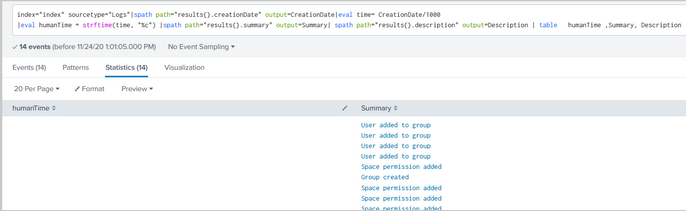
index="index" sourcetype="Logs"|spath path="results{}.creationDate" output=CreationDate|eval time= CreationDate/1000|eval humanTime = strftime(CreatedDate/1000', "%c")|spath path="results{}.summary" output=Summary | spath path="results{}.description" output=Description | table humanTime ,Summary, Description
- Mark as New
- Bookmark Message
- Subscribe to Message
- Mute Message
- Subscribe to RSS Feed
- Permalink
- Report Inappropriate Content
My answer gave two different ways to convert epochs to human-readable times. Use one or the other, but not both, in a query.
The command eval humanTime = strftime(CreatedDate/1000', "%c") uses a field (CreatedDate) that doesn't exist so the result will be null.
If this reply helps you, Karma would be appreciated.
- Mark as New
- Bookmark Message
- Subscribe to Message
- Mute Message
- Subscribe to RSS Feed
- Permalink
- Report Inappropriate Content
Hi,
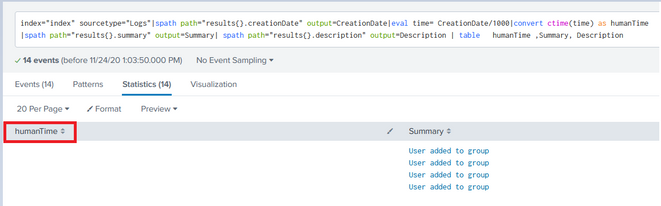
please find the below results:
index="index" sourcetype="Logs"|spath path="results{}.creationDate" output=CreationDate|eval time= CreationDate/1000|convert ctime(time) as humanTime |spath path="results{}.summary" output=Summary | spath path="results{}.description" output=Description | table humanTime ,Summary, Description
- Mark as New
- Bookmark Message
- Subscribe to Message
- Mute Message
- Subscribe to RSS Feed
- Permalink
- Report Inappropriate Content
My answer gave two different ways to convert epochs to human-readable times. Use one or the other, but not both, in a query.
The command convert ctime(time) as humanTime uses a field (time) that doesn't exist so the result will be null.
If this reply helps you, Karma would be appreciated.
- Mark as New
- Bookmark Message
- Subscribe to Message
- Mute Message
- Subscribe to RSS Feed
- Permalink
- Report Inappropriate Content
Thank you for the response,
But, It didn't help me, no output is shown.
I think (1605030538646)its a combination of Date and time

[Puzzles] Solve, Learn, Repeat: Dynamic formatting from XML events
Enter the Agentic Era with Splunk AI Assistant for SPL 1.4
Stronger Security with Federated Search for S3, GCP SQL & Australian Threat ...
