
Join the Conversation
- Find Answers
- :
- Using Splunk
- :
- Splunk Search
- :
- Re: Combine data from same field
- Subscribe to RSS Feed
- Mark Topic as New
- Mark Topic as Read
- Float this Topic for Current User
- Bookmark Topic
- Subscribe to Topic
- Mute Topic
- Printer Friendly Page
- Mark as New
- Bookmark Message
- Subscribe to Message
- Mute Message
- Subscribe to RSS Feed
- Permalink
- Report Inappropriate Content

I am looking to chart a field that contains a request path but want to display and get a total count of all events that contain the root request path(a) and events that contain the root + <some guid>/contents.(b) The path is a field I manually extracted called "request_path_in_request"
Example of the path I want to combine in the cart:
(a)path=/v4/layers/asPlanted
(b)path=/v4/layers/asPlanted<some guid>/contents
Here is my Splunk query so far:
source="partners-api-ol" request_path_in_request="/v*" | timechart count by request_path_in_request useother=f limit=10
And here is how that field is getting charted:
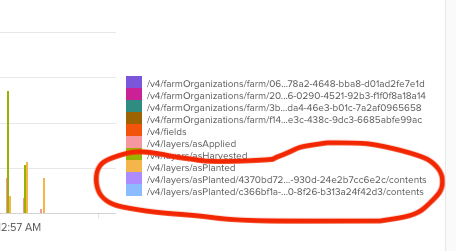
Is there a way to show only category of "/v4/layers/asPlanted" , but have the count be the total of all the events with that root path?
- Mark as New
- Bookmark Message
- Subscribe to Message
- Mute Message
- Subscribe to RSS Feed
- Permalink
- Report Inappropriate Content

Hi @ag_yeck
If I understand what you are trying to do correctly, you just need to define a new field (using a regex command for this is good) to group your results by in the timechart statement.
source="partners-api-ol" request_path_in_request="/v*"
| rex field=request_path_in_request "(?<request_root_path>^(?:\/\w+){1,3})"
| timechart count BY request_root_path useother=f limit=10
The regex is pulling out the first / delimited segments, up to levels 3 deep, and assigning this the field name request_root_path. This can then be used to group summarise the counts in timechart.
Hope this helps
- Mark as New
- Bookmark Message
- Subscribe to Message
- Mute Message
- Subscribe to RSS Feed
- Permalink
- Report Inappropriate Content

This is a less expensive and more semantic method using split and mvindex.
source="partners-api-ol" request_path_in_request="/v*" | timechart count by request_path_in_request useother=f limit=10
| eval request_path_in_request = split(request_path_in_request, "/")
| eval rootpath = mvjoin(mvindex(request_path_in_request, 0,3), "/")
- Mark as New
- Bookmark Message
- Subscribe to Message
- Mute Message
- Subscribe to RSS Feed
- Permalink
- Report Inappropriate Content
@yuanliu I like the idea of just using semantics to solve, but this did not change the visualization. Maybe I need to use "rootpath" on the "timechart" line?
- Mark as New
- Bookmark Message
- Subscribe to Message
- Mute Message
- Subscribe to RSS Feed
- Permalink
- Report Inappropriate Content
Yes, that's the idea. If you want to use request_path_in_request as you orginally do, you can do
| eval request_path_in_request = mvjoin(mvindex(request_path_in_request, 0,3), "/")But doing so would be less semantic. Personally, I often assign modified values back to original field name. But that's only when the modification do not considerably alter the semantic meaning of the original field name. (I did use | eval request_path_in_request = split(request_path_in_request, "/") in my illustration.)
- Mark as New
- Bookmark Message
- Subscribe to Message
- Mute Message
- Subscribe to RSS Feed
- Permalink
- Report Inappropriate Content
Hi @ag_yeck
If I understand what you are trying to do correctly, you just need to define a new field (using a regex command for this is good) to group your results by in the timechart statement.
source="partners-api-ol" request_path_in_request="/v*"
| rex field=request_path_in_request "(?<request_root_path>^(?:\/\w+){1,3})"
| timechart count BY request_root_path useother=f limit=10
The regex is pulling out the first / delimited segments, up to levels 3 deep, and assigning this the field name request_root_path. This can then be used to group summarise the counts in timechart.
Hope this helps
- Mark as New
- Bookmark Message
- Subscribe to Message
- Mute Message
- Subscribe to RSS Feed
- Permalink
- Report Inappropriate Content
Thank you @yeahnah , that worked! I am a Splunk noob so having the explanation after the solution is very helpful.

Join the Splunk Community Slack to learn, troubleshoot, and make connections with fellow Splunk practitioners in real time!
Join Splunk User Groups to connect and learn in-person by region or remotely by topic or industry.
Meet the .conf26 AI Agent Buildathon Winners
Trusted Autonomy in the SOC: A Maturity Journey
Supercharging Windows Security Detection Performance: Introducing Hybrid Field ...
