
Join the Conversation
- Find Answers
- :
- Using Splunk
- :
- Splunk Search
- :
- Re: How to break nested objects and lists into ind...
- Subscribe to RSS Feed
- Mark Topic as New
- Mark Topic as Read
- Float this Topic for Current User
- Bookmark Topic
- Subscribe to Topic
- Mute Topic
- Printer Friendly Page
- Mark as New
- Bookmark Message
- Subscribe to Message
- Mute Message
- Subscribe to RSS Feed
- Permalink
- Report Inappropriate Content

I have an event with multiple levels of nested objects and lists, that I need to break down into individual events. For example, a single event can look like:
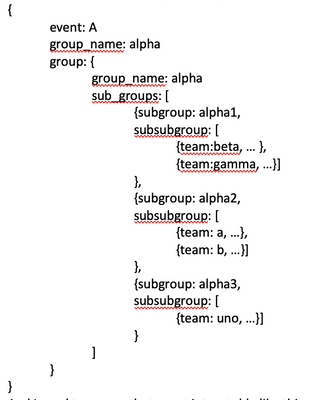
And I need to conver that event into a table like this:
|
Group_name |
Sub_group |
Subsubgroup |
Some other info … |
|
alpha |
alpha1 |
beta |
|
|
alpha |
alpha1 |
gamma |
|
|
alpha |
alpha2 |
a |
|
|
alpha |
alpha2 |
b |
|
|
alpha |
alpha3 |
uno |
|
I've tried multiple combinations of mvexpand, table, and stats, but I keep getting erroneous results. The command flatten doesn't seem to work, and I fear I might need some crazy regex to parse all the embedded objects and list of objects, not to mention this is only one event, in reality I would have multiple other groups with their corresponding subgroups and stuff.
- Mark as New
- Bookmark Message
- Subscribe to Message
- Mute Message
- Subscribe to RSS Feed
- Permalink
- Report Inappropriate Content

First of all, please post sample data in text, not in screenshot. It is much easier for other people to help.
Secondly, the screenshot shows invalid JSON syntax.
Assuming actual data are conformant, the following should give you the desired outcome
| spath path=group_name
| spath output=sub_groups path=group.sub_groups{}
| mvexpand sub_groups
| spath input=sub_groups path=subgroup
| spath input=sub_groups output=subsubgroup path=subsubgroup{}
| fields - sub_groups ``` just to clear view, not part of calculation ```
| mvexpand subsubgroup
| spath input=subsubgroup
| table group_name subgroup team "some other info"
In the above, I didn't bother to rename fields; for example, "team" is subsubgroup, etc. In input data, I assumed that there is a field "some other info" under subsubgroup.
Given test data as follows (which you should have supplied in text):
{"event":"A",
  "group_name":"alpha",
  "group":{
    "group_name":"alpha",
    "sub_groups":[
     {"subgroup":"alpha1",
      "subsubgroup": [
        {"team":"beta"},
        {"team":"gamma", "some other info":"foo"}]
     },
     {"subgroup":"alpha2",
      "subsubgroup": [
       {"team":"a"},
       {"team":"b", "some other info":"bar"}]
     },
     {"subgroup": "alpha3",
      "subsubgroup": [
       {"team": "uno", "some other info":"baz"}]
     }
   ]
  }
}
output would be
| group_name | subgroup | team | some other info |
| alpha | alpha1 | beta | |
| alpha | alpha1 | gamma | foo |
| alpha | alpha2 | a | |
| alpha | alpha2 | b | bar |
| alpha | alpha3 | uno | baz |
- Mark as New
- Bookmark Message
- Subscribe to Message
- Mute Message
- Subscribe to RSS Feed
- Permalink
- Report Inappropriate Content
First of all, please post sample data in text, not in screenshot. It is much easier for other people to help.
Secondly, the screenshot shows invalid JSON syntax.
Assuming actual data are conformant, the following should give you the desired outcome
| spath path=group_name
| spath output=sub_groups path=group.sub_groups{}
| mvexpand sub_groups
| spath input=sub_groups path=subgroup
| spath input=sub_groups output=subsubgroup path=subsubgroup{}
| fields - sub_groups ``` just to clear view, not part of calculation ```
| mvexpand subsubgroup
| spath input=subsubgroup
| table group_name subgroup team "some other info"
In the above, I didn't bother to rename fields; for example, "team" is subsubgroup, etc. In input data, I assumed that there is a field "some other info" under subsubgroup.
Given test data as follows (which you should have supplied in text):
{"event":"A",
  "group_name":"alpha",
  "group":{
    "group_name":"alpha",
    "sub_groups":[
     {"subgroup":"alpha1",
      "subsubgroup": [
        {"team":"beta"},
        {"team":"gamma", "some other info":"foo"}]
     },
     {"subgroup":"alpha2",
      "subsubgroup": [
       {"team":"a"},
       {"team":"b", "some other info":"bar"}]
     },
     {"subgroup": "alpha3",
      "subsubgroup": [
       {"team": "uno", "some other info":"baz"}]
     }
   ]
  }
}
output would be
| group_name | subgroup | team | some other info |
| alpha | alpha1 | beta | |
| alpha | alpha1 | gamma | foo |
| alpha | alpha2 | a | |
| alpha | alpha2 | b | bar |
| alpha | alpha3 | uno | baz |


Join the Splunk Community Slack to learn, troubleshoot, and make connections with fellow Splunk practitioners in real time!
Join Splunk User Groups to connect and learn in-person by region or remotely by topic or industry.
SOC4Kafka - New Kafka Connector Powered by OpenTelemetry
Event Series: Level up your SOC: Advancing with Splunk Enterprise Security
Announcing Modern Navigation: A New Era of Splunk User Experience
