
Join the Conversation
- Find Answers
- :
- Using Splunk
- :
- Splunk Search
- :
- How to append string to timechart data labels?
- Subscribe to RSS Feed
- Mark Topic as New
- Mark Topic as Read
- Float this Topic for Current User
- Bookmark Topic
- Subscribe to Topic
- Mute Topic
- Printer Friendly Page
- Mark as New
- Bookmark Message
- Subscribe to Message
- Mute Message
- Subscribe to RSS Feed
- Permalink
- Report Inappropriate Content

Hi, I have a column timechart with numerical values, and I would like to add strings, or characters, after these values, when displayed on the dashboard.
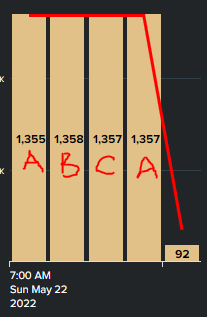
I have tried to append the string to the results themselves, but it seems like timechart is unable to populate non-numerical data.
Any help or alternative ideas on how I can achieve the above results visually? Thanks.
- Mark as New
- Bookmark Message
- Subscribe to Message
- Mute Message
- Subscribe to RSS Feed
- Permalink
- Report Inappropriate Content


Hi @dzyfer,
you should use eval before timechart and use the by in timechart, something like this:
| eval date=strftime(_time,"%H:%M")
| eval shift = case(date="07:00","A", date="15:00","B", date="23:00","C")
| timechart span=8h aligntime=@d+7h sum(meter) AS "output" BY shift
Ciao.
Giuseppe
- Mark as New
- Bookmark Message
- Subscribe to Message
- Mute Message
- Subscribe to RSS Feed
- Permalink
- Report Inappropriate Content
Hi Giuseppe, thank you for the reply.
My search is roughly along these lines
...
| timechart span=8h aligntime=@d+7h sum(meter) AS "output"
| eval date=strftime(_time,"%H:%M")
| eval shift = case(date="07:00","A", date="15:00","B", date="23:00","C")
| eval "output" = 'output' + " " + shift
- Mark as New
- Bookmark Message
- Subscribe to Message
- Mute Message
- Subscribe to RSS Feed
- Permalink
- Report Inappropriate Content
Hi @dzyfer,
you should use eval before timechart and use the by in timechart, something like this:
| eval date=strftime(_time,"%H:%M")
| eval shift = case(date="07:00","A", date="15:00","B", date="23:00","C")
| timechart span=8h aligntime=@d+7h sum(meter) AS "output" BY shift
Ciao.
Giuseppe
- Mark as New
- Bookmark Message
- Subscribe to Message
- Mute Message
- Subscribe to RSS Feed
- Permalink
- Report Inappropriate Content
Hi @gcusello , I made some edits to your suggestion, and have come up with satisfiable results, thank you.
- Mark as New
- Bookmark Message
- Subscribe to Message
- Mute Message
- Subscribe to RSS Feed
- Permalink
- Report Inappropriate Content
Hi @dzyfer,
could you share your search and what's the field containing the values "A", "B", "C", etc...?
Ciao.
Giuseppe

Join the Splunk Community Slack to learn, troubleshoot, and make connections with fellow Splunk practitioners in real time!
Join Splunk User Groups to connect and learn in-person by region or remotely by topic or industry.
Meet the .conf26 AI Agent Buildathon Winners
Trusted Autonomy in the SOC: A Maturity Journey
Supercharging Windows Security Detection Performance: Introducing Hybrid Field ...
