
Join the Conversation
- Find Answers
- :
- Using Splunk
- :
- Splunk Search
- :
- How to |addtotals on a |stats list result?
- Subscribe to RSS Feed
- Mark Topic as New
- Mark Topic as Read
- Float this Topic for Current User
- Bookmark Topic
- Subscribe to Topic
- Mute Topic
- Printer Friendly Page
- Mark as New
- Bookmark Message
- Subscribe to Message
- Mute Message
- Subscribe to RSS Feed
- Permalink
- Report Inappropriate Content

Hi Everyone,
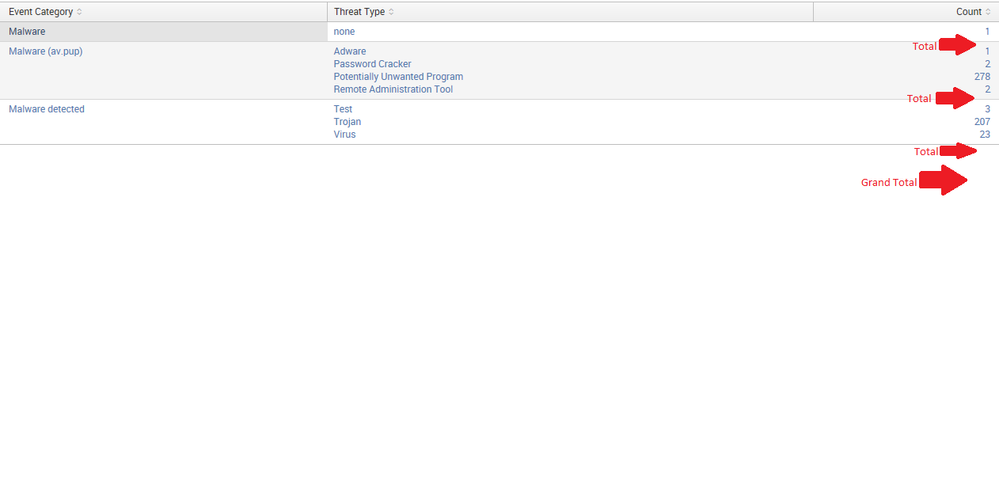
I would like to add a row, about a total (sum), for each segment list (see the picture), and if a list has only one value than there is no need to show a total. (only if possible)
here is what I got:
index="Test" |stats count by "Event Category", "Threat Type" |stats list("Threat Type") as "Threat Type" list(count) as Count by "Event Category"
Using |addtotal doesn't work at all.

- Mark as New
- Bookmark Message
- Subscribe to Message
- Mute Message
- Subscribe to RSS Feed
- Permalink
- Report Inappropriate Content
You could probably add an addcoltotals at the end of this query but haven't tested. Note the change is in the second stats command where I'm doing a sum of the count field
index="Test" |stats count by "Event Category", "Threat Type" |stats sum(count) as Total list("Threat Type") as "Threat Type" list(count) as Count by "Event Category" | where Total > 1 | sort -Total
If you want to sort the results within each section you would need to do that between the stats commands. For example
index="Test" |stats count by "Event Category", "Threat Type" | sort -count |stats sum(count) as Total list("Threat Type") as "Threat Type" list(count) as Count by "Event Category" | where Total > 1 | sort -Total
- Mark as New
- Bookmark Message
- Subscribe to Message
- Mute Message
- Subscribe to RSS Feed
- Permalink
- Report Inappropriate Content

Try something like this
index="Test" |stats count by "Event Category", "Threat Type" |stats list("Threat Type") as "Threat Type" list(count) as Count by "Event Category" | appendpipe [| stats sum(Count) as Count by "Event Category" | eventstats count as noofrows | where noofrows>1| eval "Event Category"='Event Category'."-Total" ] | appendpipe [| stats sum(Count) as Count count as noofrows | where noofrows>1 | eval "Event Category"="Grand Total" ]
- Mark as New
- Bookmark Message
- Subscribe to Message
- Mute Message
- Subscribe to RSS Feed
- Permalink
- Report Inappropriate Content
Thanks, Why I can't vote for more than one answer?
- Mark as New
- Bookmark Message
- Subscribe to Message
- Mute Message
- Subscribe to RSS Feed
- Permalink
- Report Inappropriate Content
You could probably add an addcoltotals at the end of this query but haven't tested. Note the change is in the second stats command where I'm doing a sum of the count field
index="Test" |stats count by "Event Category", "Threat Type" |stats sum(count) as Total list("Threat Type") as "Threat Type" list(count) as Count by "Event Category" | where Total > 1 | sort -Total
If you want to sort the results within each section you would need to do that between the stats commands. For example
index="Test" |stats count by "Event Category", "Threat Type" | sort -count |stats sum(count) as Total list("Threat Type") as "Threat Type" list(count) as Count by "Event Category" | where Total > 1 | sort -Total
- Mark as New
- Bookmark Message
- Subscribe to Message
- Mute Message
- Subscribe to RSS Feed
- Permalink
- Report Inappropriate Content

I tested this method and added the addtotals command...it works well enough:
index="Test"

| stats count by "Event Category", "Threat Type"

| stats sum(count) as Total list("Threat Type") as "Threat Type" list(count) as Count by "Event Category"

| addtotals col=t fieldname=Total label=TOTAL labelfield="Event Category"

| table "Event Category" "Threat Type" "Count" "Total"
- Mark as New
- Bookmark Message
- Subscribe to Message
- Mute Message
- Subscribe to RSS Feed
- Permalink
- Report Inappropriate Content
Thanks, Why I can't vote for more than one answer?

Index This | What is broken 80% of the time by February?
Unlock Faster Time-to-Value on Edge and Ingest Processor with New SPL2 Pipeline ...
Splunk MCP & Agentic AI: Machine Data Without Limits
