
Join the Conversation
- Find Answers
- :
- Using Splunk
- :
- Splunk Search
- :
- How to |addtotals on a |stats list result?
- Subscribe to RSS Feed
- Mark Topic as New
- Mark Topic as Read
- Float this Topic for Current User
- Bookmark Topic
- Subscribe to Topic
- Mute Topic
- Printer Friendly Page
- Mark as New
- Bookmark Message
- Subscribe to Message
- Mute Message
- Subscribe to RSS Feed
- Permalink
- Report Inappropriate Content

Hi Everyone,
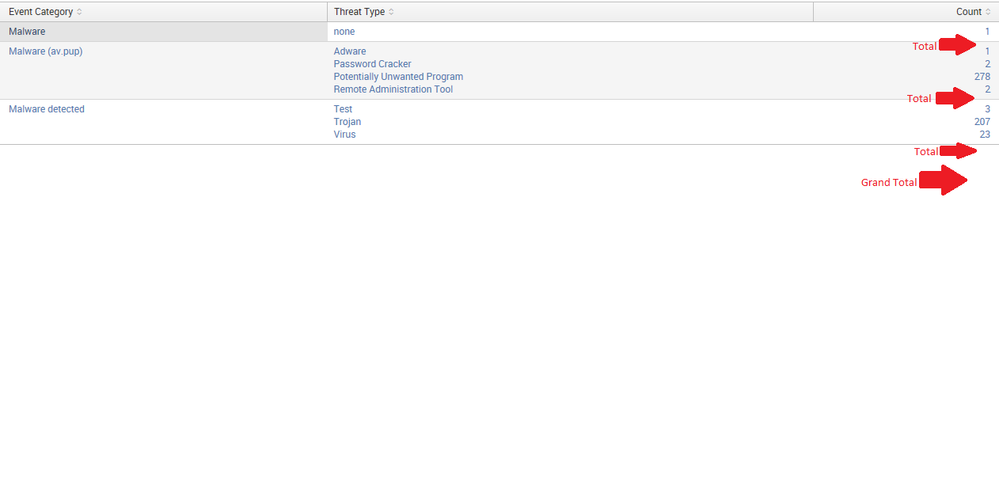
I would like to add a row, about a total (sum), for each segment list (see the picture), and if a list has only one value than there is no need to show a total. (only if possible)
here is what I got:
index="Test" |stats count by "Event Category", "Threat Type" |stats list("Threat Type") as "Threat Type" list(count) as Count by "Event Category"
Using |addtotal doesn't work at all.

- Mark as New
- Bookmark Message
- Subscribe to Message
- Mute Message
- Subscribe to RSS Feed
- Permalink
- Report Inappropriate Content
You could probably add an addcoltotals at the end of this query but haven't tested. Note the change is in the second stats command where I'm doing a sum of the count field
index="Test" |stats count by "Event Category", "Threat Type" |stats sum(count) as Total list("Threat Type") as "Threat Type" list(count) as Count by "Event Category" | where Total > 1 | sort -Total
If you want to sort the results within each section you would need to do that between the stats commands. For example
index="Test" |stats count by "Event Category", "Threat Type" | sort -count |stats sum(count) as Total list("Threat Type") as "Threat Type" list(count) as Count by "Event Category" | where Total > 1 | sort -Total
- Mark as New
- Bookmark Message
- Subscribe to Message
- Mute Message
- Subscribe to RSS Feed
- Permalink
- Report Inappropriate Content

Try something like this
index="Test" |stats count by "Event Category", "Threat Type" |stats list("Threat Type") as "Threat Type" list(count) as Count by "Event Category" | appendpipe [| stats sum(Count) as Count by "Event Category" | eventstats count as noofrows | where noofrows>1| eval "Event Category"='Event Category'."-Total" ] | appendpipe [| stats sum(Count) as Count count as noofrows | where noofrows>1 | eval "Event Category"="Grand Total" ]
- Mark as New
- Bookmark Message
- Subscribe to Message
- Mute Message
- Subscribe to RSS Feed
- Permalink
- Report Inappropriate Content
Thanks, Why I can't vote for more than one answer?
- Mark as New
- Bookmark Message
- Subscribe to Message
- Mute Message
- Subscribe to RSS Feed
- Permalink
- Report Inappropriate Content
You could probably add an addcoltotals at the end of this query but haven't tested. Note the change is in the second stats command where I'm doing a sum of the count field
index="Test" |stats count by "Event Category", "Threat Type" |stats sum(count) as Total list("Threat Type") as "Threat Type" list(count) as Count by "Event Category" | where Total > 1 | sort -Total
If you want to sort the results within each section you would need to do that between the stats commands. For example
index="Test" |stats count by "Event Category", "Threat Type" | sort -count |stats sum(count) as Total list("Threat Type") as "Threat Type" list(count) as Count by "Event Category" | where Total > 1 | sort -Total
- Mark as New
- Bookmark Message
- Subscribe to Message
- Mute Message
- Subscribe to RSS Feed
- Permalink
- Report Inappropriate Content

I tested this method and added the addtotals command...it works well enough:
index="Test"

| stats count by "Event Category", "Threat Type"

| stats sum(count) as Total list("Threat Type") as "Threat Type" list(count) as Count by "Event Category"

| addtotals col=t fieldname=Total label=TOTAL labelfield="Event Category"

| table "Event Category" "Threat Type" "Count" "Total"
- Mark as New
- Bookmark Message
- Subscribe to Message
- Mute Message
- Subscribe to RSS Feed
- Permalink
- Report Inappropriate Content
Thanks, Why I can't vote for more than one answer?

Join the Splunk Community Slack to learn, troubleshoot, and make connections with fellow Splunk practitioners in real time!
Join Splunk User Groups to connect and learn in-person by region or remotely by topic or industry.
Splunk Community Badges!
[Puzzles] Solve, Learn, Repeat: Matching cron expressions
Design, Compete, Win: Submit Your Best Splunk Dashboards for a .conf26 Pass
