
Join the Conversation
- Find Answers
- :
- Using Splunk
- :
- Splunk Search
- :
- Re: How to add tooltip for radio buttons?
- Subscribe to RSS Feed
- Mark Topic as New
- Mark Topic as Read
- Float this Topic for Current User
- Bookmark Topic
- Subscribe to Topic
- Mute Topic
- Printer Friendly Page
- Mark as New
- Bookmark Message
- Subscribe to Message
- Mute Message
- Subscribe to RSS Feed
- Permalink
- Report Inappropriate Content

Hi,
I have a radio button with 3 choice values. When any of the radio button is clicked or hovered it should show me some message. Can you please help me with the code?
Example:
When hovered/clicked on TR Details it should show message as 'TR' and similarly When hovered/clicked on TR DUE it should show message as 'DUE'
Below is my radio button code
<input type="radio" id="landscape" token="TR">
<label>Landscape</label>
<choice value="TR Details">TR Details</choice>
<choice value="TR DUE">TR DUE</choice>
<change>
<condition label="TR Details">
<set token="TR view">TR view</set>
<unset token="TR DUE">TR DUE</unset>
</condition>
<condition label="TR DUE">
<set token="TR DUE">TR DUE</set>
<unset token="TR view">TR view</unset>
</condition>
</change>
</input>
- Mark as New
- Bookmark Message
- Subscribe to Message
- Mute Message
- Subscribe to RSS Feed
- Permalink
- Report Inappropriate Content


Can you please try this?
<form script="a.js">
	<label>Radio Button tooltip</label>
	<fieldset submitButton="false">
		<input type="radio" id="landscape" token="TR">
			<label>Landscape</label>
			<choice value="TR Details">TR Details</choice>
			<choice value="TR DUE">TR DUE</choice>
			<change>
				<condition label="TR Details">
					<set token="TR view">TR view</set>
					<unset token="TR DUE">TR DUE</unset>
				</condition>
				<condition label="TR DUE">
					<set token="TR DUE">TR DUE</set>
					<unset token="TR view">TR view</unset>
				</condition>
			</change>
		</input>
	</fieldset>
</form>
a.js
require([
    'underscore',
    'jquery',
    'splunkjs/mvc',
    'splunkjs/mvc/simplexml/ready!'
], function(_, $, mvc) {
    console.log("Hie 1");
    $(document).ready(function() {
        $("#landscape label:contains('TR Details')").attr({
            "data-toggle": "tooltip",
            "data-placement": "right",
            "title": "TR"
        });
        $("#landscape label:contains('TR Details')").tooltip();

        $("#landscape label:contains('TR DUE')").attr({
            "data-toggle": "tooltip",
            "data-placement": "right",
            "title": "DUE"
        });
        $("#landscape label:contains('TR DUE')").tooltip();
    });
});
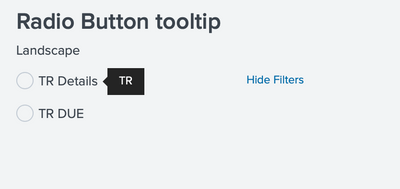
I hope this will help you.
Thanks
KV
▄︻̷̿┻̿═━一 😉
If any of my reply helps you to solve the problem Or gain knowledge, an upvote would be appreciated.
- Mark as New
- Bookmark Message
- Subscribe to Message
- Mute Message
- Subscribe to RSS Feed
- Permalink
- Report Inappropriate Content
@ITWhisperer Could you please help on this
- Mark as New
- Bookmark Message
- Subscribe to Message
- Mute Message
- Subscribe to RSS Feed
- Permalink
- Report Inappropriate Content
Can you please try this?
<form script="a.js">
	<label>Radio Button tooltip</label>
	<fieldset submitButton="false">
		<input type="radio" id="landscape" token="TR">
			<label>Landscape</label>
			<choice value="TR Details">TR Details</choice>
			<choice value="TR DUE">TR DUE</choice>
			<change>
				<condition label="TR Details">
					<set token="TR view">TR view</set>
					<unset token="TR DUE">TR DUE</unset>
				</condition>
				<condition label="TR DUE">
					<set token="TR DUE">TR DUE</set>
					<unset token="TR view">TR view</unset>
				</condition>
			</change>
		</input>
	</fieldset>
</form>
a.js
require([
    'underscore',
    'jquery',
    'splunkjs/mvc',
    'splunkjs/mvc/simplexml/ready!'
], function(_, $, mvc) {
    console.log("Hie 1");
    $(document).ready(function() {
        $("#landscape label:contains('TR Details')").attr({
            "data-toggle": "tooltip",
            "data-placement": "right",
            "title": "TR"
        });
        $("#landscape label:contains('TR Details')").tooltip();

        $("#landscape label:contains('TR DUE')").attr({
            "data-toggle": "tooltip",
            "data-placement": "right",
            "title": "DUE"
        });
        $("#landscape label:contains('TR DUE')").tooltip();
    });
});
I hope this will help you.
Thanks
KV
▄︻̷̿┻̿═━一 😉
If any of my reply helps you to solve the problem Or gain knowledge, an upvote would be appreciated.
- Mark as New
- Bookmark Message
- Subscribe to Message
- Mute Message
- Subscribe to RSS Feed
- Permalink
- Report Inappropriate Content
@kamlesh_vaghela worked perfectly 🙂

Accelerating Observability as Code with the Splunk AI Assistant
Integrating Splunk Search API and Quarto to Create Reproducible Investigation ...
Congratulations to the 2025-2026 SplunkTrust!
