
Join the Conversation
- Find Answers
- :
- Using Splunk
- :
- Splunk Search
- :
- Re: Split Group by Values
- Subscribe to RSS Feed
- Mark Topic as New
- Mark Topic as Read
- Float this Topic for Current User
- Bookmark Topic
- Subscribe to Topic
- Mute Topic
- Printer Friendly Page
- Mark as New
- Bookmark Message
- Subscribe to Message
- Mute Message
- Subscribe to RSS Feed
- Permalink
- Report Inappropriate Content

Hello, I am very new to Splunk. I am wondering how to split these two values into separate rows. The "API_Name" values are grouped but I need them separated by date. Any assistance is appreciated!
SPL:
index=...

| fields source, timestamp, a_timestamp, transaction_id, a_session_id, a_api_name, api_name, API_ID
| convert timeformat="%Y-%m-%d" ctime(_time) AS date
| eval sessionID=coalesce(a_session_id, transaction_id)
| stats values(date) as date dc(source) as cnt values(timestamp) as start_time values(a_timestamp) as end_time values(api_name) as API_Name by sessionID | where cnt>1
| eval start=strptime(start_time, "%F %T.%Q")
| eval end=strptime(end_time, "%FT%T.%Q")
| eval duration(ms)=abs((end-start)*1000)
| stats count,
perc95(duration(ms)) as 95thPercentileRespTime(ms) values(API_Name) as API_Name by date

- Mark as New
- Bookmark Message
- Subscribe to Message
- Mute Message
- Subscribe to RSS Feed
- Permalink
- Report Inappropriate Content

To group by date and api_name, you put both in groupby clause, right?
index=...

| fields source, timestamp, a_timestamp, transaction_id, a_session_id, a_api_name, api_name, API_ID
| convert timeformat="%Y-%m-%d" ctime(_time) AS date
| eval sessionID=coalesce(a_session_id, transaction_id)
| stats values(date) as date dc(source) as cnt values(timestamp) as start_time values(a_timestamp) as end_time values(api_name) as API_Name by sessionID | where cnt>1
| eval start=strptime(start_time, "%F %T.%Q")
| eval end=strptime(end_time, "%FT%T.%Q")
| eval duration(ms)=abs((end-start)*1000)
| stats count, perc95(duration(ms)) as 95thPercentileRespTime(ms) by date API_Name
Does this give you what you expect?
- Mark as New
- Bookmark Message
- Subscribe to Message
- Mute Message
- Subscribe to RSS Feed
- Permalink
- Report Inappropriate Content
Your screenshot shows two values under "date", meaning that your last stats command is working to separate values by date. Can you explain why this is not meeting your requirement? In other words, what exact output are you expecting?
- Mark as New
- Bookmark Message
- Subscribe to Message
- Mute Message
- Subscribe to RSS Feed
- Permalink
- Report Inappropriate Content
Hello, I am looking to separate by date and API_Name. I am looking for something like the below. I need a count and 95thPercentileRespTime(ms) specifically for accountstatements-v1 and a count and 95thPercentileRespTime(ms) specifically for Realtime_Image_Access_Service_V2 organized by date.
| date | count | 95thPercentileRespTime(ms) | API_Name |
| 2022-11-05 | x | x | accountstatements-v1 |
| 2022-11-06 | x | x | Realtime_Image_Access_Service_V2 |
| 2022-11-06 | x | x | accountstatements-v1 |
- Mark as New
- Bookmark Message
- Subscribe to Message
- Mute Message
- Subscribe to RSS Feed
- Permalink
- Report Inappropriate Content
To group by date and api_name, you put both in groupby clause, right?
index=...

| fields source, timestamp, a_timestamp, transaction_id, a_session_id, a_api_name, api_name, API_ID
| convert timeformat="%Y-%m-%d" ctime(_time) AS date
| eval sessionID=coalesce(a_session_id, transaction_id)
| stats values(date) as date dc(source) as cnt values(timestamp) as start_time values(a_timestamp) as end_time values(api_name) as API_Name by sessionID | where cnt>1
| eval start=strptime(start_time, "%F %T.%Q")
| eval end=strptime(end_time, "%FT%T.%Q")
| eval duration(ms)=abs((end-start)*1000)
| stats count, perc95(duration(ms)) as 95thPercentileRespTime(ms) by date API_Name
Does this give you what you expect?
- Mark as New
- Bookmark Message
- Subscribe to Message
- Mute Message
- Subscribe to RSS Feed
- Permalink
- Report Inappropriate Content
I get an error even if I use a comma between: date, API_Name.
- Mark as New
- Bookmark Message
- Subscribe to Message
- Mute Message
- Subscribe to RSS Feed
- Permalink
- Report Inappropriate Content
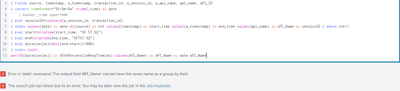
It does not unfortunately. I get errors:
- Mark as New
- Bookmark Message
- Subscribe to Message
- Mute Message
- Subscribe to RSS Feed
- Permalink
- Report Inappropriate Content
You didn't try the command in my post; it doesn't contain values(API_Name). (Whether you use comma or not is immaterial.)
- Mark as New
- Bookmark Message
- Subscribe to Message
- Mute Message
- Subscribe to RSS Feed
- Permalink
- Report Inappropriate Content
Apologies! You are correct. I had a typo. This works perfectly! Thank you very much yuanliu!!


Join the Splunk Community Slack to learn, troubleshoot, and make connections with fellow Splunk practitioners in real time!
Join Splunk User Groups to connect and learn in-person by region or remotely by topic or industry.
Cisco Data Fabric from Architecture to Investigation, Better SOC Visibility, and More ...
The Trust Gap: Why a Data Foundation is Fundamental to an Agentic Enterprise
Data Management Digest – September 2026
