
Join the Conversation
- Find Answers
- :
- Using Splunk
- :
- Splunk Search
- :
- How to Drilldown stacked column chart to a table?
- Subscribe to RSS Feed
- Mark Topic as New
- Mark Topic as Read
- Float this Topic for Current User
- Bookmark Topic
- Subscribe to Topic
- Mute Topic
- Printer Friendly Page
- Mark as New
- Bookmark Message
- Subscribe to Message
- Mute Message
- Subscribe to RSS Feed
- Permalink
- Report Inappropriate Content
How to Drilldown stacked column chart to a table?

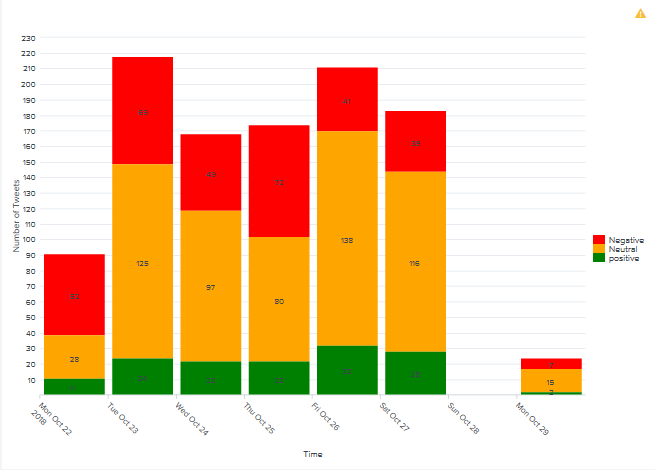
Hi All,
I need to show a drilldown report when user clicks on any of the column bar. Each bar has 3 sentiments (Positive, Negative and Neutral). The field1 is time and field2 is Sentiment. If i use the below code
<set token="selected.levels">$click.name2$</set>
It takes the fieldname "Sentiment", but not the clicked name (Expected value is either Positive, Negative or Neutral). How to get drilldown for this case?

- Mark as New
- Bookmark Message
- Subscribe to Message
- Mute Message
- Subscribe to RSS Feed
- Permalink
- Report Inappropriate Content

@aravindpadmin ,
These are the tokens available for the chart - http://docs.splunk.com/Documentation/Splunk/7.2.0/Viz/PanelreferenceforSimplifiedXML#Predefined_dril...
If click.name2 is not working for you, would you mind sharing the last part (chart part) of your search to see how you are plotting it.
For e.g. In below stacked bar chart, click.name2 gives me sourcetype name.
  <row>
    <panel>
      <title>$sourcetype$</title>
      <chart>
        <search>
          <query>index=_*|timechart span=5m count by sourcetype</query>
          <earliest>-15m</earliest>
          <latest>now</latest>
          <sampleRatio>1</sampleRatio>
        </search>
        <option name="charting.axisLabelsX.majorLabelStyle.overflowMode">ellipsisNone</option>
        <option name="charting.axisLabelsX.majorLabelStyle.rotation">0</option>
        <option name="charting.axisTitleX.visibility">visible</option>
        <option name="charting.axisTitleY.visibility">visible</option>
        <option name="charting.axisTitleY2.visibility">visible</option>
        <option name="charting.axisX.abbreviation">none</option>
        <option name="charting.axisX.scale">linear</option>
        <option name="charting.axisY.abbreviation">none</option>
        <option name="charting.axisY.scale">linear</option>
        <option name="charting.axisY2.abbreviation">none</option>
        <option name="charting.axisY2.enabled">0</option>
        <option name="charting.axisY2.scale">inherit</option>
        <option name="charting.chart">column</option>
        <option name="charting.chart.bubbleMaximumSize">50</option>
        <option name="charting.chart.bubbleMinimumSize">10</option>
        <option name="charting.chart.bubbleSizeBy">area</option>
        <option name="charting.chart.nullValueMode">gaps</option>
        <option name="charting.chart.showDataLabels">none</option>
        <option name="charting.chart.sliceCollapsingThreshold">0.01</option>
        <option name="charting.chart.stackMode">stacked</option>
        <option name="charting.chart.style">shiny</option>
        <option name="charting.drilldown">all</option>
        <option name="charting.layout.splitSeries">0</option>
        <option name="charting.layout.splitSeries.allowIndependentYRanges">0</option>
        <option name="charting.legend.labelStyle.overflowMode">ellipsisMiddle</option>
        <option name="charting.legend.mode">standard</option>
        <option name="charting.legend.placement">right</option>
        <option name="charting.lineWidth">2</option>
        <option name="trellis.enabled">0</option>
        <option name="trellis.scales.shared">1</option>
        <option name="trellis.size">medium</option>
        <drilldown>
          <set token="sourcetype">$click.name2$</set>
        </drilldown>
      </chart>
    </panel>
  </row>
What goes around comes around. If it helps, hit it with Karma 🙂
- Mark as New
- Bookmark Message
- Subscribe to Message
- Mute Message
- Subscribe to RSS Feed
- Permalink
- Report Inappropriate Content
$click.name2$ should give you the results. Is your timechart command something like this...timechart count by Sentiment, then $click.name2$ should give you value of Positive Negative Neutral
- Mark as New
- Bookmark Message
- Subscribe to Message
- Mute Message
- Subscribe to RSS Feed
- Permalink
- Report Inappropriate Content
@Vijeta , thanks for your response. $click.name2$ gives field name i.,e Sentiment. This Sentiment can be either Positive or Negative or Neutral. Any idea how to get these field's?
Thanks in advance
- Mark as New
- Bookmark Message
- Subscribe to Message
- Mute Message
- Subscribe to RSS Feed
- Permalink
- Report Inappropriate Content

if you want the value of the click.name2 field use $click.value2$ which would hold your Positive, Negative or Neutral
- Mark as New
- Bookmark Message
- Subscribe to Message
- Mute Message
- Subscribe to RSS Feed
- Permalink
- Report Inappropriate Content
$click.value2$ gets count of Positive or Negative or Neutral. So above mentioned solution is not going to work.

.conf25 technical session recap of Observability for Gen AI: Monitoring LLM ...
A Season of Skills: New Splunk Courses to Light Up Your Learning Journey
Announcing the Migration of the Splunk Add-on for Microsoft Azure Inputs to ...
