
Join the Conversation
- Find Answers
- :
- Using Splunk
- :
- Splunk Search
- :
- Re: How scheduling works?
- Subscribe to RSS Feed
- Mark Topic as New
- Mark Topic as Read
- Float this Topic for Current User
- Bookmark Topic
- Subscribe to Topic
- Mute Topic
- Printer Friendly Page
- Mark as New
- Bookmark Message
- Subscribe to Message
- Mute Message
- Subscribe to RSS Feed
- Permalink
- Report Inappropriate Content

Hi,
I have a scheduled search that runs every 1 minute and it searches events on last 1 minute.
Will this search cover all future events?
If the search could start (for example) at 5:07:05 and than at 5:08:07 - are the data from (5:07:05 - 5:07:07) lost?
- Mark as New
- Bookmark Message
- Subscribe to Message
- Mute Message
- Subscribe to RSS Feed
- Permalink
- Report Inappropriate Content

Hi lukasz92,
there is a solution to your problem.
Try to apply the following settings to your alert
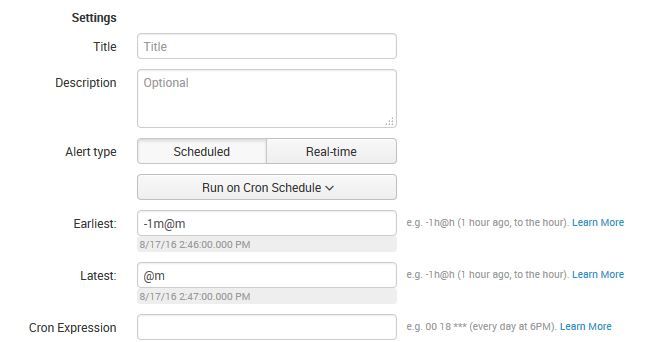
This will asure, that everything from 02:46:00 to 02:47:00 is covered. The alert is able to run between 02:47:00 and 02:47:59 and will still catch the data.
BUT, splunk takes time to index data... so data that reaches the machine on 02:46:59 might not be indexed by 02:47:00... so you should try to make like a little "window" for your alert to run in... do that in the Cron-Expression field.

- Mark as New
- Bookmark Message
- Subscribe to Message
- Mute Message
- Subscribe to RSS Feed
- Permalink
- Report Inappropriate Content
Hi lukasz92,
there is a solution to your problem.
Try to apply the following settings to your alert
This will asure, that everything from 02:46:00 to 02:47:00 is covered. The alert is able to run between 02:47:00 and 02:47:59 and will still catch the data.
BUT, splunk takes time to index data... so data that reaches the machine on 02:46:59 might not be indexed by 02:47:00... so you should try to make like a little "window" for your alert to run in... do that in the Cron-Expression field.
- Mark as New
- Bookmark Message
- Subscribe to Message
- Mute Message
- Subscribe to RSS Feed
- Permalink
- Report Inappropriate Content
it is a great solution. I have not thought about "@m".
Thanks!
- Mark as New
- Bookmark Message
- Subscribe to Message
- Mute Message
- Subscribe to RSS Feed
- Permalink
- Report Inappropriate Content
Glad to help! 🙂
- Mark as New
- Bookmark Message
- Subscribe to Message
- Mute Message
- Subscribe to RSS Feed
- Permalink
- Report Inappropriate Content


What are you trying to accomplish with your scheduled search? Do you have an alert tied to this scheduled search?
You set the time window for 1 minute, so technically the data is not "lost", but the data is not available in your 1 minute window if it's older than 1 minute
- Mark as New
- Bookmark Message
- Subscribe to Message
- Mute Message
- Subscribe to RSS Feed
- Permalink
- Report Inappropriate Content
Yes, Something like searching for custom events and alerting.
Technically I agree and understand - my question was about practice: how this does actually work.

A Season of Skills: New Splunk Courses to Light Up Your Learning Journey
Announcing the Migration of the Splunk Add-on for Microsoft Azure Inputs to ...
Splunk Observability for AI
