
Turn on suggestions
Auto-suggest helps you quickly narrow down your search results by suggesting possible matches as you type.
Splunk Search
×
Join the Conversation
Without signing in, you're just watching from the sidelines. Sign in or Register to connect, share, and be part of the Splunk Community.
- Find Answers
- :
- Using Splunk
- :
- Splunk Search
- :
- How do you extract multiline fields based on a dif...
Options
- Subscribe to RSS Feed
- Mark Topic as New
- Mark Topic as Read
- Float this Topic for Current User
- Bookmark Topic
- Subscribe to Topic
- Mute Topic
- Printer Friendly Page
- Mark as New
- Bookmark Message
- Subscribe to Message
- Mute Message
- Subscribe to RSS Feed
- Permalink
- Report Inappropriate Content

AKG1_old1
Builder
01-21-2019
07:31 AM
Hi,
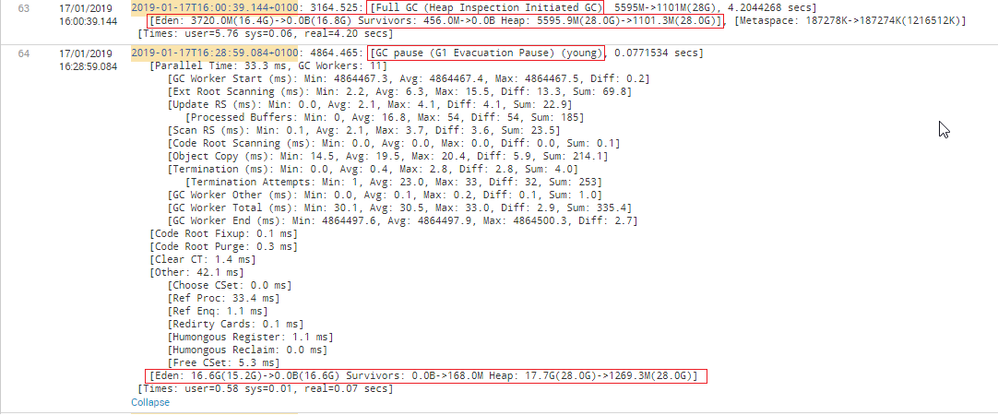
I am looking to extract fields from multi line events. I have two different types of events. I'm looking to distinguish based of matching string.
Type 1:
Matching String = Full GC
Type 2:
Matching String = GC Pause
In both events, I need to extract the same details.
[Eden: 114.0M(114.0M)->0.0B(111.0M) Survivors: 11.0M->12.0M Heap: 231.3M(270.0M)->118.7M(270.0M)]
Sample Data:
2019-01-17T15:59:28.172+0100: 3093.554: [GC pause (G1 Evacuation Pause) (young), 0.1252055 secs]
   [Parallel Time: 69.7 ms, GC Workers: 11]
      [GC Worker Start (ms): Min: 3093555.2, Avg: 3093558.8, Max: 3093566.0, Diff: 10.8]
      [Ext Root Scanning (ms): Min: 0.0, Avg: 1.6, Max: 8.4, Diff: 8.4, Sum: 17.4]
      [Update RS (ms): Min: 0.0, Avg: 1.1, Max: 2.3, Diff: 2.3, Sum: 12.0]
         [Processed Buffers: Min: 0, Avg: 7.5, Max: 33, Diff: 33, Sum: 83]
      [Scan RS (ms): Min: 0.2, Avg: 1.7, Max: 2.8, Diff: 2.6, Sum: 18.9]
      [Code Root Scanning (ms): Min: 0.0, Avg: 0.9, Max: 9.0, Diff: 9.0, Sum: 9.8]
      [Object Copy (ms): Min: 53.7, Avg: 60.6, Max: 63.1, Diff: 9.4, Sum: 666.4]
      [Termination (ms): Min: 0.0, Avg: 0.0, Max: 0.0, Diff: 0.0, Sum: 0.0]
         [Termination Attempts: Min: 1, Avg: 1.0, Max: 1, Diff: 0, Sum: 11]
      [GC Worker Other (ms): Min: 0.0, Avg: 0.1, Max: 0.1, Diff: 0.1, Sum: 0.9]
      [GC Worker Total (ms): Min: 58.8, Avg: 65.9, Max: 69.6, Diff: 10.8, Sum: 725.4]
      [GC Worker End (ms): Min: 3093624.7, Avg: 3093624.7, Max: 3093624.8, Diff: 0.1]
   [Code Root Fixup: 0.2 ms]
   [Code Root Purge: 0.1 ms]
   [Clear CT: 1.3 ms]
   [Other: 54.0 ms]
      [Choose CSet: 0.0 ms]
      [Ref Proc: 44.6 ms]
      [Ref Enq: 1.0 ms]
      [Redirty Cards: 0.4 ms]
      [Humongous Register: 1.1 ms]
      [Humongous Reclaim: 0.0 ms]
      [Free CSet: 6.1 ms]
   [Eden: 16.5G(16.5G)->0.0B(16.4G) Survivors: 272.0M->456.0M Heap: 18.2G(28.0G)->1871.9M(28.0G)]
 [Times: user=1.22 sys=0.03, real=0.12 secs]
2019-01-17T16:00:39.144+0100: 3164.525: [Full GC (Heap Inspection Initiated GC)  5595M->1101M(28G), 4.2044268 secs]
   [Eden: 3720.0M(16.4G)->0.0B(16.8G) Survivors: 456.0M->0.0B Heap: 5595.9M(28.0G)->1101.3M(28.0G)], [Metaspace: 187278K->187274K(1216512K)]
 [Times: user=5.76 sys=0.06, real=4.20 secs]
1 Solution
- Mark as New
- Bookmark Message
- Subscribe to Message
- Mute Message
- Subscribe to RSS Feed
- Permalink
- Report Inappropriate Content

harsmarvania57
Ultra Champion
01-21-2019
07:49 AM
Hi,
Can you please try this?
<yourBaseSearch> | rex field=_raw "(?s)(?:GC\spause|Full\sGC).*\[Eden\:\s(?<extracted_field>[^\]]*)"
- Mark as New
- Bookmark Message
- Subscribe to Message
- Mute Message
- Subscribe to RSS Feed
- Permalink
- Report Inappropriate Content

woodcock
Esteemed Legend
01-21-2019
08:11 AM
Use this RegEx:
:\s+\d+\.\d+:\s+\[(?<matching_string>\w+\s+\w+)
See here:
https://regex101.com/r/NUVWoD/1
- Mark as New
- Bookmark Message
- Subscribe to Message
- Mute Message
- Subscribe to RSS Feed
- Permalink
- Report Inappropriate Content
harsmarvania57
Ultra Champion
01-21-2019
07:49 AM
Hi,
Can you please try this?
<yourBaseSearch> | rex field=_raw "(?s)(?:GC\spause|Full\sGC).*\[Eden\:\s(?<extracted_field>[^\]]*)"
- Mark as New
- Bookmark Message
- Subscribe to Message
- Mute Message
- Subscribe to RSS Feed
- Permalink
- Report Inappropriate Content
harsmarvania57
Ultra Champion
01-21-2019
07:43 AM
It will be good if you provide some sample data instead of screenshot.
- Mark as New
- Bookmark Message
- Subscribe to Message
- Mute Message
- Subscribe to RSS Feed
- Permalink
- Report Inappropriate Content
AKG1_old1
Builder
01-21-2019
07:54 AM
@harsmarvania57 : added sample data to question.
- Mark as New
- Bookmark Message
- Subscribe to Message
- Mute Message
- Subscribe to RSS Feed
- Permalink
- Report Inappropriate Content
harsmarvania57
Ultra Champion
01-21-2019
07:57 AM
Can you please try regex which I have provided ?
- Mark as New
- Bookmark Message
- Subscribe to Message
- Mute Message
- Subscribe to RSS Feed
- Permalink
- Report Inappropriate Content
AKG1_old1
Builder
01-21-2019
08:01 AM
yeap, I 'll try that. regex looks fine to me havn't tried it Splunk will try and update you. Thank you 🙂



Got questions? Get answers!
Join the Splunk Community Slack to learn, troubleshoot, and make connections with fellow Splunk practitioners in real time!
Meet up IRL or virtually!
Join Splunk User Groups to connect and learn in-person by region or remotely by topic or industry.
Get Updates on the Splunk Community!
A Four-Part Event Series: Full Stack Observability For the AI Era
As AI reshapes applications, infrastructure, and the way teams operate, the traditional boundaries of ...
SOC4Kafka - New Kafka Connector Powered by OpenTelemetry
The new SOC4Kafka connector, built on OpenTelemetry, enables the collection of Kafka messages and forwards ...
Event Series: Level up your SOC: Advancing with Splunk Enterprise Security
AI has fundamentally raised the stakes for security operations, and this three-part series is your guide to ...
