
Join the Conversation
- Find Answers
- :
- Using Splunk
- :
- Splunk Search
- :
- How do I write the regex to properly extract all a...
- Subscribe to RSS Feed
- Mark Topic as New
- Mark Topic as Read
- Float this Topic for Current User
- Bookmark Topic
- Subscribe to Topic
- Mute Topic
- Printer Friendly Page
- Mark as New
- Bookmark Message
- Subscribe to Message
- Mute Message
- Subscribe to RSS Feed
- Permalink
- Report Inappropriate Content

Hi,
I need to extract attack names from Fortigate logs. All attack logs are the same, but only a few are correctly extracted.
As you can see below, the two first attack fields are correctly extracted with "WebRTC..." but the other with "Nuclear.exploit.Kit" or "OpenSSL.ChangeCipher.Injection" are not detected.
I tried to manually extract the fields using regex, but I didn't succeed using the extract command.
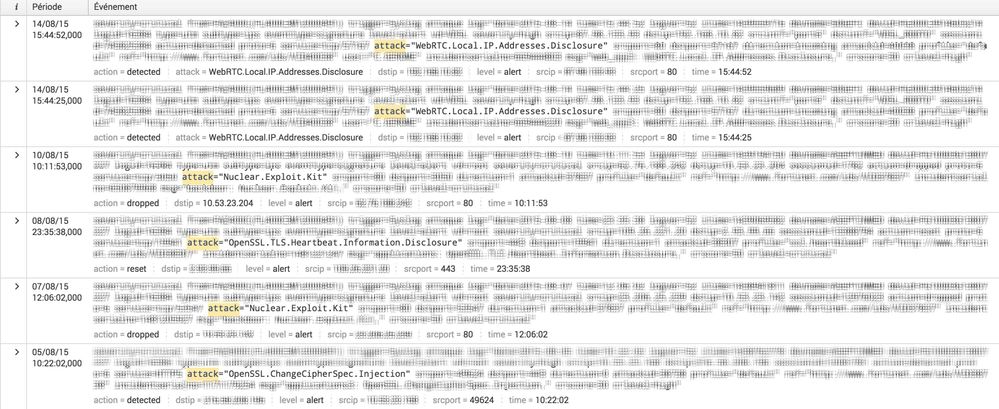
Thanks for help 😉

- Mark as New
- Bookmark Message
- Subscribe to Message
- Mute Message
- Subscribe to RSS Feed
- Permalink
- Report Inappropriate Content

Try something like this for start
your base search | rex field=_raw "attack=\"(?<attack>[^\"]+)\"" | rest of the search
Once this works, you can save this field extraction by Splunk web (Settings->Fields->Field extractions) OR props.conf within the app.
- Mark as New
- Bookmark Message
- Subscribe to Message
- Mute Message
- Subscribe to RSS Feed
- Permalink
- Report Inappropriate Content
Try something like this for start
your base search | rex field=_raw "attack=\"(?<attack>[^\"]+)\"" | rest of the search
Once this works, you can save this field extraction by Splunk web (Settings->Fields->Field extractions) OR props.conf within the app.
- Mark as New
- Bookmark Message
- Subscribe to Message
- Mute Message
- Subscribe to RSS Feed
- Permalink
- Report Inappropriate Content
Whoo! Amazing, thanks !
It's work perfectly
i'll try to understand this regex !
- Mark as New
- Bookmark Message
- Subscribe to Message
- Mute Message
- Subscribe to RSS Feed
- Permalink
- Report Inappropriate Content


What is the regex string you're using?
If this reply helps you, Karma would be appreciated.
- Mark as New
- Bookmark Message
- Subscribe to Message
- Mute Message
- Subscribe to RSS Feed
- Permalink
- Report Inappropriate Content
I use auto extract by default, all selected field are correctly extract except attack.
I try "extract new fields" in the bottom of the left column in event tab.
I manualy select attack="values" or just the values but i can't get all attack values been extract.
I need attack="*"

Data Management Digest – December 2025
Index This | What is broken 80% of the time by February?
Unlock Faster Time-to-Value on Edge and Ingest Processor with New SPL2 Pipeline ...
