
Turn on suggestions
Auto-suggest helps you quickly narrow down your search results by suggesting possible matches as you type.
Splunk Search
×
Join the Conversation
Without signing in, you're just watching from the sidelines. Sign in or Register to connect, share, and be part of the Splunk Community.
Turn on suggestions
Auto-suggest helps you quickly narrow down your search results by suggesting possible matches as you type.
- Find Answers
- :
- Using Splunk
- :
- Splunk Search
- :
- How do I use rex to extract filenames from UNC pat...
Options
- Subscribe to RSS Feed
- Mark Topic as New
- Mark Topic as Read
- Float this Topic for Current User
- Bookmark Topic
- Subscribe to Topic
- Mute Topic
- Printer Friendly Page
- Mark as New
- Bookmark Message
- Subscribe to Message
- Mute Message
- Subscribe to RSS Feed
- Permalink
- Report Inappropriate Content

mrgibbon
Contributor
06-09-2016
10:21 PM
Hi All,
I've looked at quite a few answers to this issue and none seem to work for me.
Data Sample:
\\BLAH01\BLAH\ACN\BLAH\Dataline\PARADOX.LCK
\\BLAH01\Group\BLAH\ACN\BLAH\Dataline\PARADOX.LCK
\\BLAH01\Groups\BLAH\ACN\BLAH\Dataline\PARADOX.LCK
\\BLAH02\BLAH\documents\BLAH\Documents\Virtual Machines\coreos\coreos.vmx
\\BLAH02\BLAH\documents\BLAH\Documents\Virtual Machines\Windows XP Professional x64 Edition\Windows XP Professional x64 Edition.vmx
\\BLAH02\BLAH\documents\BLAH\Documents\Virtual Machines\Windows XP Professional x64 Edition\Windows XP Professional x64 Edition.nvram
\\BLAH02\BLAH\x\BLAH\VMware\VMware_Horizon6\ACP!5C!s_BLAH.vmdk
\\BLAH02\BLAH\RAMS\$Research\BLAH\ACN\BLAH\Dataline\PARADOX.LCK
\\BLAH02\BLAH\Fil01\e_ev\Group\BLAH\Backups\Copy of BLAH\index.asp.LCK
\\BLAH02\BLAH\Fil01\d_ev\Users\BLAH\old pc files\BLAH\Local Settings\Application Data\Microsoft\Silverlight\mssl.lck
I just need a simple rex to pull out the filenames.
It should be easy, but it's taking me forever.
Can anyone help?
Thanks in advance.
1 Solution
- Mark as New
- Bookmark Message
- Subscribe to Message
- Mute Message
- Subscribe to RSS Feed
- Permalink
- Report Inappropriate Content

javiergn
Super Champion
06-10-2016
12:01 AM
See if the following helps:
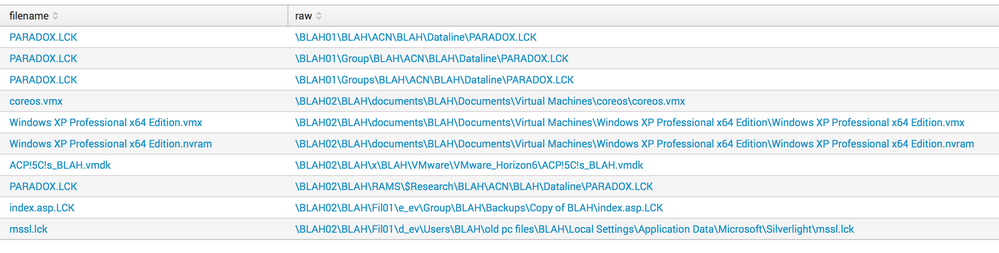
| rex field=yourfieldname "(?<filename>[^\\\]+$)"
Example:
| stats count | fields - count
| eval raw = "
\\BLAH01\BLAH\ACN\BLAH\Dataline\PARADOX.LCK;
\\BLAH01\Group\BLAH\ACN\BLAH\Dataline\PARADOX.LCK;
\\BLAH01\Groups\BLAH\ACN\BLAH\Dataline\PARADOX.LCK;
\\BLAH02\BLAH\documents\BLAH\Documents\Virtual Machines\coreos\coreos.vmx;
\\BLAH02\BLAH\documents\BLAH\Documents\Virtual Machines\Windows XP Professional x64 Edition\Windows XP Professional x64 Edition.vmx;
\\BLAH02\BLAH\documents\BLAH\Documents\Virtual Machines\Windows XP Professional x64 Edition\Windows XP Professional x64 Edition.nvram;
\\BLAH02\BLAH\x\BLAH\VMware\VMware_Horizon6\ACP!5C!s_BLAH.vmdk;
\\BLAH02\BLAH\RAMS\$Research\BLAH\ACN\BLAH\Dataline\PARADOX.LCK;
\\BLAH02\BLAH\Fil01\e_ev\Group\BLAH\Backups\Copy of BLAH\index.asp.LCK;
\\BLAH02\BLAH\Fil01\d_ev\Users\BLAH\old pc files\BLAH\Local Settings\Application Data\Microsoft\Silverlight\mssl.lck
"
| makemv delim=";" raw
| mvexpand raw
| rex field=raw "(?<filename>[^\\\]+$)"
Output: see picture

- Mark as New
- Bookmark Message
- Subscribe to Message
- Mute Message
- Subscribe to RSS Feed
- Permalink
- Report Inappropriate Content
javiergn
Super Champion
06-10-2016
12:01 AM
See if the following helps:
| rex field=yourfieldname "(?<filename>[^\\\]+$)"
Example:
| stats count | fields - count
| eval raw = "
\\BLAH01\BLAH\ACN\BLAH\Dataline\PARADOX.LCK;
\\BLAH01\Group\BLAH\ACN\BLAH\Dataline\PARADOX.LCK;
\\BLAH01\Groups\BLAH\ACN\BLAH\Dataline\PARADOX.LCK;
\\BLAH02\BLAH\documents\BLAH\Documents\Virtual Machines\coreos\coreos.vmx;
\\BLAH02\BLAH\documents\BLAH\Documents\Virtual Machines\Windows XP Professional x64 Edition\Windows XP Professional x64 Edition.vmx;
\\BLAH02\BLAH\documents\BLAH\Documents\Virtual Machines\Windows XP Professional x64 Edition\Windows XP Professional x64 Edition.nvram;
\\BLAH02\BLAH\x\BLAH\VMware\VMware_Horizon6\ACP!5C!s_BLAH.vmdk;
\\BLAH02\BLAH\RAMS\$Research\BLAH\ACN\BLAH\Dataline\PARADOX.LCK;
\\BLAH02\BLAH\Fil01\e_ev\Group\BLAH\Backups\Copy of BLAH\index.asp.LCK;
\\BLAH02\BLAH\Fil01\d_ev\Users\BLAH\old pc files\BLAH\Local Settings\Application Data\Microsoft\Silverlight\mssl.lck
"
| makemv delim=";" raw
| mvexpand raw
| rex field=raw "(?<filename>[^\\\]+$)"
Output: see picture
- Mark as New
- Bookmark Message
- Subscribe to Message
- Mute Message
- Subscribe to RSS Feed
- Permalink
- Report Inappropriate Content
mrgibbon
Contributor
06-10-2016
02:11 AM
That is 400 different types of awesome!
Thanks so much!
:)
- Mark as New
- Bookmark Message
- Subscribe to Message
- Mute Message
- Subscribe to RSS Feed
- Permalink
- Report Inappropriate Content
mrgibbon
Contributor
06-10-2016
02:13 AM
Is there a way of getting the path without the filename on the end? 🙂
- Mark as New
- Bookmark Message
- Subscribe to Message
- Mute Message
- Subscribe to RSS Feed
- Permalink
- Report Inappropriate Content
javiergn
Super Champion
06-10-2016
04:09 AM
Yes, try this:
| rex field=yourfieldname "(?<path>.+)\\\(?<filename>[^\\\]+$)"
Keep in mind Splunk is replacing the double backslash with single backslash on my example, but the principle is the same anyway.

Get Updates on the Splunk Community!
A Season of Skills: New Splunk Courses to Light Up Your Learning Journey
There’s something special about this time of year—maybe it’s the glow of the holidays, maybe it’s the ...
Announcing the Migration of the Splunk Add-on for Microsoft Azure Inputs to ...
Announcing the Migration of the Splunk Add-on for Microsoft Azure Inputs to Officially Supported Splunk ...
Splunk Observability for AI
Don’t miss out on an exciting Tech Talk on Splunk Observability for AI!
Discover how Splunk’s agentic AI ...
