
Join the Conversation
- Find Answers
- :
- Using Splunk
- :
- Splunk Search
- :
- How do I prevent milliseconds from displaying in t...
- Subscribe to RSS Feed
- Mark Topic as New
- Mark Topic as Read
- Float this Topic for Current User
- Bookmark Topic
- Subscribe to Topic
- Mute Topic
- Printer Friendly Page
- Mark as New
- Bookmark Message
- Subscribe to Message
- Mute Message
- Subscribe to RSS Feed
- Permalink
- Report Inappropriate Content
How do I prevent milliseconds from displaying in the _time field in search results?

Hello everyone !
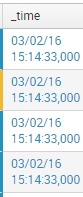
I would like my search results to not display milliseconds in the _time field in the Search app, because it's useless for me. Example, I have 15:14:33:000 and I want 15:14:33.
Thank you so much for your answer.

- Mark as New
- Bookmark Message
- Subscribe to Message
- Mute Message
- Subscribe to RSS Feed
- Permalink
- Report Inappropriate Content

You can set the time to your favourite format
your search |eval _time=strftime(_time,"%d/%m/%Y %H:%M:%S")
You can set it permanent in props.conf if you don't care about millisecond precision in your searches
http://docs.splunk.com/Documentation/Splunk/6.3.2/Data/Configuretimestamprecognition
[<spec>]
TIME_FORMAT = %d/%m/%Y %H:%M:%S
What goes around comes around. If it helps, hit it with Karma 🙂
- Mark as New
- Bookmark Message
- Subscribe to Message
- Mute Message
- Subscribe to RSS Feed
- Permalink
- Report Inappropriate Content
Thank you for your answer, but when I write your command, I have :
NaN/NaN/0NaN
NaN:NaN:NaN.000
After personalize, it's same problem...
- Mark as New
- Bookmark Message
- Subscribe to Message
- Mute Message
- Subscribe to RSS Feed
- Permalink
- Report Inappropriate Content
Try your search|eval Time=strftime(_time,"%d/%m/%Y %H:%M:%S") |table Time , "other fields"
What goes around comes around. If it helps, hit it with Karma 🙂
- Mark as New
- Bookmark Message
- Subscribe to Message
- Mute Message
- Subscribe to RSS Feed
- Permalink
- Report Inappropriate Content
Thanks you so much ! It's work !
But when I write in /opt/splunk/etc/apps/search/local/props.conf
[]
TIME_FORMAT = %d/%m/%Y %H:%M:%S
It's not work... I restart Splunk, wait +12h and it's not ok...
- Mark as New
- Bookmark Message
- Subscribe to Message
- Mute Message
- Subscribe to RSS Feed
- Permalink
- Report Inappropriate Content
Sorry you can ignore this part and remove this settings. This is for extracting the timestamp from your event(initially i thought so). Since your timestamp extraction is fine you don't need this.
Please see here :http://docs.splunk.com/Documentation/Splunk/6.3.2/Data/Configuretimestamprecognition#Reconfigure_how...
What goes around comes around. If it helps, hit it with Karma 🙂

Join the Splunk Community Slack to learn, troubleshoot, and make connections with fellow Splunk practitioners in real time!
Join Splunk User Groups to connect and learn in-person by region or remotely by topic or industry.
[Puzzles] Solve, Learn, Repeat: Matching cron expressions
Design, Compete, Win: Submit Your Best Splunk Dashboards for a .conf26 Pass
May 2026 Splunk Expert Sessions: Security & Observability
