
Join the Conversation
- Find Answers
- :
- Using Splunk
- :
- Splunk Search
- :
- How do I get the total and percentage on each row ...
- Subscribe to RSS Feed
- Mark Topic as New
- Mark Topic as Read
- Float this Topic for Current User
- Bookmark Topic
- Subscribe to Topic
- Mute Topic
- Printer Friendly Page
- Mark as New
- Bookmark Message
- Subscribe to Message
- Mute Message
- Subscribe to RSS Feed
- Permalink
- Report Inappropriate Content

Hello there,
My current code is giving me the following (if the screenshot is not clear, I provide the numbers later on):
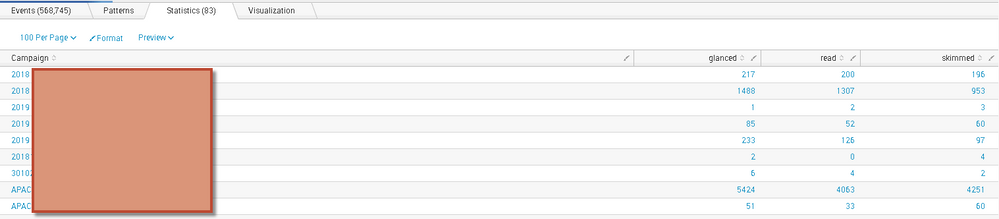
By each row or 'campaign', it shows the counts of events that fell in each of the 3 buckets (i.e. 'glanced', 'read','skimmed'). The value of field "read_category" has the 3 buckets.
In the above picture, here are the numbers if the picture is blurry:
-First Campaign: glanced = 217, read=200, skimmed=196
-Second Campaign: glanced=1488, read = 1307, skimmed = 953
I would now like to add % on each row by bucket for the row. The sum of percentages on each row should add to 100%. Something like this:
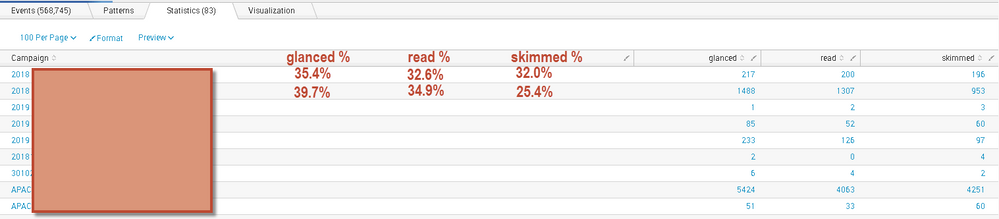
How can I achieve this? I would appreciate any help. Thanks in advance!
My current code is:
sourcetype="xxx" source="yyy.log"

| eval read_category = case (
     duration < 3,"glanced",
     duration > 8, "read",
     duration >= 3 AND duration <= 8, "skimmed"
     )
| lookup cml_campaign_lookup_2018_12_11.csv deliveryid OUTPUT Campaign, sent_date
| table  deliveryid, user, duration, clientIP, read_category, Campaign, sent_date
| chart count as total over Campaign by read_category
- Mark as New
- Bookmark Message
- Subscribe to Message
- Mute Message
- Subscribe to RSS Feed
- Permalink
- Report Inappropriate Content

try this
 sourcetype="xxx" source="yyy.log"
 | eval read_category = case (
      duration < 3,"glanced",
      duration > 8, "read",
      duration >= 3 AND duration <= 8, "skimmed"
      )
 | lookup cml_campaign_lookup_2018_12_11.csv deliveryid OUTPUT Campaign, sent_date
 | table  deliveryid, user, duration, clientIP, read_category, Campaign, sent_date
 | chart count as total over Campaign by read_category
 | eval totcount=glanced + read + skimmed
 | eval glancedperc = glanced/totcount*100
 | eval readperc = read/totcount*100
 | eval skimmedperc = skimmed/totcount*100
 | fields - totcount
- Mark as New
- Bookmark Message
- Subscribe to Message
- Mute Message
- Subscribe to RSS Feed
- Permalink
- Report Inappropriate Content

try and run this anywhere:
| makeresults count=300
| eval campaign = "campaign1;;;campaign2"
| makemv  delim=";;;" campaign
| mvexpand campaign
| eval duration = random()%20
| eval read_category = case (
      duration < 3,"glanced",
      duration > 8, "read",
      duration >= 3 AND duration <= 8, "skimmed"
      )
| rename COMMENT as "the above generates data below is the solution"
| eventstats count as total_count by campaign
| stats count(eval(read_category=="read")) as "read" count(eval(read_category=="skimmed")) as "skimmed" count(eval(read_category=="glanced")) as "glanced"  max(total_count) as total by campaign
| eval read_perc = round(read/total*100)."%"
| eval skimmed_perc = round(skimmed/total*100)."%"
| eval glanced_perc = round(glanced/total*100)."%"
| table *
screenshot:
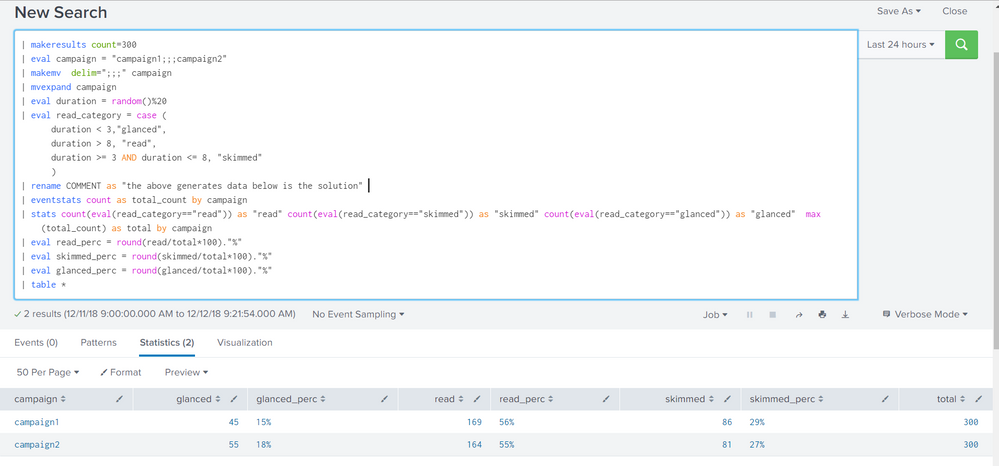


hope it helps

- Mark as New
- Bookmark Message
- Subscribe to Message
- Mute Message
- Subscribe to RSS Feed
- Permalink
- Report Inappropriate Content
try this
 sourcetype="xxx" source="yyy.log"
 | eval read_category = case (
      duration < 3,"glanced",
      duration > 8, "read",
      duration >= 3 AND duration <= 8, "skimmed"
      )
 | lookup cml_campaign_lookup_2018_12_11.csv deliveryid OUTPUT Campaign, sent_date
 | table  deliveryid, user, duration, clientIP, read_category, Campaign, sent_date
 | chart count as total over Campaign by read_category
 | eval totcount=glanced + read + skimmed
 | eval glancedperc = glanced/totcount*100
 | eval readperc = read/totcount*100
 | eval skimmedperc = skimmed/totcount*100
 | fields - totcount
- Mark as New
- Bookmark Message
- Subscribe to Message
- Mute Message
- Subscribe to RSS Feed
- Permalink
- Report Inappropriate Content
Hi kmaron - thanks for looking into this and providing feedback. That has totally worked. Thank you so much!!

Splunk Observability for AI
[Puzzles] Solve, Learn, Repeat: Dereferencing XML to Fixed-length events
Stay Connected: Your Guide to December Tech Talks, Office Hours, and Webinars!
